Filter Orders by Product for WooCommerce

Descripció

Have you ever wanted to filter your order page results by a specific product? With this plugin, now you can!

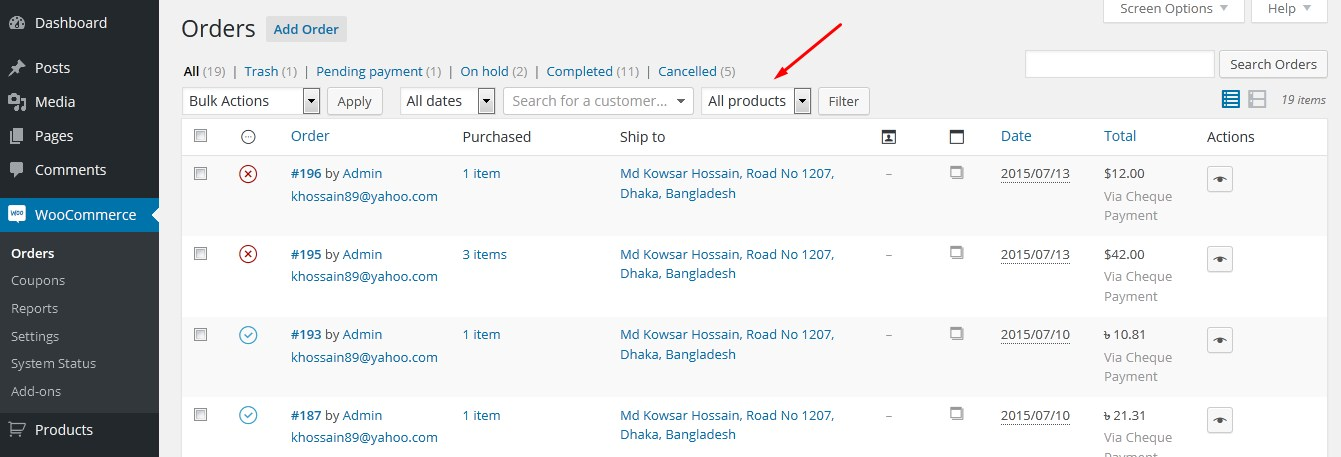
Once installed, a new filter dropdown will appear on the WooCommerce Orders screen, displaying a list of all products. Simply select a product and click the “Filter” button to view orders containing only that product.

This plugin supports filtering orders by:

  • Product Name
  • Product Category

Note: This plugin is compatible with both WooCommerce’s new HPOS (High-Performance Order Storage) and the legacy WordPress posts storage. Whether you’re using HPOS or the traditional storage method, this plugin will work seamlessly.

Captures

  • Des del tauler d’administració, feu clic a “WooCommerce>Comandes” per veure les comandes a la pantalla. Hi veureu un filtre desplegable nou.
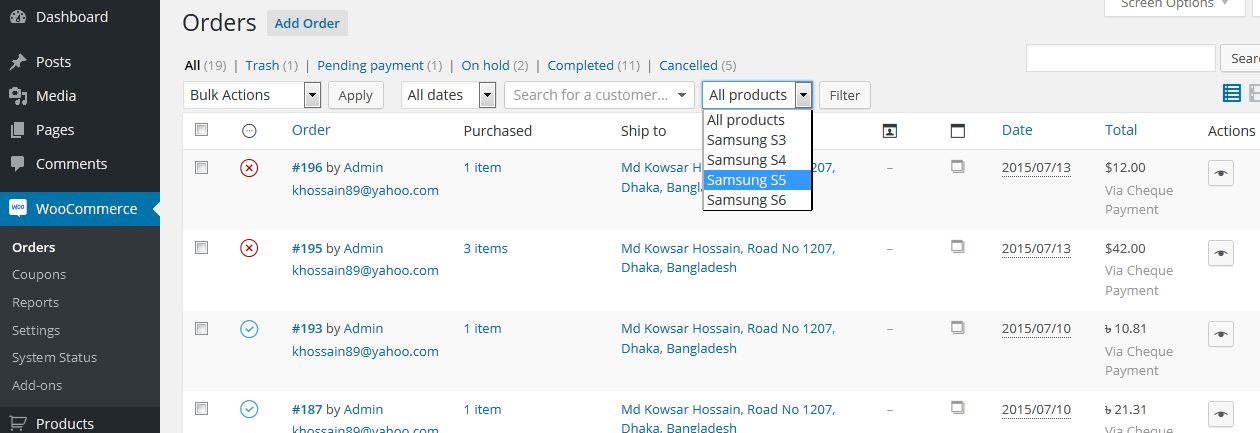
  • Feu clic en aquest menú desplegable i veureu una llista de tots els productes. Seleccioneu un producte i feu clic al botó “Filtre”. Mostrarà les comandes que conté només aquell producte específic.

Instal·lació

There are three different ways to install this plugin, as well as any other plugin from the WordPress.org repository.

Automatic Installation via WordPress Dashboard

  1. Log in to your WordPress admin dashboard.
  2. Navigate to Plugins > Add New.
  3. Search for “Filter Orders by Product for WooCommerce”.
  4. Click Install Now next to the plugin.
  5. Once installed, click Activate.

Manual Upload through WordPress Dashboard

  1. Download the “Filter Orders by Product for WooCommerce” plugin ZIP file.
  2. Log in to your WordPress admin dashboard.
  3. Navigate to Plugins > Add New.
  4. Click Upload Plugin.
  5. Click Choose File, select the plugin ZIP file you downloaded, and click Install Now.
  6. Once the installation is complete, click Activate Plugin.

Installation via FTP

  1. Download the “Filter Orders by Product for WooCommerce” plugin ZIP file and extract it to your computer.
  2. Using an FTP client, connect to your web server.
  3. Navigate to /wp-content/plugins/.
  4. Upload the extracted plugin folder to the /wp-content/plugins/ directory on your server.
  5. Log in to your WordPress admin dashboard.
  6. Navigate to Plugins.
  7. Locate “Filter Orders by Product for WooCommerce” in the list and click Activate.

After the installation is complete, a new filter will appear on the WooCommerce Orders page.

PMF

Does this plugin work for all product statuses (public, draft, etc.)?

Currently, this plugin only works for published products. To make it work for all product statuses (e.g., draft, private), add the following code to your theme’s functions.php file:

add_action( 'wfobp_product_status', 'filter_order_by_product_status' );
function filter_order_by_product_status(){
    return 'any';
}

Ressenyes

16 de novembre de 2024
Hi friend, thanks for your plugin! i tried to integrate search by SKU for woo, but then i found your plugin. I did small improvement to your code, so now we can search products by SKUs also, i would like that you will add it to your code, so we’ll not lose it with next update:)i did change in dropdown_fields() functionand replaced your query: public function dropdown_fields() { global $wpdb; $status = apply_filters( ‘wfobp_product_status’, ‘publish’ ); $sql = “SELECT p.ID AS product_id, p.post_title AS product_title, pm.meta_value AS product_sku FROM $wpdb->posts as p LEFT JOIN $wpdb->postmeta as pm ON pm.post_id = p.ID WHERE p.post_type = ‘product’ AND pm.meta_key = ‘_sku'”; $sql .= ( $status == ‘any’ ) ? ” : ” AND post_status = ‘$status'”; $all_posts = $wpdb->get_results( $sql, ARRAY_A ); $fields = array(); $fields[0] = esc_html__( ‘All Products’, ‘woocommerce-filter-orders-by-product’ ); foreach ( $all_posts as $all_post ) { $fields[ $all_post[’product_id’] ] = $all_post[’product_title’] . ‘(‘ . $all_post[’product_sku’] . ‘)’; } return $fields; } You used select2 search for dropdown, so now we have sku in product name and we easily can search product by typing SKUs in search dropdown 🙂
22 de maig de 2024
This plugin does exactly what it says, and good. Very handy and simply a must have. I have made my own (private) plugin depend on this one. Can’t live without it.
2 de abril de 2021
This plugin is super helpful. I wanted to add a link on a custom admin page to orders for a specific product, and I just had to copy the URL string and add it to a link. Many thanks to the author!
Llegiu totes les 15 ressenyes

Col·laboradors i desenvolupadors

«Filter Orders by Product for WooCommerce» és programari de codi obert. La següent gent ha col·laborat en aquesta extensió.

Col·laboradors

“Filter Orders by Product for WooCommerce” s’ha traduït a 11 configuracions regionals. Gràcies als traductors per les seves aportacions.

Traduïu «Filter Orders by Product for WooCommerce» a la vostra llengua.

Interessats en el desenvolupament?

Navegueu pel codi, baixeu-vos el repositori SVN, o subscriviu-vos al registre de desenvolupament per fisl de subscripció RSS.

Registre de canvis

4.1.2 – Sep 21, 2025

  • Tweak: Plugin name updated

4.1 – May 20, 2024

  • Tweak: Readme updated

4.0 – Dec 31, 2023

  • Tweak: Added WooCommerce HPOS support

3.3 – Aug 20, 2023

  • Fix: Resolved PHP notice caused by incorrect use of the is_search() function

3.1

  • S’ha actualitzat el fitxer llegeix-me

3.0

  • Nou: Ara és possible filtrar per la categoria de producte
  • Codi refactoritzat

2.0.7

  • Correcció: els productes amb el mateix nom abans només apareixien una vegada

2.0.6

  • S’ha afegit una mini funció (hook) per canviar l’estat del producte

2.0.5

  • S’ha corregit un error d’injecció SQL

2.0.4

  • Codi millorat

2.0.3

  • Corregit: Idioma

2.0.2

  • S’ha corregit un error de traducció (Agraïments a Kasperta)

2.0.1

  • S’ha corregit un error menor

2.0.0

  • Nou: desplegable de cerca
  • S’ha corregit un error important

1.0.0

  • Versió inicial