

Descripció
Turn browsing into a game – let shoppers swipe through your WooCommerce products one by one and add favorites to the cart with a single swipe.
Why Swipe n Buy?
Swipe n Buy brings Tinder-like swiping to shopping. Instead of scrolling through grids, visitors swipe to the next or previous product, add items to the cart or wishlist, and head to checkout – a fun, mobile-friendly way to discover your catalog.
Create a custom swiping landing page with just a click, filter which products appear by category, and style the layout and buttons to match your store’s design. WooCommerce is required, and everything is configured from a simple «Swipe n Buy» menu in your dashboard.
Free Features
- Swipe to Cart & Wishlist: Add products to the cart and wishlist effortlessly with a single swipe.
- Seamless Product Swiping: Swipe through all products one by one.
- One-Click Landing Page: Easily create a custom landing page with just a click.
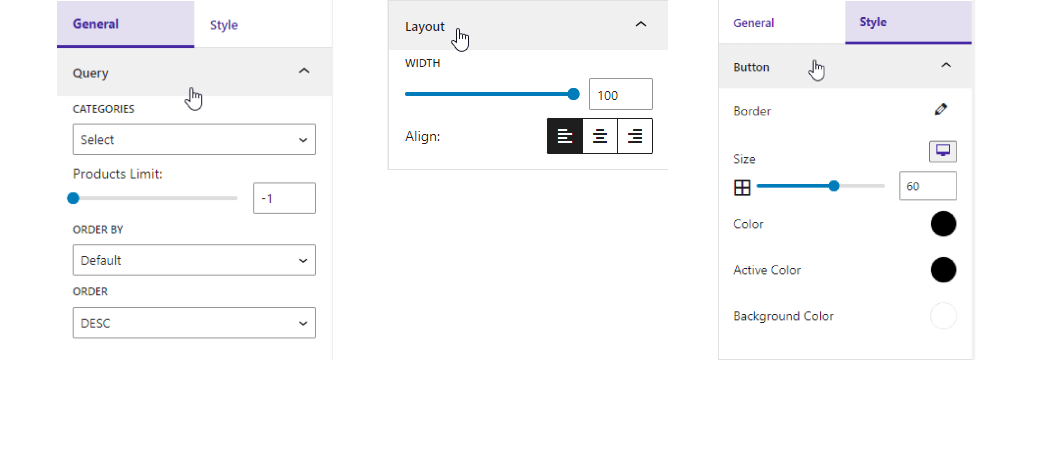
- Category Filtering: Filter products by specific categories for a refined shopping experience.
- Sorting Options: Sort products by Order and Order By to surface exactly what you need.
- Layout Controls: Customize layout width and alignment to match your website’s design.
- Button Styling: Personalize button color, size, and background color for a unique touch.
How to Use
- Install and activate the Swipe n Buy plugin (WooCommerce must be active).
- Find the new Swipe n Buy menu in your dashboard sidebar.
- Adjust the plugin settings from the settings option.
- Enjoy – your swipeable product experience is live!
Liked this plugin? Hate it? Want a new feature? Send us some feedback
⭐ Check out the Parent Plugin of this plugin-
🔥 b Blocks – Best gutenberg blocks collections for WordPress.
⭐ Check out our other WordPress Plugins-
🔥 Html5 Audio Player – Best audio player plugin for WordPress.
🔥 Html5 Video Player – Best video player plugin for WordPress.
🔥 PDF Poster – A fully-featured PDF Viewer Plugin for WordPress.
🔥 StreamCast – A fully-featured Radio Player Plugin for WordPress.
🔥 3D Viewer – Display interactive 3D models on the webs.
Captures


Blocs
Aquesta extensió proporciona 1 bloc.
- Swipe n buy A WooCommerce block plugin to make the purchase process easy and fast
Instal·lació
From your WordPress dashboard (recommended):
- Go to Plugins Add New.
- Search for «Swipe n Buy».
- Click Install Now, then Activate.
- Open the Swipe n Buy menu in your dashboard to configure settings.
Manual installation:
- Download the Swipe n Buy plugin (.zip file).
- In your admin area, go to Plugins Add New and click Upload Plugin.
- Choose the
swipe-n-buy.zipfile, click Install Now, then Activate. - Alternatively, upload the plugin folder to the
/wp-content/plugins/directory and activate it through the Plugins menu.
PMF
-
Is Swipe n Buy free?
-
Yes, Swipe n Buy is a free Gutenberg block plugin.
-
Is it necessary to have WooCommerce activated to use Swipe n Buy?
-
Yes, the WooCommerce plugin must be activated for Swipe n Buy to function properly.
-
Can Swipe n Buy display content other than WooCommerce products?
-
No, the plugin is designed to exclusively showcase WooCommerce products.
-
Can shoppers add products to the cart by swiping?
-
Yes. Visitors can add products to the cart and wishlist with a single swipe, and move to the next or previous product by swiping through the catalog.
-
Can I choose which products appear in the swipe view?
-
Yes. You can filter products by specific categories and sort them using the Order and Order By options.
-
Does it work with any WordPress theme?
-
Yes, it works with any standard WordPress theme.
-
Can I change plugin settings?
-
Yes, you can change the plugin settings from the Swipe n Buy settings options, including layout width, alignment, and button styling.
-
Where can I get support?
-
You can post your questions on the support forum here.
Ressenyes
No hi ha ressenyes per a aquesta extensió.
Col·laboradors i desenvolupadors
«Swipe n Buy for WooCommerce – let shoppers swipe through products and buy» és programari de codi obert. La següent gent ha col·laborat en aquesta extensió.
Col·laboradors


Interessats en el desenvolupament?
Navegueu pel codi, baixeu-vos el repositori SVN, o subscriviu-vos al registre de desenvolupament per fisl de subscripció RSS.
Registre de canvis
1.0.4 – 18 Dec, 2024
- Redirect swipe n buy settings page
1.0.3 – 10 Nov, 2024
- Variable work grid layout
1.0.2 – 24 June, 2024
- Can set new layout according to device.
1.0.1 – 22 May,2024
- New feature block convert this plugin
1.0.0
- Initial Release