

Descripció
LATW AI Translator for WPML is a powerful WordPress plugin that leverages OpenAI’s language models to automatically translate your content. It integrates seamlessly with WPML to provide high-quality, AI-powered translations.
Features
- AI-Powered Translations – Uses OpenAI GPT models for natural, context-aware translations
- WPML Integration – Works seamlessly with WPML for multilingual site management
- Page Builder Support – Full support for Elementor and Bricks Builder. Other builders compatible with WPML should also work but have not been tested
- ACF Support – Translates Advanced Custom Fields content
- Batch Processing – Queue and process multiple translations efficiently using an unlimited background queue
- Custom Prompts – Customize translation prompts for your specific needs
- SEO Friendly – Works with Yoast SEO, Rank Math, SEOPress and All in One SEO (AIOSEO). Translates meta titles and descriptions
- Reliable Category Translation – Categories and custom taxonomies are resolved and assigned atomically to avoid WPML sync conflicts
Supported Content
- Post titles, content, and excerpts
- Custom post types
- Elementor and Bricks Builder widgets and modules
- ACF fields
- Yoast SEO, Rank Math, SEOPress and All in One SEO (AIOSEO) meta data
- Categories and custom taxonomies
Requirements
- WordPress 6.2 or higher
- PHP 7.4 or higher
- WPML plugin (required)
- OpenAI API key
LATW AI Translator for WPML Versions
LATW AI Translator for WPML Free:
* Translate content to English
* Full access to translation workflow
* Elementor and ACF support
* Batch processing
* No time limits
LATW AI Translator for WPML Pro (Optional):
* Translate to all languages configured in WPML
* Priority support
* Automatic updates
* Commercial use
More information about the Pro version
Third-Party Services
This plugin connects to the following external services:
OpenAI API
This plugin sends content to OpenAI’s API for translation processing.
- Service URL: https://api.openai.com/
- Privacy Policy: https://openai.com/privacy/
- Terms of Use: https://openai.com/terms/
Your content is sent to OpenAI only when you initiate a translation. No data is sent without user action.
The plugin does not store, log, or cache any translated content.
All requests are sent directly from the user’s WordPress server to OpenAI.
Captures
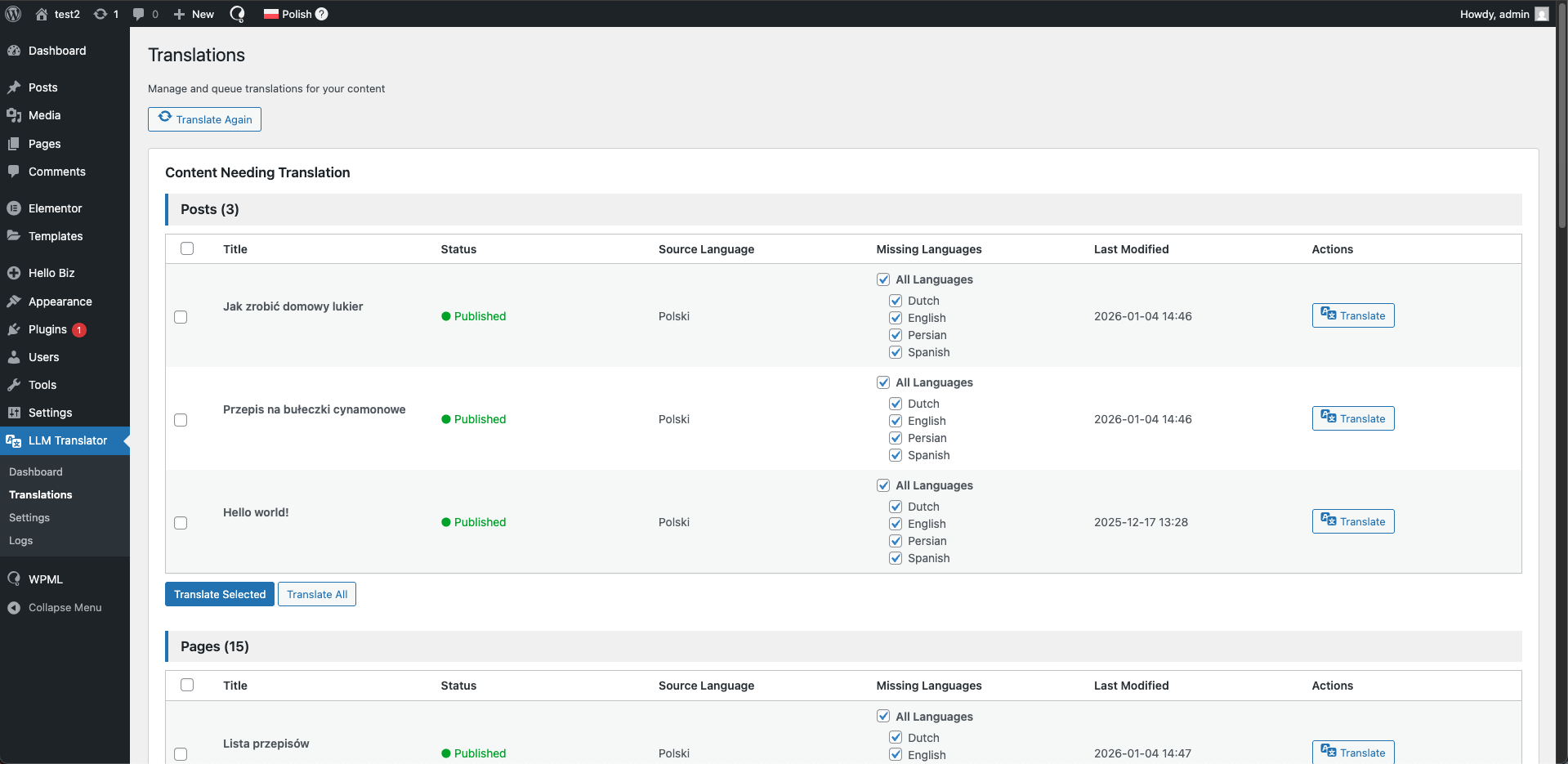
Main translation dashboard
Instal·lació
- Upload the plugin
- Activate the plugin through the ‘Plugins’ menu in WordPress
- Ensure WPML is installed and activated
- Go to Settings > AI Translator to configure the plugin
- Enter your OpenAI API key
- Set translation options
- Start translating your content
PMF
-
What can I do with the free version?
-
The free version allows you to translate all your content to English. All features are available.
-
How do I get a Pro license?
-
Visit our website to purchase a Pro license. Once purchased, you’ll receive a license key to enter in the plugin settings.
-
Do I need WPML to use this plugin?
-
Yes, WPML is required. This plugin extends WPML’s translation capabilities with AI-powered automatic translations.
-
Where do I get an OpenAI API key?
-
You can get an API key from OpenAI’s website. You’ll need to create an account and add billing information.
-
How much does translation cost?
-
Translation costs depend on the OpenAI model you choose and the amount of content. GPT-5-nano is the most cost-effective option. The plugin shows estimated costs before translation. Note: OpenAI API costs are separate from the Pro license.
-
Which OpenAI models are supported?
-
The plugin supports GPT-5, GPT-5-mini, GPT-5-nano models.
-
Can I customize translation prompts?
-
Yes, you can add a website description and custom instructions to improve translation quality and context.
-
Does it work with page builders?
-
Yes, the plugin has full support for Elementor and Bricks Builder. Other page builders that are compatible with WPML should also work, but have not been officially tested.
-
How are translations queued?
-
Translations are processed using WordPress Cron for reliable background processing without timeouts.
-
What happens when my license expires?
-
When your license expires, you can continue using the plugin version you have, but you won’t receive updates. To access newer versions, you’ll need to renew your license. The English only version continues to work without any license.
Ressenyes


Col·laboradors i desenvolupadors
«LATW AI Translator for WPML» és programari de codi obert. La següent gent ha col·laborat en aquesta extensió.
Col·laboradors
Traduïu «LATW AI Translator for WPML» a la vostra llengua.
Interessats en el desenvolupament?
Navegueu pel codi, baixeu-vos el repositori SVN, o subscriviu-vos al registre de desenvolupament per fisl de subscripció RSS.
Registre de canvis
1.5.1
- Background queue dispatcher – translations are now saved as
pendingand dispatched to OpenAI in batches by the cron, removing the old 50-item hard limit for queueing - Atomic taxonomy assignment – categories and custom taxonomies are now resolved and passed directly to
wp_insert_post/wp_update_post, preventing WPML’s publish-time sync from overwriting them - Paginated translation queue – the queue table now supports pagination and a per-page selector (20 / 50 / 100 items)
- Object cache layer – all repeated database reads (queue status, history, stats) are now cached via the WordPress object cache and invalidated on every write, fully compatible with Redis and Memcached
- Improved retry logic – failed translations reset to
pendingso the dispatcher re-submits them, instead of creating a duplicate queue entry - Added
pending/Waiting...status indicator in the queue table - Cancel button now also appears for
pendingitems - Flush object cache after option saves so Redis/Memcached users see settings changes immediately
1.4.1
- Various bug fixes and stability improvements
1.4.0
- Glossary support for consistent terminology across translations
- Choose source language per translation
- Check cron status from admin UI
1.3.0
- Added a button to cancel translations in progress
- Introduced a Translation History page to review past translations
- Added support for the latest GPT-5.4 model with an option to configure reasoning effort
- Extended local database logging to store more detailed information about each translation
- Fixed an issue that caused translations to be processed twice
- Fixed incorrect category assignment during translation
1.2.0
- Bricks Builder support
- SEOPress and All in One SEO (AIOSEO) support
- Fix category creation issues
- Various bug fixes
1.1.1
- Translate categories
- Add new category when no translated category exists
- Show posts needing translation based on WPML data
- Manual check responses button
- Save timestamps in UTC
- Fix error message for max 50 translations queue limit
- Save Elementor data directly to avoid re-encoding issues
- More debug logs
1.1.0
- Initial public release