

Descripció
FlickShow Viewer is a stunning, luxury-styled center-focus video slider. The video in the center position plays automatically and pauses when scrolled away. Everything is customizable directly from the WordPress admin — no coding required.
Features:
- ✅ YouTube, Vimeo, and direct MP4 / WebM support
- ✅ Center video auto-plays, pauses when scrolled away
- ✅ Default Muted / Unmuted — controllable from Settings
- ✅ Typography controls — font family, size, color for heading and sub-heading
- ✅ Responsive font sizes — separate controls for Desktop, Tablet, and Mobile
- ✅ Color controls — accent color, background color, text colors
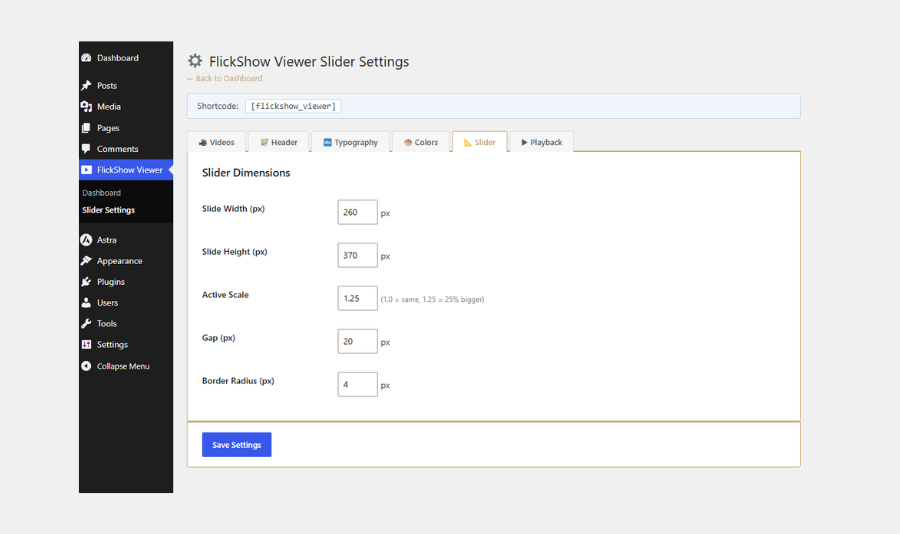
- ✅ Slider dimensions — slide width, height, active scale, gap, border radius
- ✅ Playback settings — autoplay on/off, loop on/off, show/hide player controls
- ✅ Glitch-free CSS scale transitions (zero layout reflow)
- ✅ Gold-accent luxury design with animated corner decorations
- ✅ YouTube auto-thumbnail detection
- ✅ Keyboard navigation ( )
- ✅ Touch / swipe support for mobile
- ✅ Accessible — ARIA labels, focus-visible styles, live regions
- ✅ Multiple sliders on same page supported
- ✅ Simple shortcode:
[flickshow_viewer] - ✅ Clean uninstall — removes all data on delete
Usage:
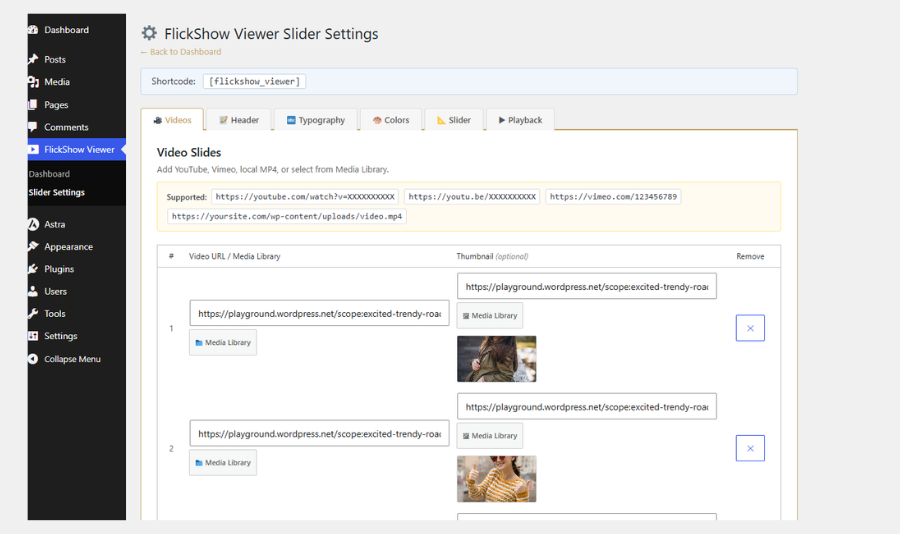
- Go to Settings FlickShow Viewer and add your video URLs.
- Customize fonts, colors, and playback settings.
- Paste
[flickshow_viewer]into any page or post.
Supported video URL formats:
https://www.youtube.com/watch?v=XXXXXXXXXXXhttps://youtu.be/XXXXXXXXXXXhttps://www.youtube.com/shorts/XXXXXXXXXXXhttps://vimeo.com/123456789https://example.com/video.mp4
Captures

Instal·lació
- Upload the
flickshow-viewerfolder to/wp-content/plugins/. - Activate via the Plugins menu in WordPress.
- Go to Settings FlickShow Viewer to configure.
- Add
[flickshow_viewer]to any page or post.
Or install directly from the plugin directory:
- Go to Plugins Add New.
- Search for FlickShow Viewer.
- Click Install Now, then Activate.
PMF
-
Does it support YouTube?
-
Yes. Paste any YouTube URL (youtube.com/watch, youtu.be, or Shorts). The plugin automatically extracts the video ID, generates a thumbnail, and handles autoplay via the YouTube iframe API.
-
Why does YouTube start muted before unmuting?
-
Browsers block unmuted autoplay by security policy. FlickShow Viewer works around this: it starts muted (which browsers allow), then unmutes after ~800ms — so sound plays automatically. You can also enable «Default Muted» in Settings to keep videos muted.
-
Can I control whether videos start muted?
-
Yes. Go to Settings FlickShow Viewer Playback and toggle «Default Muted» on or off.
-
Can I change the font?
-
Yes. Go to Settings FlickShow Viewer Typography to choose font family, size, and color for both the heading and sub-heading. Sizes can be set separately for Desktop, Tablet, and Mobile.
-
Can I change colors?
-
Yes. The Colors tab in Settings controls the accent color, accent light color, and background color.
-
Can I use MP4 files from my server?
-
Yes. Paste the direct
.mp4file URL in the Video URL field. -
Does it work on mobile?
-
Yes. Touch swipe is supported and font sizes have separate mobile controls.
-
Can I place multiple sliders on one page?
-
Yes, each
[flickshow_viewer]shortcode instance runs independently. -
Does the plugin load on every page?
-
No. Assets are only loaded on pages that contain the
[flickshow_viewer]shortcode.
Ressenyes

Col·laboradors i desenvolupadors
«FlickShow Viewer» és programari de codi obert. La següent gent ha col·laborat en aquesta extensió.
Col·laboradors
Traduïu «FlickShow Viewer» a la vostra llengua.
Interessats en el desenvolupament?
Navegueu pel codi, baixeu-vos el repositori SVN, o subscriviu-vos al registre de desenvolupament per fisl de subscripció RSS.
Registre de canvis
1.0.0
- Initial release.
- YouTube, Vimeo, and MP4 support.
- Full typography controls (font family, size per device, color).
- Full color customization.
- Slider dimension controls.
- Playback settings (mute, autoplay, loop, controls).
- Glitch-free CSS scale transitions.
- Keyboard and touch navigation.
- Accessible ARIA markup.
- Clean uninstall.