

Descripció
Happy customers are your best marketing — but asking for testimonials, copying them from emails and keeping a page up to date takes time. Praisvia turns it into a simple loop:
- Collect — add the Testimonial Form block to any page and share the link.
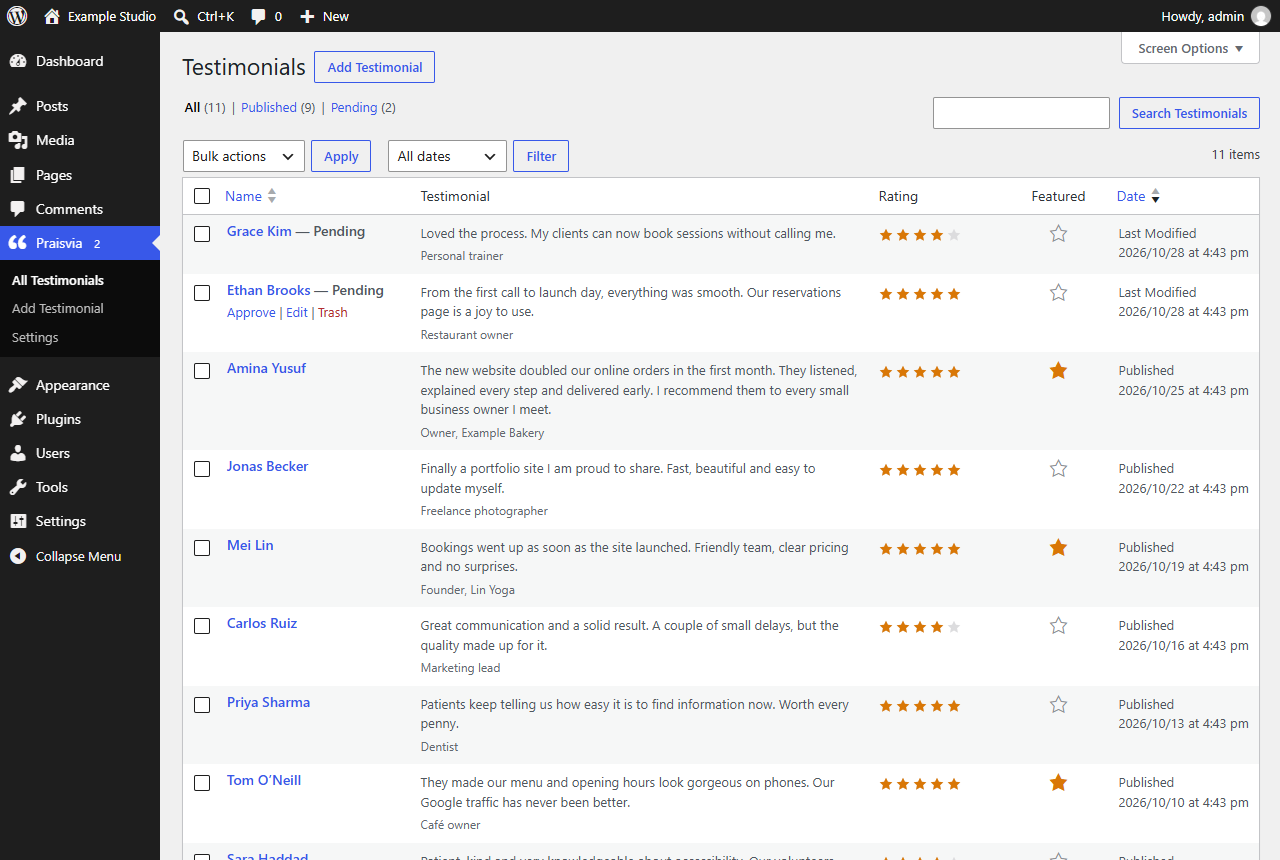
- Approve — new testimonials wait in your dashboard. Approve them with one click and star your favourites.
- Show — display them anywhere with the Wall of Love and Rating Summary blocks.
Praisvia is a self-hosted alternative to paid testimonial services: no account, no monthly bill, no external requests. Your testimonials stay in your own WordPress database.
Three blocks
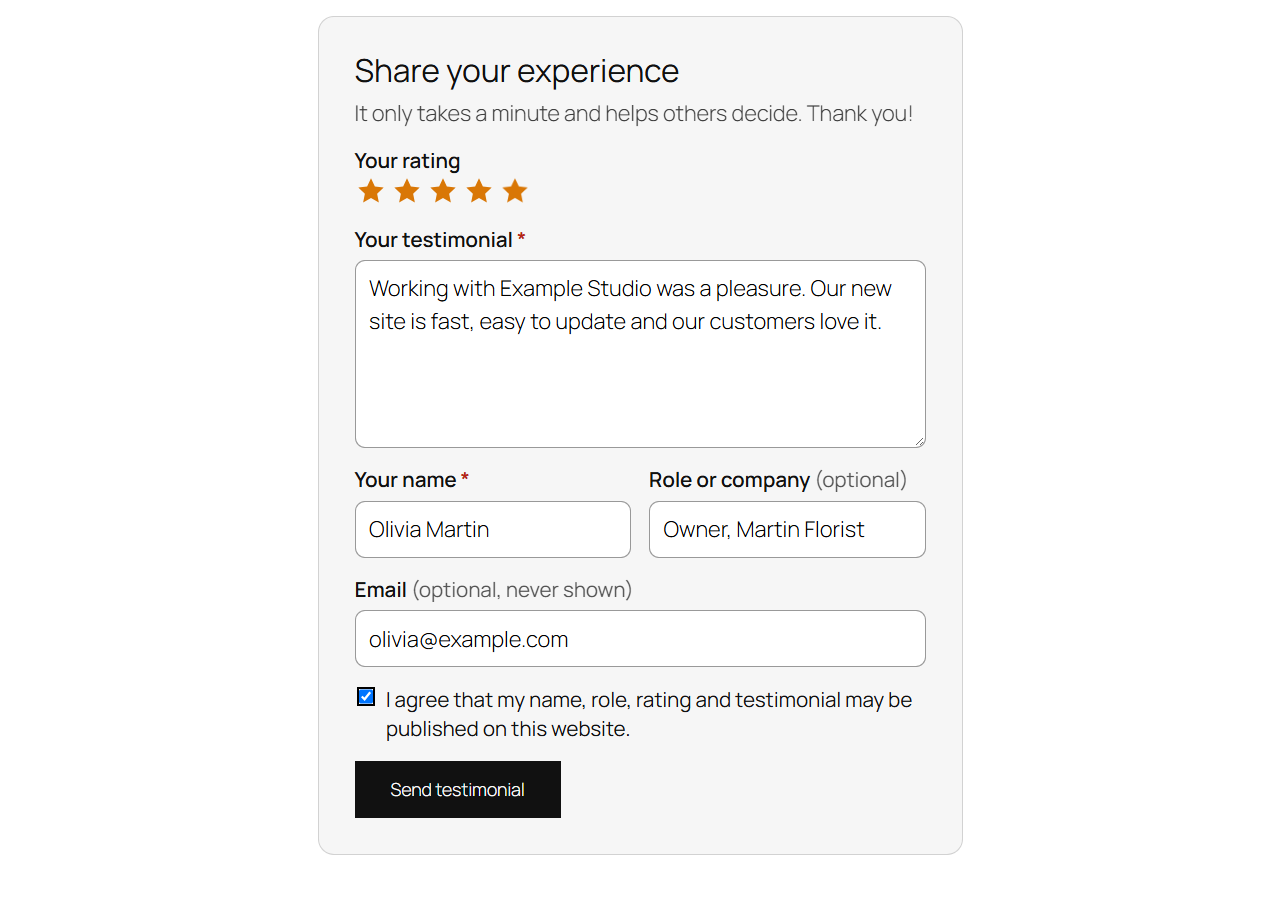
- Testimonial Form — name, optional role or company, optional private email, an accessible 1–5 star rating, the testimonial and a publication consent checkbox. Works with and without JavaScript, and on cached pages.
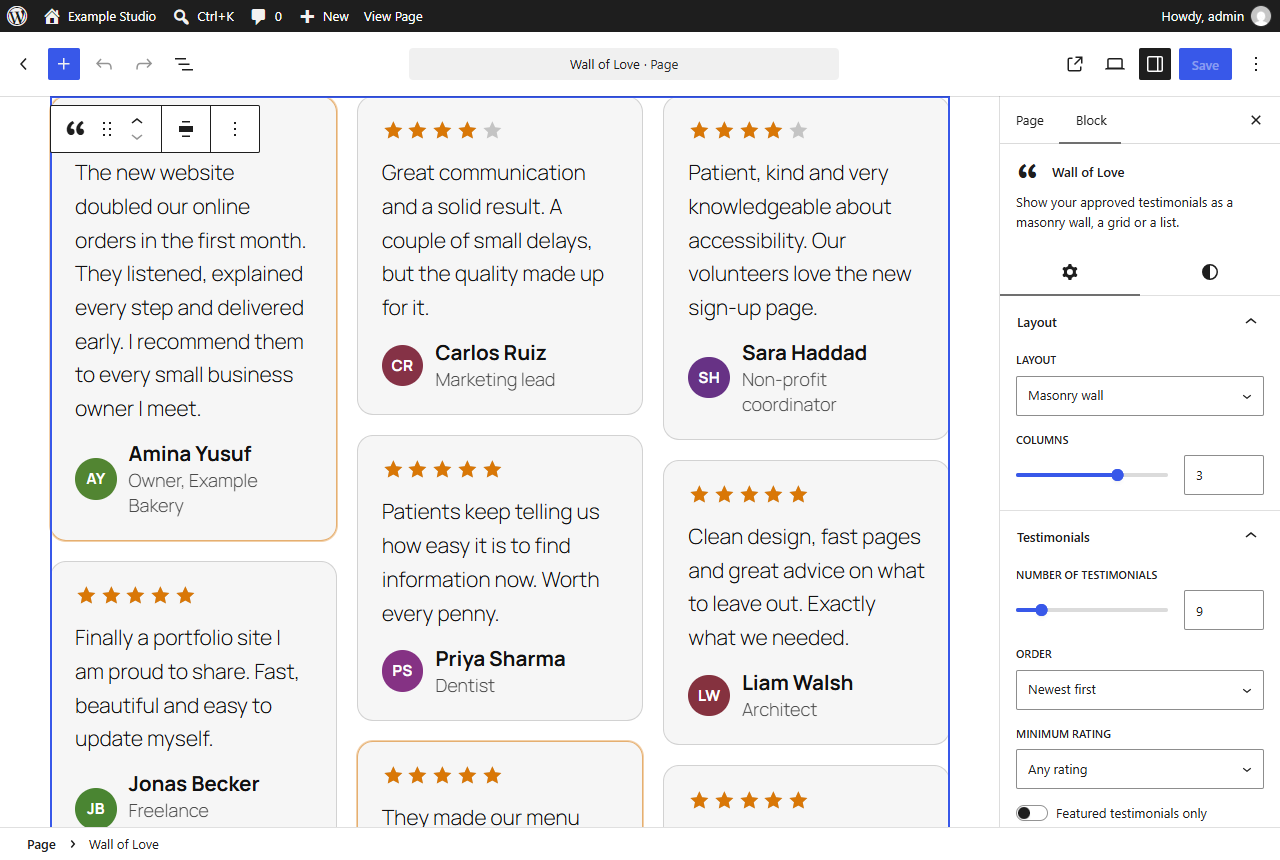
- Wall of Love — approved testimonials as a masonry wall, a grid, a list or a carousel you can swipe. Choose the number, order (newest, highest rating or random), minimum rating, category and whether to show only featured testimonials. Long testimonials can be shortened with a «Read more» button.
- Rating Summary — the average rating with stars and the number of testimonials, for example «4.9 ★★★★★ from 127 testimonials».
All blocks use your theme’s fonts and colors and support block color, spacing and typography settings.
Shortcodes for every page builder
Using Elementor, Divi, Beaver Builder or the classic editor? The same three features work as shortcodes:
[praisvia_form][praisvia_wall layout="carousel" number="6"][praisvia_summary]
Categories
Group testimonials by product, service or location. Show one category per page, give each its own rating summary, and let a form file new testimonials under a category automatically.
Photos
Add a photo of the person to any testimonial. Without a photo, a colorful initials avatar is shown.
Moderation made easy
- Every new testimonial waits for your approval — nothing is published automatically.
- Approve from the list with one click, and star the best testimonials to feature them.
- A count bubble in the menu shows how many testimonials are waiting.
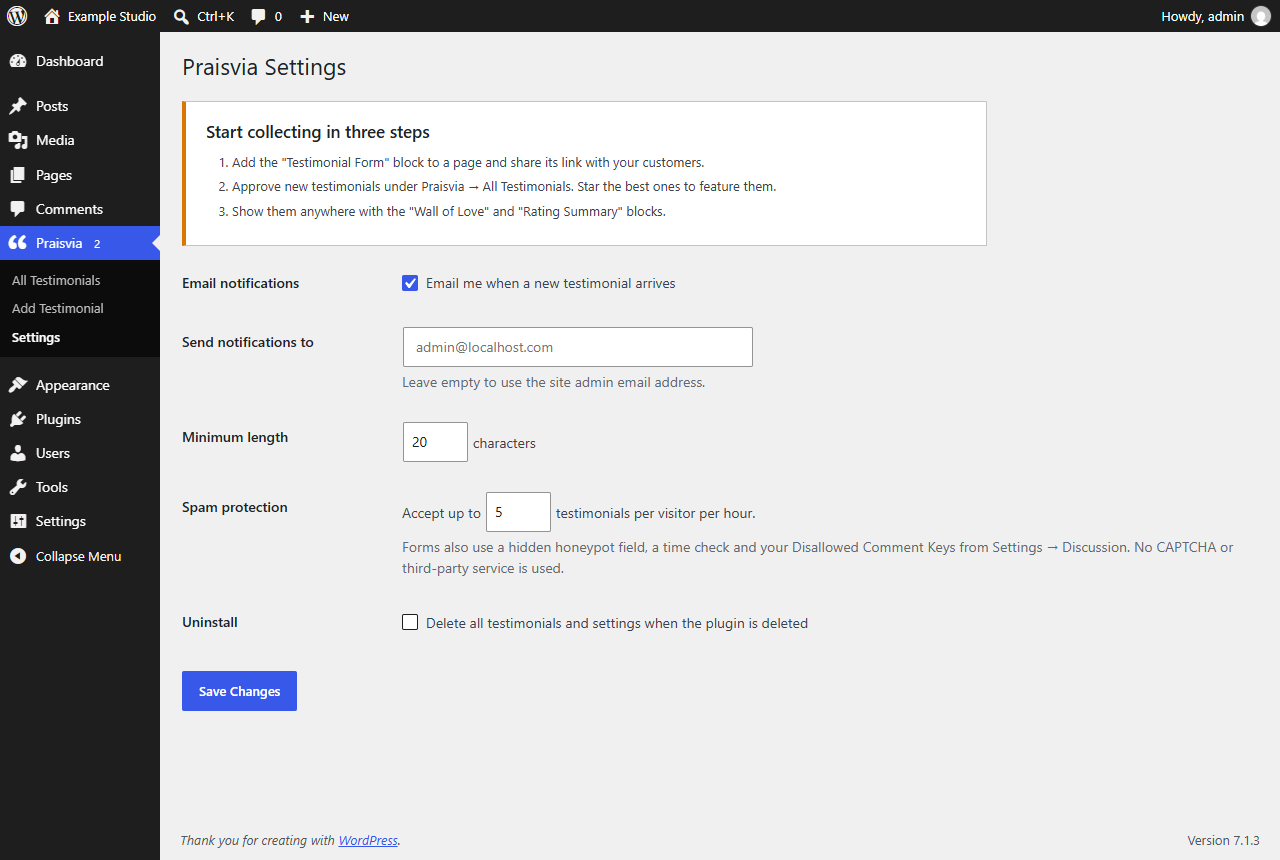
- Optional email notification for each new testimonial.
- Add testimonials you received elsewhere by hand.
- Switching plugins? Import your testimonials from Strong Testimonials or Jetpack Testimonials in one click, with ratings, companies, photos and categories. The originals are not changed.
Spam protection without CAPTCHAs
- A hidden honeypot field and a signed time token stop most bots.
- A per-visitor hourly limit, using only a temporary salted hash of the IP address.
- Your own Disallowed Comment Keys (Settings Discussion) are respected.
- No third-party CAPTCHA, no cookies, no tracking.
Privacy first
- Consent to publish is required and its time is stored with each testimonial.
- Email addresses are optional and never shown.
- Testimonials can be exported and erased with the core Export/Erase Personal Data tools, and suggested privacy policy text is included.
- No data ever leaves your site.
Accessible
The form uses real labels, a keyboard-friendly star rating, clear error messages connected to their fields and a status region for screen readers. Star ratings have text alternatives everywhere.
Captures


Blocs
Aquesta extensió proporciona 3 blocs.
- Rating Summary Show the average star rating and the number of approved testimonials.
- Testimonial Form A friendly form where customers send you a testimonial with a star rating. New testimonials wait for your approval.
- Wall of Love Show your approved testimonials as a masonry wall, a grid, a list or a carousel.
Instal·lació
- Install and activate Praisvia from the Plugins screen.
- Create a page such as «Share your experience» and add the Testimonial Form block.
- Add the Wall of Love or Rating Summary block wherever you want to show testimonials.
- Approve incoming testimonials under Praisvia All Testimonials. Adjust notifications and spam protection under Praisvia Settings.
PMF
-
Are testimonials published automatically?
-
No. Every testimonial sent through the form is saved as pending and appears only after you approve it.
-
Does it work with page caching?
-
Yes. The form does not depend on login sessions and refreshes its security token when the page loads, so cached pages keep working.
-
Does it work without JavaScript?
-
Yes. With JavaScript the form sends without reloading the page. Without it, the form is posted normally and the visitor returns to the same page with a confirmation.
-
Can I add testimonials I received by email?
-
Yes. Go to Praisvia Add Testimonial, enter the name, the text, the rating and the role, then publish.
-
How do I use Praisvia with Elementor, Divi or the classic editor?
-
Use the shortcodes
[praisvia_form],[praisvia_wall]and[praisvia_summary]. All options are listed under Praisvia Settings. For example:[praisvia_wall layout="grid" columns="2" number="4" order="rating" lines="5"]. -
Can I move my testimonials from another plugin?
-
Yes, from Strong Testimonials and Jetpack Testimonials. When Praisvia finds them, an «Import testimonials» button appears under Praisvia Settings. Your original testimonials stay untouched.
-
How do I show testimonials for one product or service?
-
Create a category under Praisvia Categories and assign testimonials to it. Then choose the category in the Wall of Love or Rating Summary block, or add
category="your-category"to the shortcode. -
Is there a slider?
-
Yes: choose the «Carousel» layout. Visitors can swipe on phones, scroll with the keyboard or use the arrow buttons. It does not move on its own, so nobody misses a testimonial while reading.
-
Can I import reviews from Google or other sites?
-
No. Praisvia does not connect to external services, so you stay in control of what you publish.
-
Does it add review rich snippets?
-
No. Search engines do not show star snippets for reviews a business publishes about itself, so Praisvia does not output review schema that could look misleading.
-
What happens when I delete the plugin?
-
Settings are removed. Your testimonials are kept unless you enable «Delete all testimonials and settings when the plugin is deleted» in Praisvia Settings.
Ressenyes
No hi ha ressenyes per a aquesta extensió.
Col·laboradors i desenvolupadors
«Praisvia» és programari de codi obert. La següent gent ha col·laborat en aquesta extensió.
Col·laboradors
Traduïu «Praisvia» a la vostra llengua.
Interessats en el desenvolupament?
Navegueu pel codi, baixeu-vos el repositori SVN, o subscriviu-vos al registre de desenvolupament per fisl de subscripció RSS.
Registre de canvis
1.0.1
- New: Carousel layout for the Wall of Love, with swipe, keyboard and arrow buttons.
- New: Shortcodes [praisvia_form], [praisvia_wall] and [praisvia_summary] for page builders and the classic editor.
- New: Testimonial categories, with a category filter in the Wall of Love and Rating Summary, and forms that file testimonials under a category.
- New: Photos for testimonials, shown instead of the initials avatar.
- New: «Read more» for long testimonials.
- New: Import from Strong Testimonials and Jetpack Testimonials.
1.0.0
- Initial release.