

Descripció
Anchor Menu is a WordPress plugin designed for showcase websites, blogs, and long-form content pages.
It provides an accessible anchor menu that highlights the current section and improves navigation on both desktop and mobile devices.
Current limitation: Anchor Menu is not designed for WooCommerce. Dynamic product pages are not supported.
Video Tutorials & Overview
Anchor Menu comes with video resources to help you get started quickly.
- Plugin overview and features presentation
- Step-by-step tutorials (English & French)
You can find all videos on the official YouTube channel:
https://www.youtube.com/channel/UClZTid0uXs6FxgFp5BaEryQ
Key Benefits
-
Automatic and intelligent: generates an anchor menu from defined sections.
-
Fully responsive:
- Floating vertical menu on desktop (draggable or collapsible to show only its toggle button).
- Collapsible horizontal bar at the bottom of the screen on mobile.
-
Display control: enable or hide the desktop menu and the mobile bar separately from the admin settings.
-
Visual customization: clean and readable by default, with an admin interface to customize colors, styles, and sizes.
-
Enhanced accessibility: keyboard navigation, screen reader support, optimized contrast, and built-in ARIA attributes.
-
Per-page customization: each page can have its own anchor menu tailored to its content.
-
Clarifies page structure: helps modern search engines and intelligent analysis tools better interpret your content through coherent section-based navigation.
-
SEO friendly: improves structure, internal linking, and readability for search engines.
-
Intuitive interface: fully managed from the WordPress admin, no coding required.
-
Non-intrusive: the mobile menu stays discreet and never blocks the main content.
Captures
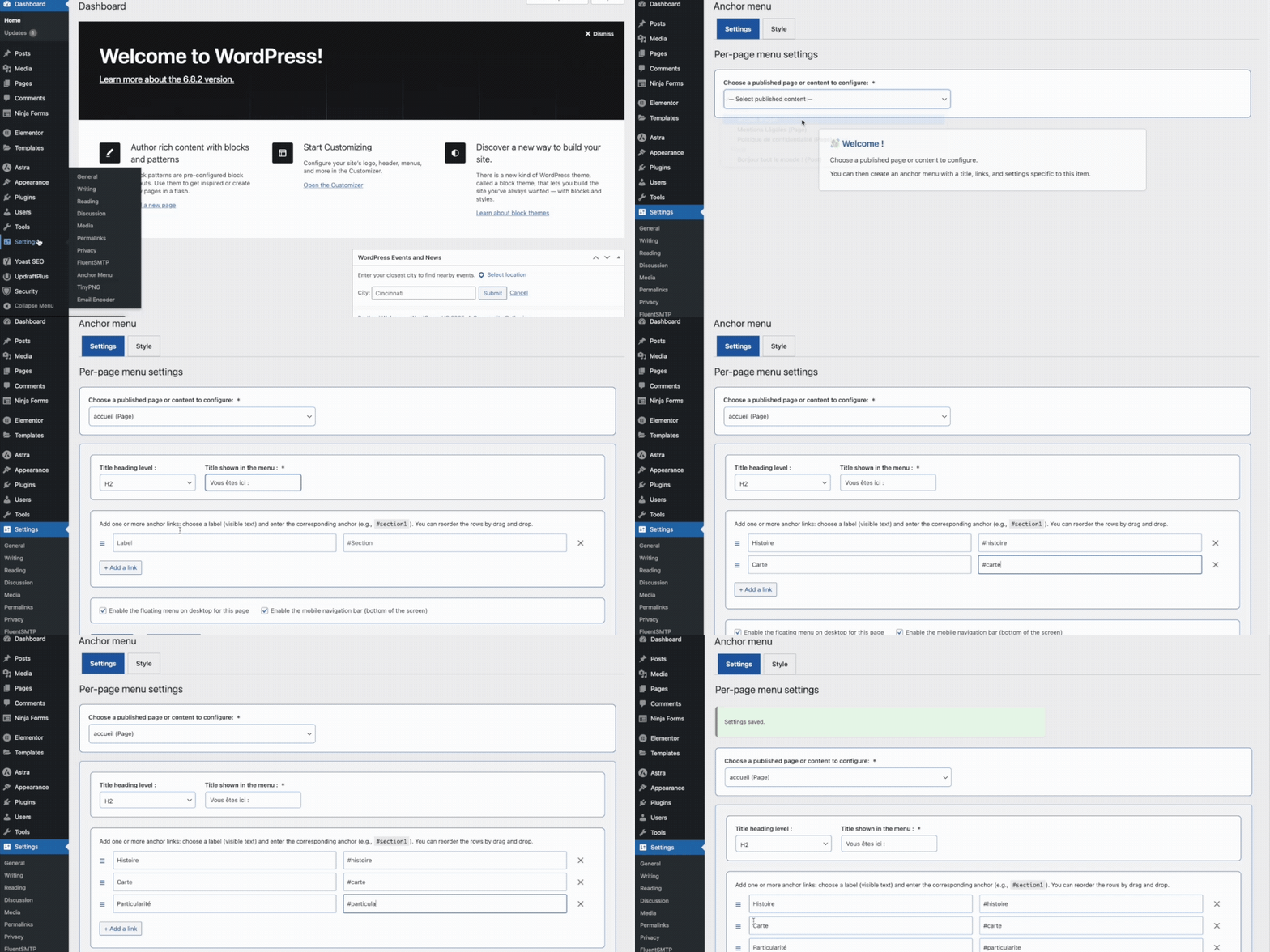
Admin settings: create your first anchor menu. 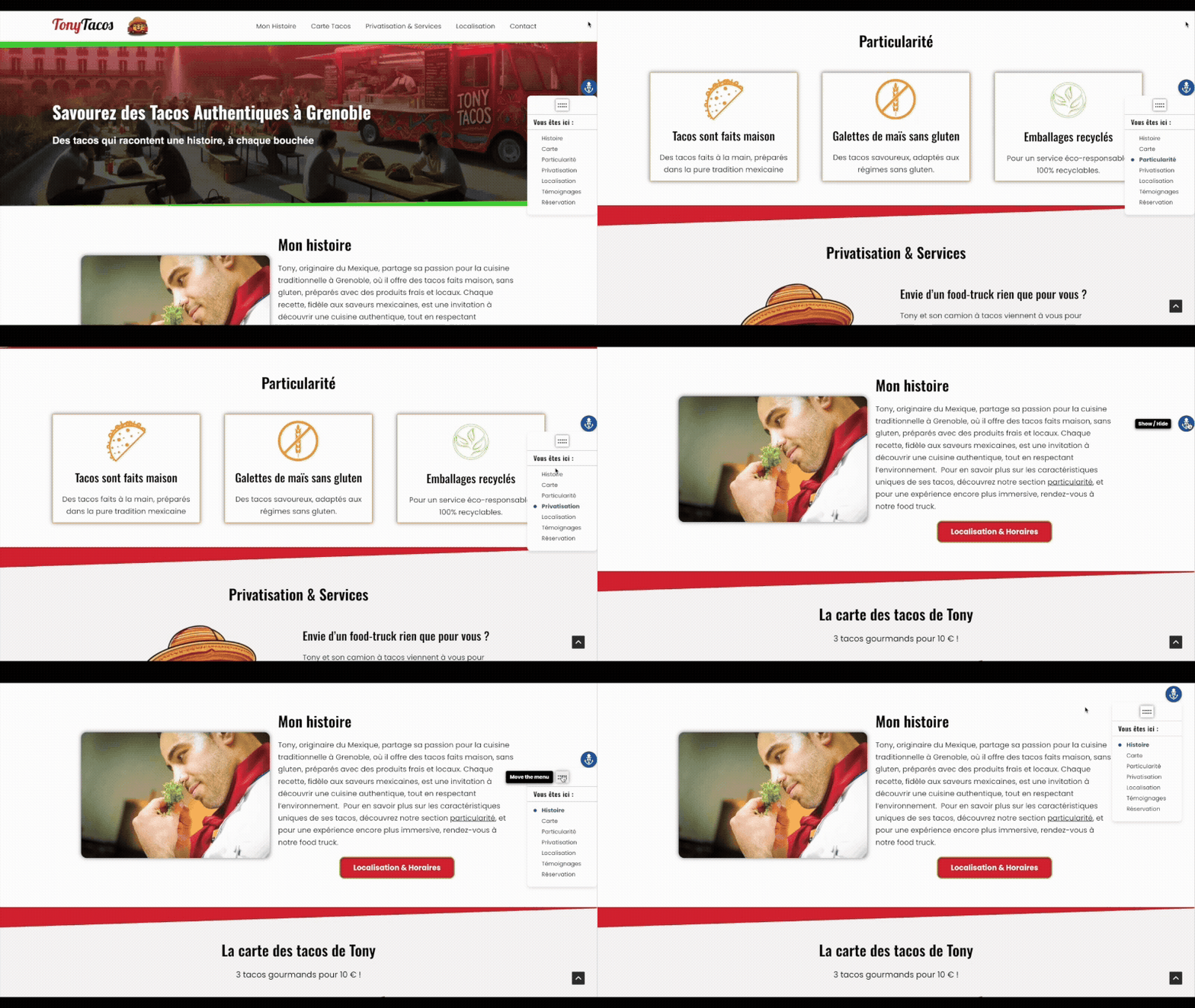
Floating desktop menu with drag-and-drop reordering. 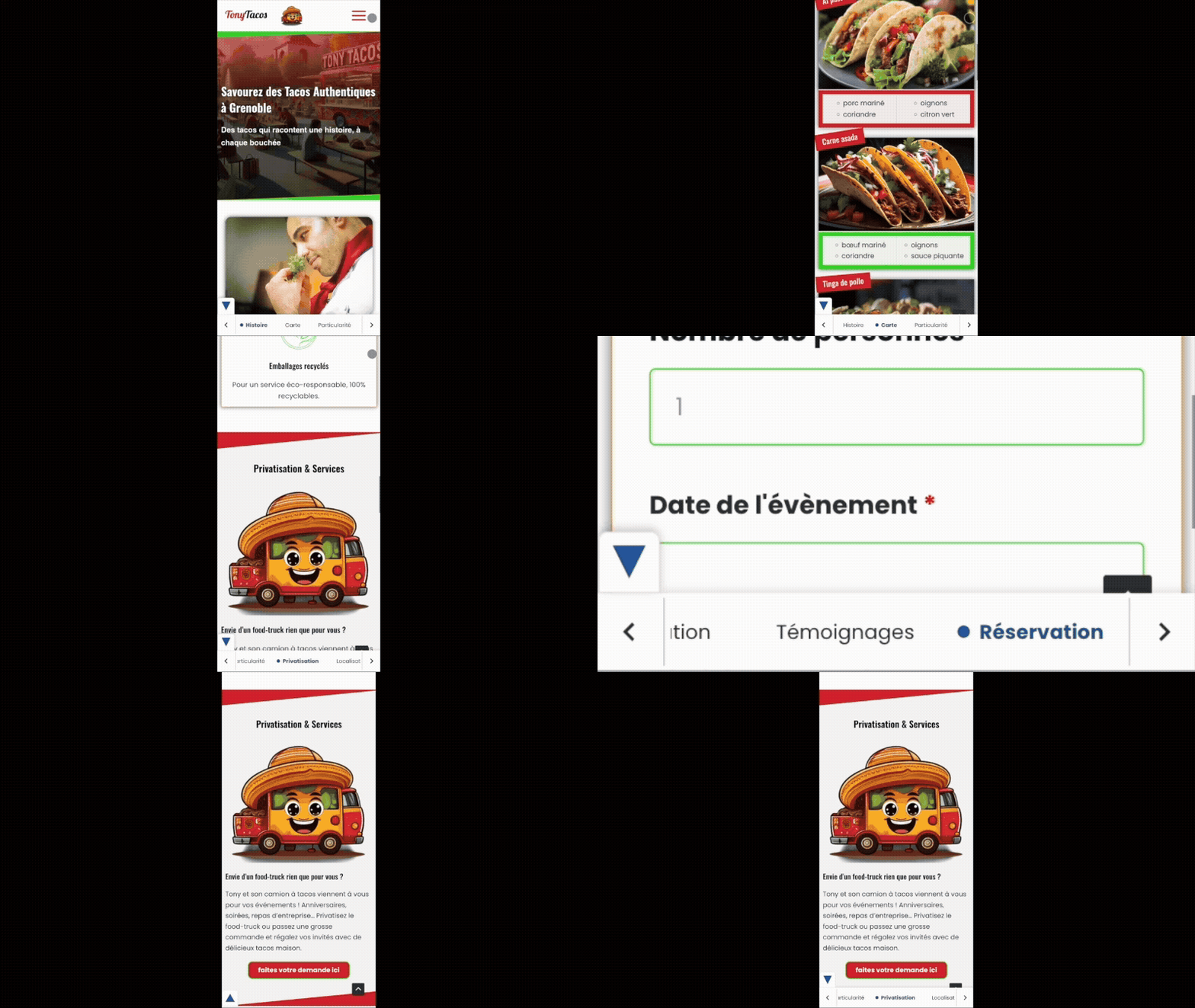
Horizontal navigation bar on mobile at the bottom of the screen.
Instal·lació
From the WordPress admin (recommended method)
- In the WordPress dashboard, go to Plugins > Add New.
- Search for Anchor Menu.
- Click Install, then Activate.
- Go to Settings > Anchor Menu to configure your menu.
Manual installation (via .zip file)
- Download the Anchor Menu plugin archive from its page on WordPress.org.
- In the WordPress dashboard, go to Plugins > Add New > Upload Plugin.
- Select the
.zipfile, then click Install and Activate. - Go to Settings > Anchor Menu to configure your menu.
PMF
-
To install Anchor Menu:
- In your WordPress dashboard, go to Plugins > Add New.
- Search for Anchor Menu.
- Click Install, then Activate.
- Go to Settings > Anchor Menu to configure your menu.
-
Yes. Anchor Menu works with all WordPress themes that follow coding standards.
The plugin has been successfully tested with the default Twenty Twenty-Four and Twenty Twenty-Five themes, as well as Gutenberg- and Elementor-based themes.It is compatible with most modern themes that use standard HTML headings and section tags.
If you experience a compatibility issue with a specific theme, you can report it on the WordPress.org support forum.
-
Current limitation: Anchor Menu is not designed for WooCommerce.
Product pages use dynamic content and unpredictable IDs that are not compatible with the plugin’s anchor system.Anchor Menu is optimized for showcase websites, blogs, and standard content pages.
-
Yes. Anchor Menu is compatible with most WordPress plugins.
It has been successfully tested with major SEO plugins (Yoast SEO, Rank Math), caching plugins (WP Super Cache, W3 Total Cache), security plugins (Solid Security), translation plugins (TranslatePress), and form builders such as Ninja Forms.If you experience a compatibility issue with a specific plugin, you can report it on the WordPress.org support forum.
-
No coding skills are required.
Anchor Menu is fully managed from the WordPress admin interface with a simple and intuitive setup.You only need to assign IDs to your sections or blocks, which can be done directly in the WordPress editor or in page builders like Gutenberg and Elementor.
-
No. Anchor Menu is lightweight and optimized.
CSS and JS files are intentionally small, with no unnecessary dependencies. Inline CSS is limited to what is strictly necessary, and no heavy script runs on scroll.Performance tests (Lighthouse mobile and desktop) confirmed that the plugin does not impact core metrics (CLS, LCP).
-
Are the plugin files loaded on every page?
-
No. Scripts and styles are loaded only on pages where Anchor Menu is enabled (via shortcode or settings).
This keeps your website lightweight. -
Yes. Only administrators can change the plugin settings.
Anchor Menu follows WordPress security best practices: data sanitization, proper escaping, and use of the WordPress Settings API.
It also removes its own data cleanly upon uninstall. -
Yes. The plugin supports full keyboard navigation, includes ARIA roles and labels, and uses accessible color contrasts (≥ 4.5:1).
The interface and the rendered menu both follow accessibility guidelines. -
When uninstalled, Anchor Menu removes only its own data stored in the database (settings and options).
No other site data is touched. -
Yes. Anchor Menu is translation-ready and already available in multiple languages.
You can contribute directly on the official platform:
https://translate.wordpress.org/ -
AI systems (Google AI, ChatGPT, etc.) understand pages better when the content is clearly structured into sections.
Anchor Menu creates a clean table of contents with anchors and headings, making long-form content easier for AI to analyse, summarise, and recommend. -
Why are long and well-structured pages important for AI?
-
Modern AI prefers pages that provide detailed, high-quality explanations.
This kind of expert content is naturally longer, and Anchor Menu makes it easier to navigate — both for readers and for AI engines, which interpret each section more accurately. -
Yes. The plugin clarifies the hierarchy of your content (H1 H2 H3) and exposes each section through anchor links.
This helps AI engines understand your topics, extract key information, and identify sub-themes more efficiently. -
Absolutely. Whether it’s a blog, documentation, a knowledge page, or an informational article, AI rewards clear content organisation.
Anchor Menu enhances clarity, navigation, and perceived expertise — all important signals for modern AI-driven search.
Ressenyes
No hi ha ressenyes per a aquesta extensió.
Col·laboradors i desenvolupadors
«Anchor Menu» és programari de codi obert. La següent gent ha col·laborat en aquesta extensió.
Col·laboradors
“Anchor Menu” s’ha traduït a 5 configuracions regionals. Gràcies als traductors per les seves aportacions.
Traduïu «Anchor Menu» a la vostra llengua.
Interessats en el desenvolupament?
Navegueu pel codi, baixeu-vos el repositori SVN, o subscriviu-vos al registre de desenvolupament per fisl de subscripció RSS.
Registre de canvis
1.0.0
- Initial release with desktop and mobile menus, per-page customization, accessibility features, and optimized loading.