
Descripció
Abhinavdev Environment Badge is a lightweight, zero-bloat utility plugin created for WordPress developers, agency teams, and site owners.
Have you or your clients ever accidentally edited posts, deleted products, or updated theme options on a Live Production site believing you were safely working on a Staging or Local sandbox?
This plugin eliminates that risk by injecting an unmistakable, color-coded visual indicator directly into the top WordPress Toolbar (Admin Bar) on both backend and frontend.
Key Features
- Intelligent Environment Detection: Automatically identifies your environment using native WordPress
wp_get_environment_type(),WP_ENVIRONMENT_TYPEconstants, or domain heuristics (localhost,.test,.local,staging.*). - Manual Override & Custom Labels: Need to specify a custom label like «Client UAT» or «Feature Branch»? Override detection with a single click.
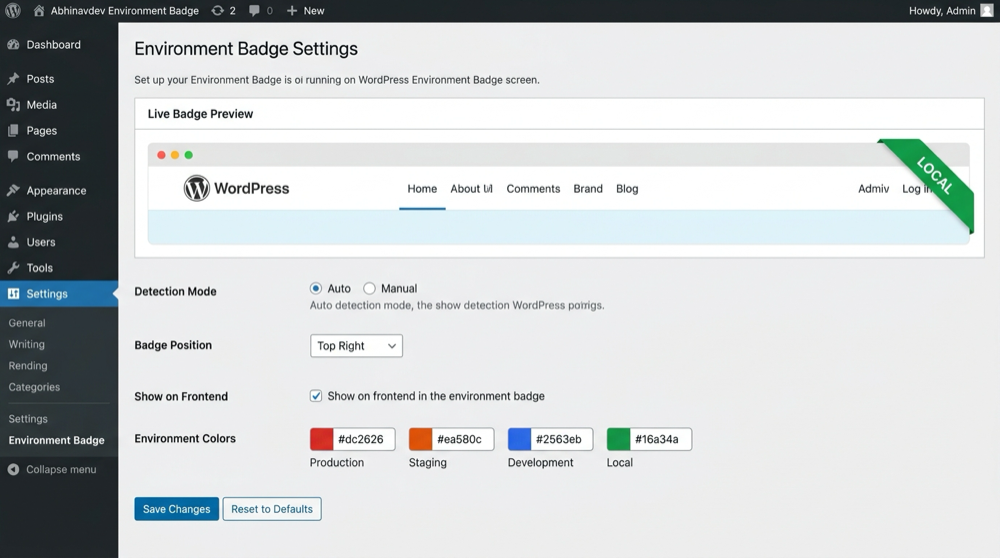
- Custom Color Palettes: Full control over background and text colors for each environment using native WordPress color pickers.
- Live Settings Preview: See your badge update in real-time right inside the settings dashboard before saving.
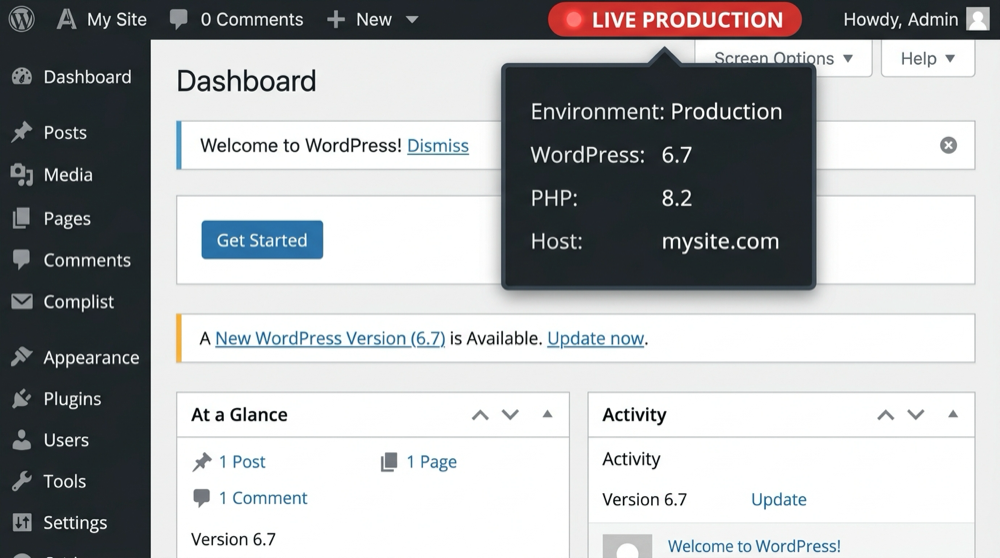
- System Info Dropdown: Hovering over the badge displays key diagnostic data: Active Environment, WordPress Version, PHP Version, and Host name.
- Position Controls: Position the badge on the right or left of the admin bar.
- Frontend Visibility Option: Choose whether logged-in administrators see the badge on the frontend or backend only.
- 100% Native & Lightweight: Zero third-party JavaScript libraries or external CDN dependencies. Clean CSS and native WordPress Settings API.
Captures
Instal·lació
- Upload the
abhinavdev-environment-badgefolder to your/wp-content/plugins/directory, or install the.zipfile via Plugins > Add New > Upload Plugin in your WordPress admin dashboard. - Activate the plugin through the Plugins screen in WordPress.
- Navigate to Settings > Environment Badge to customize your environment colors, labels, and display preferences.
PMF
-
Does this plugin work with WordPress core’s WP_ENVIRONMENT_TYPE?
-
Yes! If you define
define( 'WP_ENVIRONMENT_TYPE', 'staging' );inside yourwp-config.php, the plugin automatically recognizes it and applies the corresponding staging badge. -
Will site visitors see this badge?
-
No. The badge is strictly rendered inside the WordPress Admin Bar for logged-in users who have administrative or post-editing privileges. Public visitors will never see it.
-
Does this plugin affect site performance?
-
Not at all. The plugin enqueues less than 2 KB of pure CSS and runs zero external requests or heavy database queries.
-
Can I use custom colors?
-
Yes. Under Settings > Environment Badge, you can use the color pickers to set any hex color for production, staging, development, local, or custom environments.
Ressenyes


Col·laboradors i desenvolupadors
«Abhinavdev Environment Badge» és programari de codi obert. La següent gent ha col·laborat en aquesta extensió.
Col·laboradors

Traduïu «Abhinavdev Environment Badge» a la vostra llengua.
Interessats en el desenvolupament?
Navegueu pel codi, baixeu-vos el repositori SVN, o subscriviu-vos al registre de desenvolupament per fisl de subscripció RSS.
Registre de canvis
1.1.0
- Added: Automatic detection for major hosting preview and temporary domains (Hostinger, SiteGround, WP Engine, Kinsta, Cloudways, Flywheel, Pantheon, Bluehost).
- Added: «Production Domain» setting – seamlessly switches cloned staging sites to the Staging badge if current domain differs from production.
- Improved: Detection hierarchy to prioritize explicit constants and domain patterns over default production fallback.
1.0.0
- Initial public release.
- Automatic environment detection via
wp_get_environment_type()and host matching. - Live preview in settings dashboard.
- Customizable color palettes and label text for all environments.
- System information dropdown sub-nodes.
- Fully compliant with WordPress.org security and coding standards.