

Descripció
WordPress MCP server for AI agents, governed and off by default
Agent Abilities for MCP is a WordPress plugin that turns your site into a governed Model Context Protocol (MCP) server. It exposes 179 curated WordPress «abilities» (tools) to AI agents like ChatGPT, Claude, Cursor, and VS Code over MCP, so your AI client can read and, when you allow it, write to your site as a real, least-privilege WordPress user you choose. It is built on the WordPress 6.9 Abilities API and the official MCP Adapter, so there is no custom server or transport to trust.
Nothing is exposed until you turn it on. Permission controls are the point: the agent only ever acts as the WordPress user you bind it to, never an admin-equivalent key, and every call is re-checked against that user’s capabilities and written to the audit log before it runs, denied attempts included. You add reach as you build trust, not all at once. See External Services below for exactly what the plugin can reach on its own.
Quick links: Website | Documentation | Getting started | Supported clients | Prompt Library | GitHub
What is a WordPress MCP server?
A WordPress MCP server lets an AI assistant work on your site directly, instead of copying text between a chat window and wp-admin. MCP (Model Context Protocol) is an open standard that tells an AI client which tools a service offers and how to call them, so Claude, ChatGPT, or any other MCP client can list your posts, draft one, or update a WooCommerce order.
An MCP server hands a language model the ability to change your live site, so how far it can reach and whether you can audit it afterwards both matter – exactly what Agent Abilities for MCP governs, off by default and logged.
Prefer to watch first? Here is a short walkthrough of the plugin in action.
🛡️ Permission controls and an audit log on every call
- Least privilege by design. The AI agent connects as a real, scoped WordPress user through OAuth or an Application Password, never an admin-equivalent key.
- Off by default. Nothing is exposed until you enable it, and updates never silently widen access.
- Read-only mode. One switch stops every write ability from registering at all, whatever is ticked, abilities from other plugins included, and your selections are untouched when you switch it back off.
- Two-layer capability gating. A connection only sees the tools its user can call, and every call re-checks that capability before it runs.
- Per-role and per-connection allowlist. Narrow what one role, or one connection, can reach on top of the global list. The lists only narrow: an ability has to clear the global list, the role’s list, and that connection’s list before an agent can call it. A site that never opens the screen sees no change.
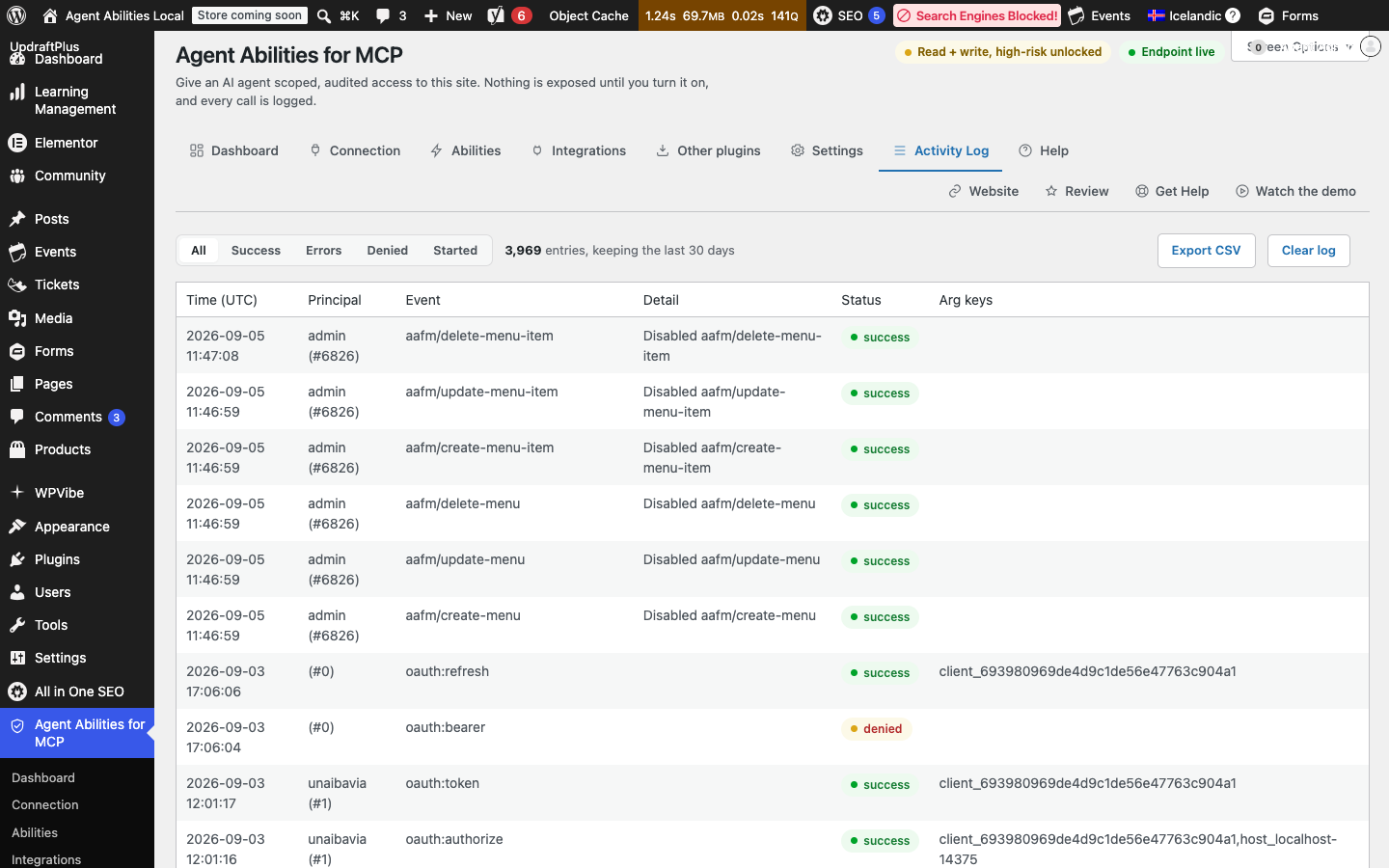
- Honest audit log. Every call is recorded, denied attempts included, along with the user or connection that made the call, the argument keys, and a short identifier-only note of what it touched. Free-text argument content is never stored, and the log lives in your own database.
- Bounded by construction. No arbitrary option or meta access, no code execution. Uploads are validated by their real bytes against an image allow-list, and a URL upload refuses private, loopback, or link-local targets with no redirects followed. A new user gets the default role, never admin, and the last administrator can never be removed. Anything destructive is off by default, capability-gated, and routed to Trash where supported.
- Optional safety controls. Switch on a per-minute rate limit, an IP allowlist, a force-to-draft mode, or a title-length cap. All four stay off until you set them.
- No content leaves your site. The plugin contacts no AI provider and has no telemetry; see External Services below for the two outbound requests it can make on its own.
- Two ways to connect. Approve an agent over OAuth (no secret in a config file) or point a dedicated low-privilege user at an Application Password; a guided screen builds the config for you. An Application Password is a whole-site credential scoped only by that user’s role, so this plugin’s own limits (allowlist, high-risk floor, audit log) apply only to calls through its MCP endpoint. OAuth has no such limit, since a token this plugin issues only ever authenticates this one endpoint.
🤖 Built on the WordPress Abilities API and MCP Adapter
WordPress 6.9 ships the Abilities API and the official MCP Adapter (wordpress/mcp-adapter). Agent Abilities for MCP registers a curated, governed set of abilities on top of them, rather than inventing its own protocol or server, so there’s no bespoke transport to trust.
📦 179 governed abilities
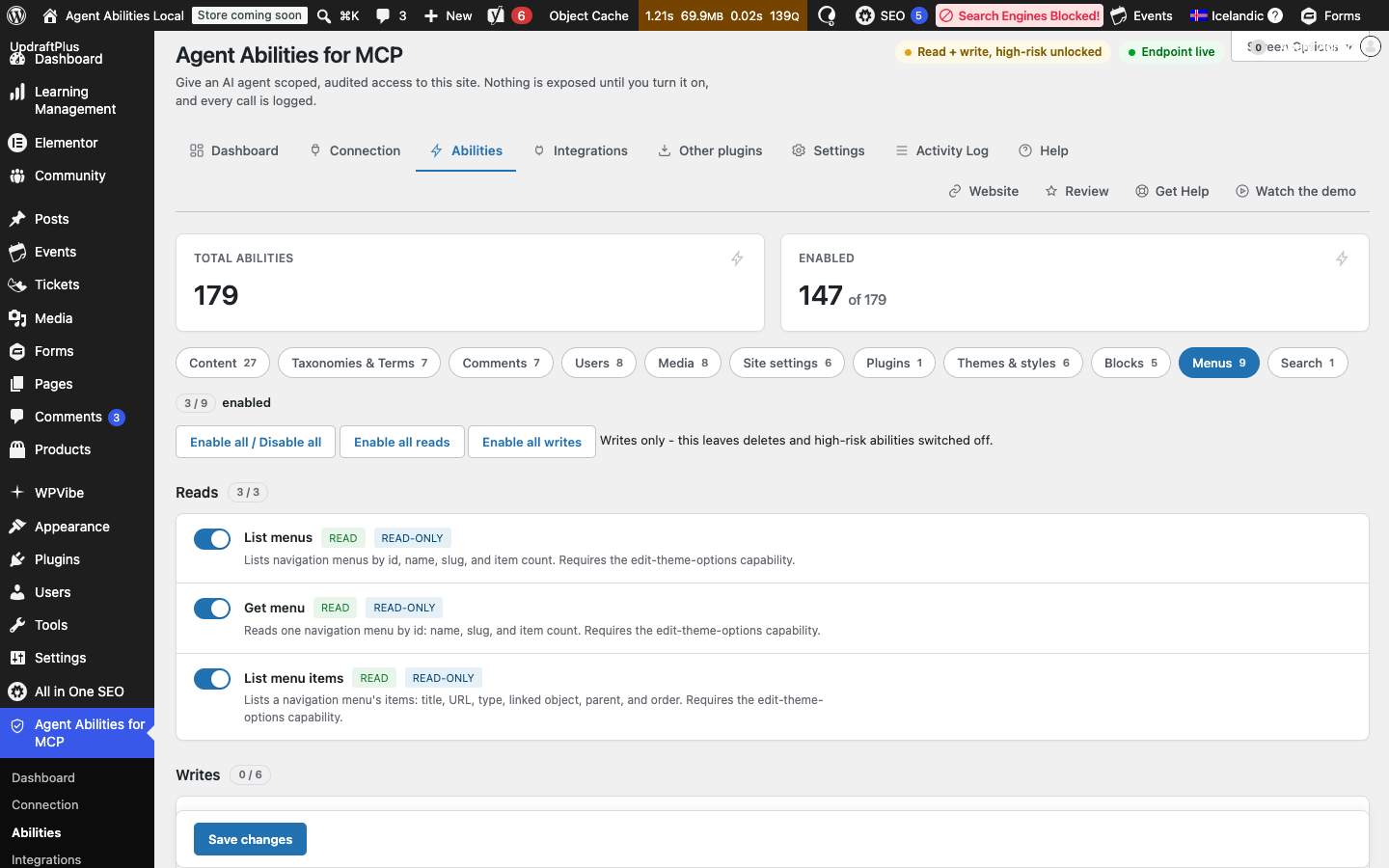
The plugin ships 179 governed abilities: 85 across WordPress core and 94 from auto-detected integrations, every one off until you enable it, scoped, capability-gated, and logged. It can also bridge abilities from your other plugins (see below).
WordPress core (85 abilities). Reads plus guarded writes across your whole site:
- 📝 Posts & Pages: list, read, create, update, and delete, with destructive actions off by default and deletes routed to Trash.
- 🏷️ Terms & Taxonomies: manage categories, tags, and custom taxonomy terms.
- 💬 Comments: read and moderate the comment queue.
- 🖼️ Media: list and read the library, and add images from inline data or an HTTPS URL, validated by their real bytes against an allow-list.
- 🗂️ Post Meta: read and write only administrator-allowlisted meta keys; protected, underscore-prefixed, and authentication keys can never be allowlisted.
- 👥 Users: read and manage users within capability limits; a new user gets the default role, never admin, and the last administrator can’t be removed.
- 🧭 Site structure: work with menus and the structural pieces that hold the site together.
- 🕓 Revision history: read the revision trail for content.
- 🧱 Blocks & Templates: work with reusable blocks, themes, and templates.
- ⚙️ Limited settings & site health: a tightly scoped set of settings, plus read-only site health and plugin status.
- 🔍 Site-wide search: one search that spans every post type at once.
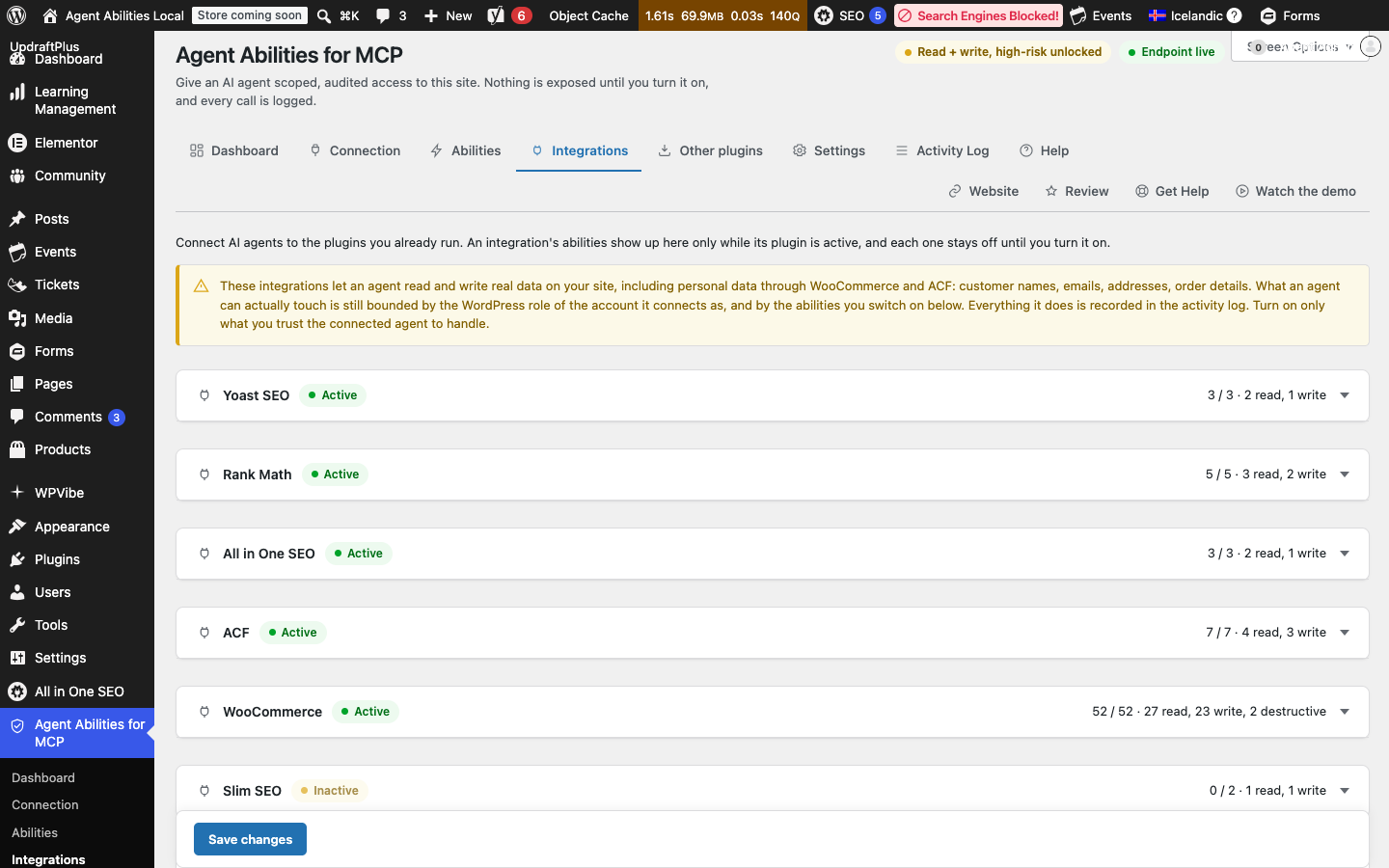
Integrations (94 abilities). Detected automatically per active plugin, off until you turn them on, capability-gated, logged, and only present while that plugin is active:
- 🛒 WooCommerce MCP (52 abilities): read and write products, orders, and customers to help run your store. These touch personal data (names, emails, addresses), so they sit behind a clear admin notice and stay off until enabled.
- 🧩 Advanced Custom Fields (7 abilities): read and write ACF field data; like WooCommerce, these can reach personal data and sit behind the same notice.
- 📈 Rank Math SEO (5 abilities): read and manage Rank Math SEO data.
- 📈 Yoast SEO (3 abilities): read and manage Yoast SEO data.
- 📈 All in One SEO (3 abilities): read and manage AIOSEO data.
- 📅 The Events Calendar (13 abilities): read and manage events, venues, and organizers.
- 🎫 Event Tickets (3 abilities): read tickets and attendees for an event. No ticket-purchase write is exposed.
- 📈 Slim SEO (2 abilities): read and manage Slim SEO data.
- 🎨 Avada / Fusion Builder (2 abilities): read a page’s raw Fusion Builder markup and replace text without disturbing the shortcode layout.
- 📍 GeoDirectory (4 abilities, off by default): read and manage business and place listings; stays off even when active, turn it on in the Integrations tab.
More integrations are planned.
🔗 Abilities from your other plugins (new in 1.1.0)
WordPress 6.9 lets any plugin register its own abilities, not just this one, and Agent Abilities for MCP can bring those in too. Abilities from other active plugins appear on a dedicated Other plugins screen, grouped by plugin, every one off until you enable it – then it becomes a governed MCP tool under the same rules as the built-in catalog: scoped, capability-checked, rate-limited, and logged with identifiers only.
One limit worth knowing: since it’s the other plugin’s code doing the work, WordPress can only check a bridged ability’s answer against a description if that plugin publishes one. The governance above (permissions, scoping, rate limiting, the audit log) applies in full either way.
So you are not limited to the integrations shipped here: any plugin that speaks the Abilities API can be handed to your agent, with a whole plugin’s set toggled at once. The bundled WP-CLI command wp aafm catalog export prints a site’s discoverable abilities as JSON.
Page builder pages: refused, not silently broken
Elementor, Divi, Beaver Builder, and Avada keep their layout outside the normal post content, so a write that reports success can leave the front end exactly as it was. Since 1.7.4 the plugin checks before it writes and refuses the call with an error naming the builder that owns the page. This is a guard, not an integration with any of them, and OptimizePress is not covered yet.
Connect Claude to WordPress
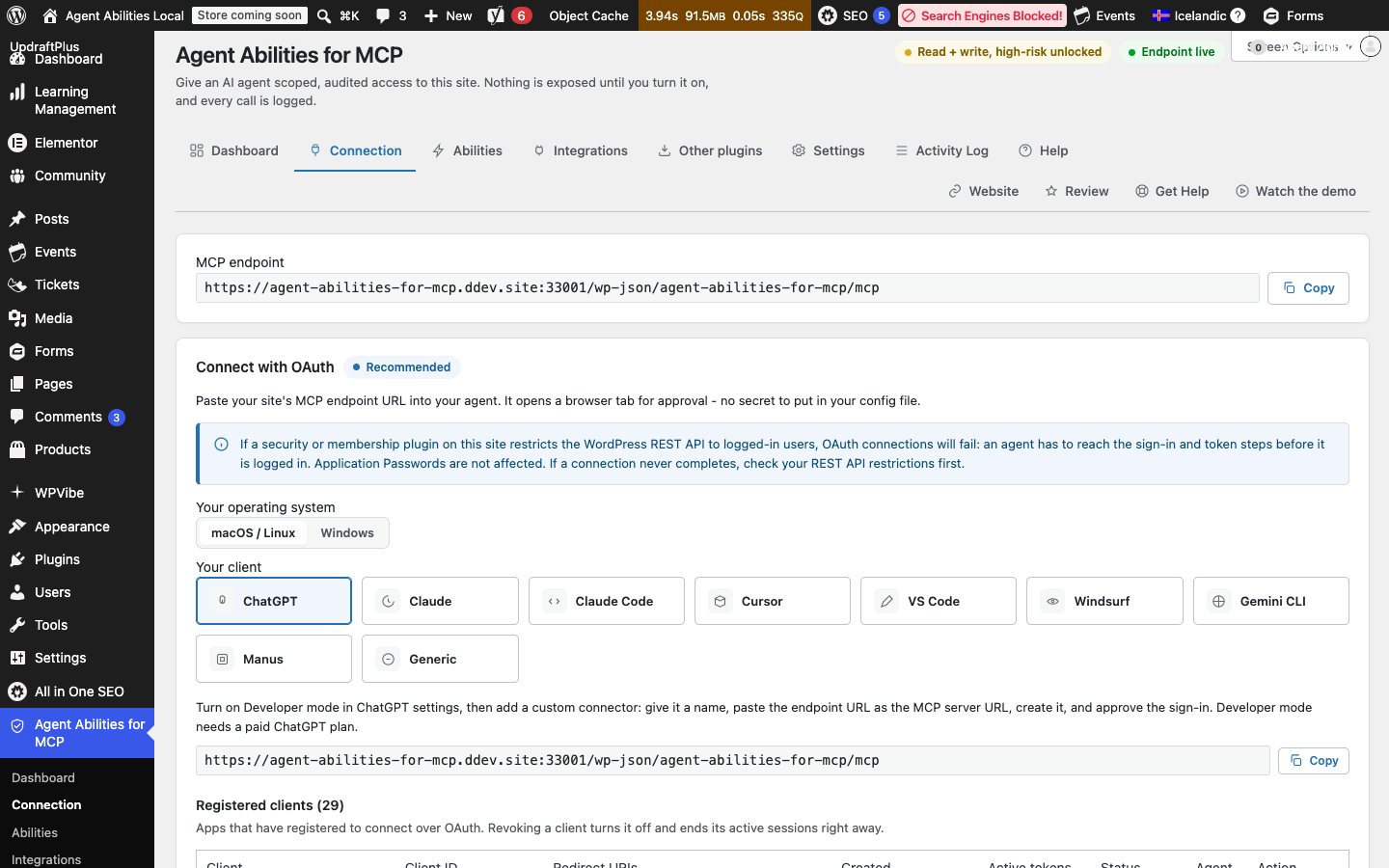
Install the plugin, switch on the abilities you want Claude to have, add your site’s MCP endpoint as a custom connector in Claude, and approve the OAuth sign-in once. No API key or config file. The claude.ai app, Claude Desktop, and Claude Code share this flow, and Claude only ever acts as the WordPress user who approved it.
Connect ChatGPT to WordPress
Turn on Developer Mode in ChatGPT (Settings, then Connectors, then Advanced), add your site’s MCP endpoint as a custom connector, and approve it once over OAuth – a beta feature on ChatGPT’s paid plans, not the plugin’s limit. ChatGPT then reaches only the abilities you switched on, acting as the WordPress user that approved the connection.
🔌 Supported AI platforms
Your AI client connects in over MCP; the plugin never calls out to an AI provider, so there’s no model API key to add. Anthropic Claude, OpenAI ChatGPT, Manus, and Google Gemini (via its CLI) all work today; the hosted Gemini app does not yet.
🧩 Compatible clients and frameworks
Connect any MCP client that can reach your endpoint: over OAuth (paste the endpoint URL, approve once) or with an Application Password (point a dedicated low-privilege user at it).
- Hosted apps: ChatGPT, Claude, and Manus, by URL over OAuth.
- Editors and IDEs: Claude Code, Cursor, VS Code, and Windsurf.
- Command line: Gemini CLI.
- Frameworks: any MCP-compatible framework can call your enabled abilities as tools.
- Bridged clients: the open-source
mcp-remoteor@automattic/mcp-wordpress-remotebridge runs on your machine for clients that cannot connect directly.
⚖️ Disclaimer
Model Context Protocol (MCP) is an open specification originally developed by Anthropic. Claude, ChatGPT, Cursor, VS Code, Gemini, and other product names are trademarks of their respective owners. Agent Abilities for MCP is a third-party plugin and is not affiliated with, endorsed by, or sponsored by any of them.
External Services
This plugin contacts no AI provider and includes no analytics or telemetry.
It makes two kinds of outbound HTTP request on its own: the Connection tab’s reachability check (a same-origin call confirming your MCP endpoint answers), and, only when you enable the off-by-default upload-media-from-url ability, a fetch of the exact HTTPS URL your AI client supplies so that file can be added to your media library. That fetch is SSRF-hardened against private, reserved, and redirect-based targets, and carries none of your content, credentials, or site data – it only reads what’s already public at that URL.
Connecting a client is done by the client, not this plugin. Some reach your endpoint directly; others use a bridge such as the open-source mcp-remote or @automattic/mcp-wordpress-remote, run on your own machine and not bundled with this plugin:
- mcp-remote: https://www.npmjs.com/package/mcp-remote
- @automattic/mcp-wordpress-remote: https://www.npmjs.com/package/@automattic/mcp-wordpress-remote
Captures




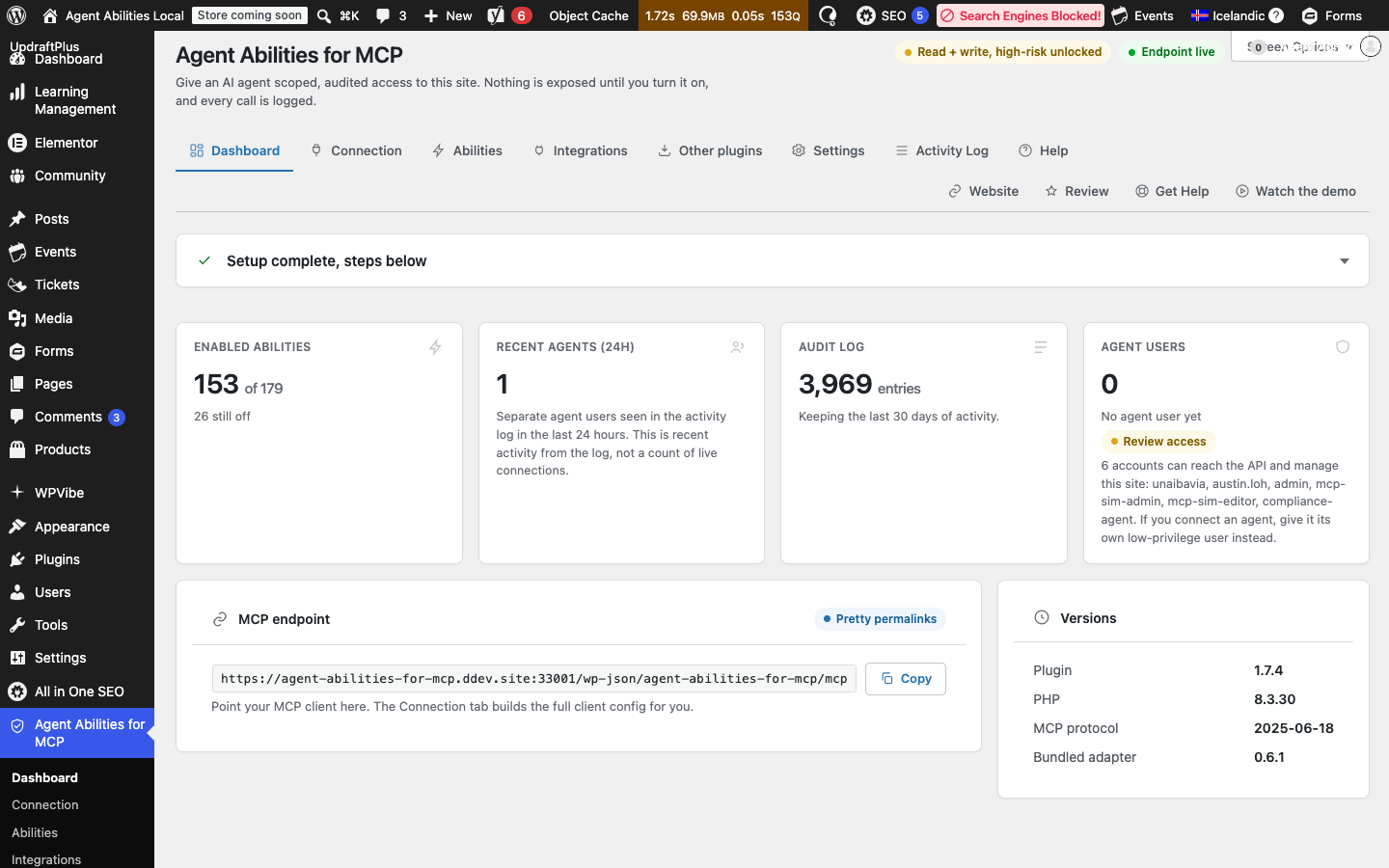
Instal·lació
- Upload the plugin to the
/wp-content/plugins/agent-abilities-for-mcpdirectory, or install it from the WordPress plugins screen. - Activate it from the Plugins screen.
- Open the Agent Abilities for MCP menu in your admin sidebar. On the Abilities tab, turn on only the abilities you want the agent to have. Everything starts off.
- On the Connection tab, copy your site’s MCP endpoint. The simplest path is OAuth: paste the endpoint into your MCP client and approve the connection once in the browser, where the agent acts as your own account.
- Prefer not to use OAuth, or on a client that can’t? Create the dedicated low-privilege agent user the Connection tab offers, generate an Application Password for it, and connect with that instead.
- Use the connection check on the Connection tab to confirm the endpoint is reachable from your server.
For a full walkthrough, see the getting started guide and connecting a client.
PMF
More help: Documentation | Connecting a client | Security and disclosure | Support forum
-
How do I connect an AI agent to my WordPress site?
-
Install and activate the plugin, then open the Agent Abilities for MCP screen and turn on the abilities you want, since everything starts off. Copy your site’s MCP endpoint from the Connection tab and add it to your AI client. The simplest path is OAuth: paste the endpoint and approve the connection once in the browser. If your client cannot use OAuth, point a dedicated low-privilege user at an Application Password instead. Claude Desktop, Claude Code, Cursor, VS Code, Windsurf, and Gemini CLI all connect today, some directly and some through the mcp-remote bridge that runs on your own machine.
-
How do I connect Claude to WordPress?
-
Install the plugin, enable the abilities you want on the Abilities tab, then copy your MCP endpoint from the Connection tab and add it to Claude as a custom connector. Approve the sign-in once in the browser. The claude.ai web app and Claude Desktop use that same flow; Claude Code connects from the command line.
-
Does the agent get admin access?
-
No. The agent authenticates as whatever WordPress user you bind it to. Point it at the dedicated low-privilege user the plugin can create for you, and it can only do what that user can do. Each ability also re-checks the user’s capability before it runs, so a connection can never call a tool its user is not allowed to use.
-
What permission controls do I get over the AI agent?
-
Agent Abilities for MCP gives you three layers. Every ability is off until you enable it. The agent connects as a real WordPress user you choose, so it can only do what that user’s role already allows. Every call re-checks that user’s capability before it runs, and a call that fails the check is denied and recorded.
-
Can I give one connection less access than another?
-
Yes. Beyond the site-wide list of enabled abilities, you can add a per-role allowlist, a per-connection allowlist, or both, on the Connections screen. Either one only narrows what was already enabled: an ability still has to clear the global list, then the matching role’s list, then the matching connection’s list, before an agent can call it. There is no finer-grained scoping below role and OAuth connection – an Application Password inherits its user’s whole role, with no separate per-password limit. Leave the screen alone and nothing changes; every existing connection keeps working exactly as it did before.
-
Is there an audit log of what the agent did?
-
Yes. Agent Abilities for MCP writes every ability call to an audit log in your own database, denied attempts included. Each entry records the acting user, the ability name, the argument keys, and a short note of what the call touched: small identifying values only, such as ids, meta key names, slugs, and status values. Free-text argument content, a post body or an email address, is never stored. You can clear the log from the admin screen.
-
Is it safe to connect an AI agent to my WordPress site?
-
Yes, when the connection is scoped, which is what this plugin is built around. The agent connects as a real, least-privilege WordPress user you choose, never an admin-equivalent key. Every ability is off until you enable it, each call re-checks the user’s capability before it runs, and every call is logged, denied attempts included. The plugin itself never holds an admin-equivalent key.
-
What can an agent actually do?
-
Only the abilities you have enabled, and only within the bound user’s capabilities. The catalog is reads and guarded writes over posts, pages, terms, comments, media, post meta, and site structure, plus revision history and a search that spans every post type at once. There is no ability to change options arbitrarily, change roles, or run code. The one ability that fetches a remote URL is a media upload: it only accepts https, refuses a target that resolves to a private, loopback, or link-local address, never follows a redirect, and stays off until you enable it like every other ability. An agent can only write post meta for keys an administrator has explicitly allowlisted, and protected, underscore-prefixed, and authentication keys can never be allowlisted. Deletes move content to Trash where the ability supports it, and the permanent ones are off by default and capability-gated.
-
Will an agent break my Elementor or Divi page?
-
No, it will refuse the write instead. Elementor, Divi, Beaver Builder, and Avada all store their layout somewhere other than the normal post content, so an unguarded edit could report success while changing nothing you can see, or corrupt the builder’s own markup. The plugin checks page-builder ownership before any content write and refuses the call with an error naming the builder that owns the page, so you find out immediately rather than discovering it later. Edit that page in its own builder instead. This is a refusal guard, not an integration with any of these builders, and OptimizePress is not covered yet.
-
How does the plugin handle tools and access?
-
Agent Abilities for MCP ships everything off, binds the agent to one WordPress user you pick, re-checks that user’s capability on every call, and logs every call including denials. You add reach as you build trust, not all at once. It trades raw tool count for control you can audit.
-
Is it free?
-
Yes. Agent Abilities for MCP is free on WordPress.org, with no paid tier, no API key to buy, and no usage limits added by the plugin.
-
Does it work with my other plugins?
-
Yes, for a set of supported plugins. When one is active, Agent Abilities for MCP adds abilities for it under the same rules as the core: detected automatically, off until you turn them on, capability-gated, and logged. Out of the box it covers WooCommerce, Advanced Custom Fields, and SEO (Yoast, Rank Math, and All in One SEO). The WooCommerce and ACF abilities can read and write real customer and order data, including personal data such as names, emails, and addresses, so they sit behind a clear notice in the admin and stay off until you switch them on. Beyond these built-in integrations, the plugin can also bridge abilities that any of your other plugins register through the WordPress Abilities API. More integrations are planned.
-
Can I expose abilities from my other plugins?
-
Yes. WordPress 6.9 lets any plugin register abilities, and Agent Abilities for MCP can bridge the ones declared by your other active plugins. Open Other plugins in the admin, where they are grouped by the plugin that registered them and start off. Turn one on and it becomes a governed MCP tool under the same rules as everything else: scoped to the bound user, capability-checked on every call, rate-limited, and logged. You can enable or disable a whole plugin’s set at once, and nothing is exposed until you choose it.
-
Can an AI agent manage my WooCommerce store?
-
Yes, when WooCommerce is active. The plugin adds WooCommerce abilities for reading and writing products, orders, and customers, so an AI agent can help run your store through this MCP server for WooCommerce. Those abilities reach real customer and order data, including personal data such as names, emails, and addresses, so they stay off until you enable them and sit behind a clear notice in the admin, under the same least-privilege and audit-logging rules as everything else.
-
Can an agent manage my events, tickets, or directory listings?
-
Yes, when the matching plugin is active. With The Events Calendar active, an agent can read and manage events, venues, and organizers; with Event Tickets active, it can read tickets and attendees, though no ticket-purchase write is exposed. With GeoDirectory active, it can read and manage business and place listings, but that integration stays off even when the plugin is active – you turn it on yourself on the Integrations tab, unlike most other integrations, which are simply off until enabled. All of these abilities follow the same rules as everything else: off until you switch them on, capability-gated, and logged.
-
Is this the same as the WordPress Abilities API, or the official MCP adapter?
-
It is built on both. WordPress 6.9 ships the Abilities API and the official MCP Adapter; Agent Abilities for MCP registers a curated, governed set of abilities on top of them rather than inventing its own protocol or transport. So there is no bespoke server to trust, and the plugin inherits the standard’s behavior. What it adds is the governance layer: the off-by-default catalog, the capability gating, the safety controls, and the audit log.
-
How is this different from other WordPress MCP plugins?
-
Most MCP plugins for WordPress compete on how many tools they can expose. Agent Abilities for MCP competes on control. Everything is off until you enable it, the agent acts as a real least-privilege WordPress user rather than an admin-equivalent key, every call re-checks that user’s capability before it runs, and every call is logged, denials included. It builds on the official WordPress Abilities API and MCP Adapter instead of a hand-rolled server, so there is no custom transport to trust. It trades raw tool count for reach you can audit and widen as you build trust.
-
What’s the difference between this and the WordPress REST API?
-
The REST API exposes raw endpoints. MCP describes your site’s abilities as discoverable tools an AI agent can reason about and call, and this plugin wraps each one in a governance layer: off by default, capability-gated on every call, and logged. It is the same underlying WordPress, governed so an agent can drive it within the limits you set.
-
Which WordPress version do I need?
-
WordPress 6.9 or newer, which is where the Abilities API and the official MCP Adapter the plugin builds on are available. PHP 7.4 or newer is required.
-
Which AI clients work?
-
Any MCP client that can reach your site’s endpoint. With OAuth you paste the endpoint URL into the client and approve the connection once in the browser; clients like Claude Desktop, Claude Code, Cursor, VS Code, Windsurf, and Gemini CLI connect this way, some directly and some through the mcp-remote bridge that runs on your own machine. You can also connect with an Application Password instead of OAuth, though the hosted cloud apps use OAuth only. ChatGPT connects too, once you turn on developer mode and add your site as a custom connector, and so does Manus. The hosted Gemini app is not supported yet.
-
Does it work with ChatGPT?
-
Yes. In ChatGPT, turn on developer mode, then add your site as a custom connector using your MCP endpoint URL and approve the connection once over OAuth. This needs a ChatGPT plan that allows custom connectors. Claude Desktop, Claude Code, Cursor, VS Code, Windsurf, and Gemini CLI also work, some directly and some through the mcp-remote bridge that runs on your own machine.
-
Do I need to expose my computer to connect a remote site?
-
No. Your WordPress site is the MCP server, so the endpoint is already public over HTTPS on the site itself, not on your computer. Connecting a hosted client like ChatGPT or Claude to a remote WordPress install means pasting that endpoint URL into the client and approving one OAuth sign-in in the browser. No tunnel, no reverse proxy, no local bridge process to keep running. A bridge is only needed for a client that can’t open a remote MCP connection on its own, covered above.
-
Can ChatGPT edit my WordPress site?
-
Only the parts you allow. ChatGPT reaches your site through a custom connector you add yourself, it acts as the WordPress user that approved the connection, and it sees nothing beyond the abilities you switched on. Every write is capability-checked before it runs and recorded in the audit log, and you can stop all writes at once with read-only mode.
-
I’m on Windows and the config won’t start.
-
Windows MCP clients can’t launch the npx shim by name. Wrap it in cmd: set «command» to «cmd» and put «/c», «npx» at the front of «args». The Connection tab has a Windows tab that generates this for you.
-
My agent can’t connect to a local or staging site.
-
Local stacks like DDEV, Local, and Valet serve a self-signed certificate that Node rejects, so the proxy never reaches WordPress. For local testing only, add «NODE_TLS_REJECT_UNAUTHORIZED»: «0» to the «env» block (the Connection tab adds it automatically when it detects a local site). Don’t ship that setting to production. A public site has a trusted certificate and doesn’t need it.
-
OAuth discovery returns 403 or 404 on my server.
-
When OAuth is enabled, clients find your site by fetching two documents under /.well-known/: /.well-known/oauth-protected-resource and /.well-known/oauth-authorization-server. WordPress serves both, but the request has to actually reach WordPress. Some servers deny anything that starts with a dot before PHP runs, and that blocks discovery.
On nginx the usual cause is a dotfile deny rule (location ~ /. { deny all; }). Add a more specific block ahead of it so /.well-known/ falls through to WordPress:
location ^~ /.well-known/ {
try_files $uri $uri/ /index.php?$args;
}The ^~ prefix tells nginx to prefer this block over the dotfile deny. Other hidden files stay denied.
Apache usually works as-is, because the WordPress .htaccess sends anything that isn’t a real file to index.php, /.well-known/ included. If a host or security plugin is blocking dotfiles, look for that rule (often in the vhost or a hardening snippet, not WordPress itself) and let /.well-known/ through.
To check, request https://your-site/.well-known/oauth-protected-resource. A working setup returns a JSON document instead of a 403 or 404.
-
My agent can’t connect and my site is behind Cloudflare or another CDN.
-
A CDN or firewall in front of WordPress can stop the agent before its request reaches your site. The common culprit is Cloudflare’s «Block AI Bots» setting (and Super Bot Fight Mode): the agent finishes signing in, but its MCP request is blocked at the edge because it comes from the AI client’s servers with an AI User-Agent. The sign-in shows up in the Activity Log, and no ability calls follow it.
To confirm, open your CDN’s firewall or security event log and look for a blocked request to the plugin’s MCP endpoint (its path ends in /mcp) from the AI client’s IP range, around the time you tried to connect. The entry names the rule that blocked it.
The fix is to let that endpoint through. On Cloudflare, either turn off «Block AI Bots» under Security, Bots, or add a rule that skips bot protection for the /mcp path so the rest of your site stays covered. Other CDNs and security plugins have the same kind of allowlist or exception.
-
Is there rate limiting?
-
Yes. Set a per-minute cap on the Settings tab under «Rate limit (per minute)». Each connection can make that many agent calls a minute, counted per agent user; 0 turns the limit off. Calls over the cap are denied and logged on the Activity Log tab, so you can spot a connection that keeps hitting it.
-
Does it send my content to OpenAI, Anthropic, or Google?
-
No. The plugin never connects to OpenAI, Anthropic, Google, or any other AI provider. Your own AI client connects in to your site and calls the abilities you have enabled. Whatever your AI client does with the results afterward is between you and whoever makes that client. (The one thing the plugin itself can fetch is a URL, if you enable the URL-upload ability – see «Does it send data anywhere?» below.)
-
Does it send data anywhere?
-
No AI provider and no telemetry. Your agent talks directly to your site. The one exception is the off-by-default upload-media-from-url ability: if you turn it on, it fetches the URL your AI client gives it (HTTPS only, private and reserved addresses refused, no redirects followed) so that file can be added to your media library. That fetch is an ordinary HTTP GET – like any request to that address, its destination sees the URL, your site’s IP, and when the request happened – but it carries none of your content, credentials, or other site data; it only pulls in the file at the URL you asked it to fetch.
-
What does the audit log record?
-
Every ability call, whether it started, succeeded, errored, or was denied, with the acting user, the ability name, the argument keys, and a short note of what the call touched: small identifying values only, such as ids, meta key names, slugs, and status values. Free-text argument content, a post body or an email address, is never stored. The activity log lives in your own database and can be cleared from the admin screen.
-
Does uninstalling the plugin revoke my agent’s access?
-
Not by itself. Uninstalling removes the plugin’s own settings and activity log, and, only if you turned on «Delete data on uninstall» first, its OAuth tables too. It never removes the dedicated agent user the plugin can create for you, or any Application Password issued to it, because those are ordinary WordPress account credentials that exist outside the plugin’s own data. To fully cut off an agent, revoke its OAuth grant from the Connection tab, or delete its Application Password or user account from the Users screen, before or after you remove the plugin.
-
How do I report a security issue?
-
Please report security issues privately rather than in the support forum, so a fix can ship before details are public. Use the security contact listed on the plugin’s GitHub repository.
Ressenyes


Col·laboradors i desenvolupadors
«Agent Abilities for MCP – MCP Server with Permission Controls and Audit Log» és programari de codi obert. La següent gent ha col·laborat en aquesta extensió.
Col·laboradors
Interessats en el desenvolupament?
Navegueu pel codi, baixeu-vos el repositori SVN, o subscriviu-vos al registre de desenvolupament per fisl de subscripció RSS.
Registre de canvis
1.7.4
- Feature: 26 new abilities cover The Events Calendar, Event Tickets, Slim SEO, Avada, and GeoDirectory, plus uploading media straight from a URL. All of them stay off until you turn them on.
- Feature: A page-builder guard refuses a write that would silently do nothing on a page owned by Elementor, Divi, Beaver Builder, or Avada. A new allowlist narrows what each role or connection can reach.
- Fix: The bump to mcp-adapter 0.6.1 closes a multisite bug where a real subsite connection was reported as failed.
- Fix: Several OAuth paths treated a failed database read as permission granted. A deactivated client, a missing client record, or an unreadable registration limit now refuse the request instead of letting it through.
- Fix: Grants belonging to a deleted user are cleared out, the Connections screen shows each identity’s current role, and a batch of smaller fixes lands across WooCommerce, the admin screens, and the connection tab.
1.7.3
- Fix: The plugin is now fully compatible with a persistent WordPress object cache (Redis, Memcached, or a host’s own drop-in): a switch you turn off stays off, and a change that did not take is reported instead of logged as done.
- Fix: Reset to defaults and delete-on-uninstall clear the plugin’s own option cache entries too, so a stale cache cannot bring a setting back after a reset.
1.7.2
- Feature: The consent screen an agent sees at sign-in was rebuilt. It carries a real brand mark, your Site Icon, and the connector’s own icon when the plugin recognizes it by its verified redirect host.
- Feature: The Activity Log now records every MCP request that reaches WordPress. A sign-in with no calls after it means a CDN or firewall stopped the agent before it arrived.
- Fix: ChatGPT could not connect on sites where dynamic client registration was off. It has its own switch on the Settings tab again, on by default, and existing installs get switched on when they update.
- Fix: Three connection bugs are gone: the OAuth authorize step mangled percent-encoded redirect addresses, a failed session write handed back a session ID that did not exist, and a very large tool schema could exhaust memory while the tool list was built.
- Fix: Smaller correctness fixes across WooCommerce, ACF, and Rank Math, plus a wrong capability check on delete-revision, OAuth options left behind at uninstall, and a new readme FAQ for CDNs that block the agent at the edge.
1.7.1
- Fix: lang:»all» measured a partial set of languages and reported success anyway. It now queries every configured WPML language for posts, pages, media, terms, search, and WooCommerce products, and the shared count helper sums across all of them.
- Fix: A tool’s visibility in tools/list could disagree with what its execute-time permission check actually allowed, both ways, hiding tools an agent could use and advertising ones it couldn’t. Discovery is reconciled with execute-time permissions across custom post types, pages, and ACF term fields.
- Fix: The RFC 9728 protected-resource-metadata route 404’d at the path agents actually request it at, breaking Claude connections for at least one user who reported it. It now resolves at the path-suffixed URL the spec calls for.
- Fix: moderate-comment reported failure when a comment was already in the requested state (already approved, already spam, and so on), even though nothing was wrong. It reports success on a no-op now, and no longer logs one as an audit error.
- Fix: Several code paths could short-circuit or reject a call before it finished, leaving a stuck or unreadable «started» row in the audit log rather than a real outcome, including on WordPress cores before 7.1. Every invocation now gets a unique token and closes out its row cleanly.
- Fix: Bridged output from a third-party plugin’s own ability could hide an unsafe object a level or two deep. The bridge now recurses into the result to find it, and refuses a bare or ambiguous object rather than assuming it’s safe. Bridged output isn’t redacted the way this plugin’s own abilities’ output is, and the readme now says so.
- Fix: Media uploads now go through WordPress’s own sideload handling and re-sanitize the resulting attachment’s content, and the pixel-size cap that no longer matched that path is gone.
- Fix: A batch of smaller correctness fixes across WooCommerce, ACF, AIOSEO, Rank Math, and Yoast: writes and reads route through each vendor’s own functions instead of re-deriving their behavior, plus fixes to tool descriptions, cache invalidation, and a few pages that had the wrong discovery floor.
- Chore: Uninstall now clears both daily cron events, not just the one tied to deleting data.
1.7.0
- Feature: Sections on the Abilities tab now have an «Enable all writes» button beside «Enable all reads». It ticks the ordinary writes and leaves deletes and high-risk abilities alone.
- Feature: The audit log records more. Permanent deletes name what they removed, and term meta, user meta and site settings updates name the keys they wrote. It logs names and identifiers, not the free text a call carried.
- Fix: An authorize request in flight when you revoked a grant could still mint a code, and the token endpoint never re-checked consent, so that code redeemed into a working token after the screen said the revoke had succeeded. Consent is checked again at redemption.
- Fix: Payment gateway settings returned camelCase credential keys in full and marked none of them redacted. Authorize.Net’s apiLoginID and transactionKey are the real case.
- Fix: Four ACF writes destroyed stored content and then reported failure: an unresolvable flexible content layout, clearing through a near-matching address, a protected-meta check that read the caller’s address instead of ACF’s, and a sub-field write landing under an undeclared name. All are refused before anything is written.
- Fix: WooCommerce counted refunds as orders, so a store with six orders and three refunds reported nine. Variations were validated against a display filter rather than the parent product, a variation delete reported failure on success, and an order lookup that threw escaped its rollback.
- Fix: Two refusals over MCP said «Permission denied» when that was not the problem. Setting alt text hit it because WordPress stores alt under a protected key, and the refusal now names aafm-update-media instead. A call missing a required argument hit it too, and now gets the schema error naming what is missing.
- Fix: Invisible characters are stripped from text on its way into storage, covering WooCommerce, SEO and ACF fields, order addresses and stored post text. Permanent deletes stop offering recovery the site cannot deliver, and an ability declaring no risk is treated as a permanent delete. Plus smaller fixes across shipping zones, menu listings on WordPress 6.9, ACF container writes, the first-run wizard, and refusal messages that named the wrong cause.
- Chore: Tested against WordPress 7.1. An accessibility pass over the admin screens covers keyboard operation, focus rings under forced colors, and proper names on toggles and table headers. OAuth housekeeping is sturdier, with InnoDB tables so token work rolls back and a cleanup cron that heals itself on subsites. A notice now asks for a wordpress.org review once the plugin has been carrying traffic for a while, and it can be dismissed for good. Vendor repository metadata no longer ships to wordpress.org.
1.6.3
- Chore: Condensed the changelog so the full release history fits within the wordpress.org listing’s length limit, in both readmes. Same releases, fewer lines, with the security and data-integrity fixes still called out one by one.
- Chore: Corrected a code comment that slightly overstated when a consumer plugin’s short-circuit is visible to the rate-limit release hook.
1.6.2
- Feature: The admin activity log can filter on «Started», the state a crashed call leaves behind, matching what the activity-log ability already exposed.
- Fix: Closed a privilege gap where editing a WooCommerce customer, or writing user meta or ACF user fields, needed only the manage-WooCommerce capability and could read or overwrite any account’s details. These require a real user-editing capability now and sit behind the high-risk lock.
- Fix: The rate limit on the OAuth endpoints never took effect on sites with no persistent object cache, which covers most shared hosting. It does now, and the per-user limit no longer counts each call twice.
- Fix: Several WooCommerce writes reported success when nothing happened: deletes that removed nothing, order-status changes that failed to apply, and per-line refunds that quietly became full refunds. Each is confirmed or refused before it reports success now, and an invalid billing email no longer erases the stored address.
- Fix: Bad values that used to be coerced silently are refused now: unparseable sales-report and coupon dates, non-numeric coupon amounts, negative limits, unknown tax classes (which had been filed under Standard and changed checkout tax), and a stock status set while stock management is on.
- Fix: ACF repeater, group, and flexible-content writes saved their rows but reported a failure, so an agent would retry over content it had already published; and fields nested in flexible-content or clone layouts were sanitized as plain text, flattening rich text and letting a javascript: link through. Both are fixed, at any nesting depth.
- Fix: Tightened what an agent can see and reach: an enabled admin-only tool could leak into a lower-privileged connection’s tool list, an SEO head read could return for a post type the operator had not exposed, and a caller on a blocked IP could flood the activity log with denial rows.
- Fix: Multisite activation creates the plugin’s tables on every site now, including sites added later; deleting a user reports that they were only removed from the current site rather than fully deleted; and creating an agent user honours the network’s add-new-users setting.
- Fix: Corrected a run of tool descriptions and operator disclosures that overstated behaviour (what the activity log stores, how the ACF maps are keyed, count semantics, revision reversibility), and fixed a batch of smaller crash and response-shape defects across posts, blocks, comments, WPML, and SEO reads.
- Chore: Cleared stale comments and dead test scaffolding, and brought the WooCommerce test stubs in line with what the real plugin does.
1.6.1
- Feature: A new aafm_ability_resolved action fires when a call finishes, so an uptime monitor or a logging plugin can react to a failure instead of waiting for someone to open wp-admin.
- Feature: The activity-log ability returns each entry’s detail, so an agent can read why a call failed, not only that it did.
- Fix: Empty category, tag, custom-field, gallery, settings, and user maps returned an array where the schema declares an object, so a strict MCP client rejected the whole response. Reported by an outside user as issue #81; the sweep it prompted fixed the same defect across the catalog.
- Fix: Calling a bridged ability from another plugin with arguments could take the site down on 1.6.0, because the bridge rewrote the source plugin’s schema into a shape WordPress core’s validator cannot read. That rewrite is gone.
- Fix: The activity log stored the raw text of an unexpected error, which for a plugin like WooCommerce often quotes the value that caused the failure, such as an email or a SKU. It records the error’s type and location now, which cannot carry your data.
- Fix: A permission check that failed unexpectedly returned the underlying error to the connected agent and could empty the entire tool list; it denies the call and records it now.
- Fix: Shipping method reads returned WooCommerce’s legacy global settings, empty for zone methods since WooCommerce 2.6, so a title or cost you just wrote did not show up; they report the real per-instance configuration now. A variation no longer claims it manages stock it inherits from its parent.
- Fix: Coupon and product validation that used to crash or save a bad record returns a clean error now: a percentage coupon over 100 (including one raised past 100 by a later type change), a duplicate variation SKU, a negative amount, and a maximum below the minimum.
- Chore: Corrected copy and a code comment: the two shipping-method reads and the consent screen note that a method carries its own per-instance settings, and the settings redactor is described as the best-effort denylist it is, not deny-by-default.
1.6.0
- Feature: Read-only mode, a switch on the Settings tab that stops any ability that writes from registering as an MCP tool, whatever is ticked, and it covers abilities from other plugins too. Turning it on or off enables and disables nothing by itself, so your selections survive, and finishing Quick Connect without choosing write access turns it on rather than ticking boxes.
- Feature: An «Enable all reads» button on the Abilities, Integrations, and Bridge tabs ticks every read ability in a section and leaves the writes alone.
- Feature: The page header states the site’s posture on every tab (read-only, read plus write, or read plus write with high-risk unlocked), worked out from what would actually register rather than the stored setting. Turning read-only mode on or off is recorded in the activity log.
- Fix: A refund amount with surrounding whitespace is trimmed before the numeric check now, several lists that could sort differently on PHP 7.4 than on 8.x sort the same everywhere, and an ability from another plugin that returns an unexpected shape is caught and reported rather than failing further down.
- Chore: The minimum PHP version is now 7.4, down from 8.0. The Settings tab is reorganised with Safety controls up front, the «Other plugins» tab has its own name and icon, and the listing leads with what the plugin gives you rather than the generic «for AI agents» framing.
1.5.0
- Feature: Eight WooCommerce abilities that move money or grant authority (refunds, order status and updates, payment gateway settings, coupon and tax-rate creation and updates) are locked by default now behind a single audited master switch on the Settings tab.
- Feature: The activity log records ability toggles and setting changes, not only calls, with a detail column that names what changed and links each identifier to its edit screen, and it can be exported as a CSV carrying the current filter.
- Feature: A failed Application Password attempt against the MCP endpoint is logged now, and rate limited per source IP so a credential-stuffing run cannot flood the log.
- Fix: Creating a WooCommerce customer requires the create-users capability now, and listing or reading one requires list-users, closing a gap that let a caller with only manage-WooCommerce read any user’s email, address, and phone, administrators included. A stock Shop Manager is denied both where it was not before.
- Fix: Payment gateway and shipping settings could return secrets under field names the redaction list missed, such as passphrase and salt, and deleting a product variation did not check the caller’s capability on that specific product. Both are fixed.
- Fix: A run of admin-log defects: an identifier could link to the wrong object, the Event and Detail columns could misalign after filtering, a large export could truncate while looking complete, and counts did not refresh until reload.
- Chore: Clarified copy on what an Application Password grants, that uninstalling does not revoke access on its own, and that an OAuth grant’s requested scope does not limit the token; the rate-limit setting notes it ships off with a suggested starting value.
1.4.3
- Fix: Media reads handed the whole library to anyone who could upload a file or edit a post; an agent connected as an author sees only what it uploaded now, and the media count follows the same rule. Deleting a WooCommerce product checks whether that particular product was yours to delete.
- Fix: A duplicate product SKU or coupon code returns a message naming the collision now instead of an uncaught error, and a bridged ability that answered with a bare list where the protocol asks for an object is always shaped as an object before it reaches the wire.
- Fix: The OAuth 401 pointer compared the request path case-sensitively, so a differently-cased request got no pointer, and the authorization response left out the issuer RFC 9207 requires. Both are fixed, on error redirects too.
- Chore: Tightened the build checks that guard these tools, including one that quietly passed any ability whose code it could not read.
1.4.2
- Feature: Every input on every tool explains itself now, all 505 of them, where only three abilities were fully documented before.
- Fix: Post status was ignored on create: «create a post as a draft» published it live and reported success. Create honours the status you ask for now, treats scheduling and private as publishing, and refuses a status your user cannot publish, on custom post types too.
- Fix: Updating a WooCommerce order with line_items added items rather than changing them, quietly raising the total; there is a clear add_line_items field now, and a request mixing valid and invalid product ids is fully validated before anything is written. A product type that does not match the product returns an error instead of being discarded.
- Chore: Added a build check that fails when any tool input goes undocumented, so this cannot drift back.
1.4.1
- Fix: OAuth errors came back in WordPress’s {code, message, data} shape instead of the {error, error_description} shape RFC 6749 requires, so no standard OAuth client could read them; reported as issue #68, and wrong since the first release. A malformed JSON body to an OAuth route escaped with the same wrong shape and no cache headers.
- Fix: Responses that carry a credential were missing Pragma: no-cache next to Cache-Control: no-store, including the token response.
- Fix: Calling a tool that does not exist or is switched off returned HTTP 404, which the MCP spec reserves for a dead session, so an ordinary mistake told the client to reconnect; it returns the right error now. The OAuth discovery document no longer advertises a client-registration endpoint when dynamic registration is off.
- Fix: Every ability declares openWorldHint false now, which the MCP schema otherwise reads as «may reach the open internet», the opposite of what the plugin actually does.
- Chore: Rate-limited OAuth responses send Retry-After now.
1.4.0
- Feature: A first-run Quick Connect wizard gets a new admin connected on one screen: turn on OAuth and copy the endpoint, or create a dedicated agent user and generate an application password, then switch on content reads and, if you want, writes. A menu pointer greets a brand-new install and points to the plugin page.
- Fix: The onboarding «Connect your agent» step and the «Agent users» count no longer read any application password as a connected agent; they track the agent users this plugin created or an approved OAuth connection, so an unrelated password stops showing a false «done» or padding the count.
1.3.2
- Feature: Content reads (posts, pages, search, terms, media, products) take an optional language argument now and report which language they returned, and a single-item read can fetch a specific translation. Sites without WPML are unaffected.
- Fix: On a WPML site the content lists returned only the default language while the counters reported every language; the counts match the returned language now, and the menu-item tools no longer report a false failure when WPML’s language filter hides the new item from the re-read.
- Chore: Added a real-WPML contract test and a guard that fails the build if a read-only ability ever starts writing.
1.3.1
- Feature: WooCommerce abilities require WooCommerce 9.1 or newer now; below that they simply do not register, with a clear reason on the Integrations screen rather than a fatal error.
- Feature: The activity log attributes each call to its OAuth client, shows a result count for list and read calls, and leaves a marker when the log is cleared.
- Fix: A run of WooCommerce fixes: list-customers can filter by role so a customer on another role stays visible, order-note authorship is detected correctly, a payment gateway’s real display order and saved values are reported, the refund executor no longer crashes on a gateway with no tax method, and product-attribute updates work across WooCommerce versions.
- Fix: SEO and content fixes: the Rank Math and AIOSEO head and write-verification paths return a clear error or accept a benign normalization instead of a false failure, a term’s parent must belong to the same taxonomy, count-media ignores the trash, upload-media fails clearly without the fileinfo extension, and update-site-settings reports failure when WordPress silently reverts a value.
- Fix: Admin and OAuth fixes: abilities from an inactive integration survive a form save, the agent-user picker finds users past the first page, a filtered-out row is actually hidden, denied OAuth bearer attempts are logged, and the consent screen and code redirect are never cached.
- Chore: Added a real-vendor contract test suite that runs against pinned WooCommerce, Rank Math, AIOSEO, and ACF code to catch API-shape regressions before release, and stopped shipping the mcp-adapter’s Node package metadata in the zip.
1.3.0
- Feature: The OAuth consent screen warns when the account approving a connection is an administrator, the settings screen warns before a REST API lockdown would cut off your OAuth connections, and the Abilities Bridge directory shows each bridged ability’s effective permission.
- Fix: New installs ship with OAuth off by default now, while sites that already had it on keep it, and a consent-grant phishing path that could get an administrator to approve a malicious client is closed.
- Fix: Hardened governance: the MCP capability gate verifies the running adapter still applies its filter rather than trusting a text match, update-user requires edit_users, and a bridged ability with no destructive annotation is treated as destructive rather than assumed safe.
- Fix: WooCommerce reads that failed on every real store are fixed: customer listing (it called a function WooCommerce does not have), empty shipping zones, ignored order paging on legacy storage, and product attributes dropped on create and wiped on update.
- Fix: SEO and content fixes: Yoast’s robots_noindex was inverted so an agent wrote the opposite of what it asked, Rank Math and AIOSEO social images render now because the plugin writes the attachment id, ACF numeric and boolean writes stopped reporting a false failure, a partial menu-item update no longer wipes untouched fields, and the page-publish check recognises custom public statuses.
1.2.1
- Chore: The plugin’s website link points to agentabilitieswp.com now instead of the GitHub repository.
- Chore: Refreshed the documentation so the supported-client list matches what works: ChatGPT, Claude (the claude.ai web app and Claude Desktop), and Manus connect by URL over OAuth, while Claude Code, Cursor, VS Code, Windsurf, and Gemini CLI connect from your own machine.
1.2.0
- Feature: Added ChatGPT as a connection option and a single Claude entry that covers both the web app and Claude Desktop; hosted apps connect by URL over OAuth, so they no longer show the application-password steps, and Manus connects the same way.
- Fix: Logged-out visitors could see «There has been a critical error» on every page when another active plugin checked the current user very early in the load (The Events Calendar is one example); the plugin waits until it has finished loading now.
- Fix: The Settings screen saves the Enable OAuth, Dynamic Client Registration, and strict block-validation switches correctly now (they were being switched off on save), and there is no more white screen when the standalone MCP Adapter plugin is active alongside this one.
- Fix: Tightened OAuth token scoping so an MCP access token can only authenticate the MCP endpoint and never another REST route, closed a rare condition that could exhaust memory during connection setup, and made publishing always require publish permission, including for custom public post statuses. Valid Cover and Media & Text blocks are no longer flagged as invalid.
- Chore: Tightened the connection-snippet helpers.
1.1.1
- AI agents that write pages, posts, or templates are now steered to keep block styling in the block attributes instead of inline CSS, the mistake that made blocks show «unexpected or invalid content» in the editor.
- Block markup is checked before it is saved, and anything that would break in the editor is flagged back to the agent to fix on its next try.
- A new strict option under Safety controls rejects a write outright when its block markup would be invalid, off by default so existing sites are unchanged.
1.1.0
- Bridge abilities from your other plugins: any active plugin that registers abilities through the WordPress Abilities API can now be exposed as a governed MCP tool, opt-in per ability and off by default, on a new «Abilities from other plugins» screen grouped by the source plugin.
- Turn a whole plugin’s abilities on or off at once, with each source plugin’s name shown in title case.
- Bridged abilities run under the full governance layer: a capability re-check on every call, rate limiting, and the same audit log as the built-in catalog.
- Added a WP-CLI catalog exporter,
wp aafm catalog export, that lists a site’s discoverable abilities as JSON. - Refreshed the branding with a new icon, banner, and a matching admin menu mark.
- Added a WordPress Playground blueprint so the plugin page can offer a one-click live preview.
1.0.0
- Initial release.
- 153 governed abilities: 83 across WordPress core (reads and guarded writes for posts, pages, terms, comments, media, users, post meta, revisions, blocks, templates, and site structure, plus a search that spans every post type) and 70 from auto-detected integrations for WooCommerce, Advanced Custom Fields, Yoast, Rank Math, and All in One SEO.
- Built on the WordPress Abilities API and the official MCP Adapter, with no custom transport.
- Connect over OAuth in the browser, or with a least-privilege Application Password user.
- Everything off by default, with two-layer capability gating and per-connection tool filtering.
- Optional safety controls: rate limit, IP allowlist, force-to-draft, and title-length cap.
- Audit log that records every call, denied attempts included.
- Guided connection screen with endpoint diagnostics.