

Descripció
If someone steals a logged-in user’s session cookie, WordPress has no way of knowing. The cookie is valid, so the attacker is simply treated as that user — no password needed, and two-factor authentication never comes into play, because no new login ever happens.
Anti Session Hijacking closes that gap. It remembers the IP address each session was created from, checks it on every logged-in request, and immediately ends the session if the request comes from somewhere else. A stolen cookie stops working the moment it’s used from another machine.
How it works
WordPress core already records the IP address for every session token it issues at login. This plugin compares that recorded IP against the IP of each later request using the same session. On a mismatch it destroys that session token, clears the authentication cookie, and redirects the user to the login screen with an explanation. Other sessions belonging to the same user are left alone.
There is nothing to configure to get started — the check is active for every role as soon as you activate the plugin.
Features
- Verifies the client IP on every logged-in request against the IP recorded when the session was created.
- Immediately ends the hijacked session and signs the user out, without touching their other sessions.
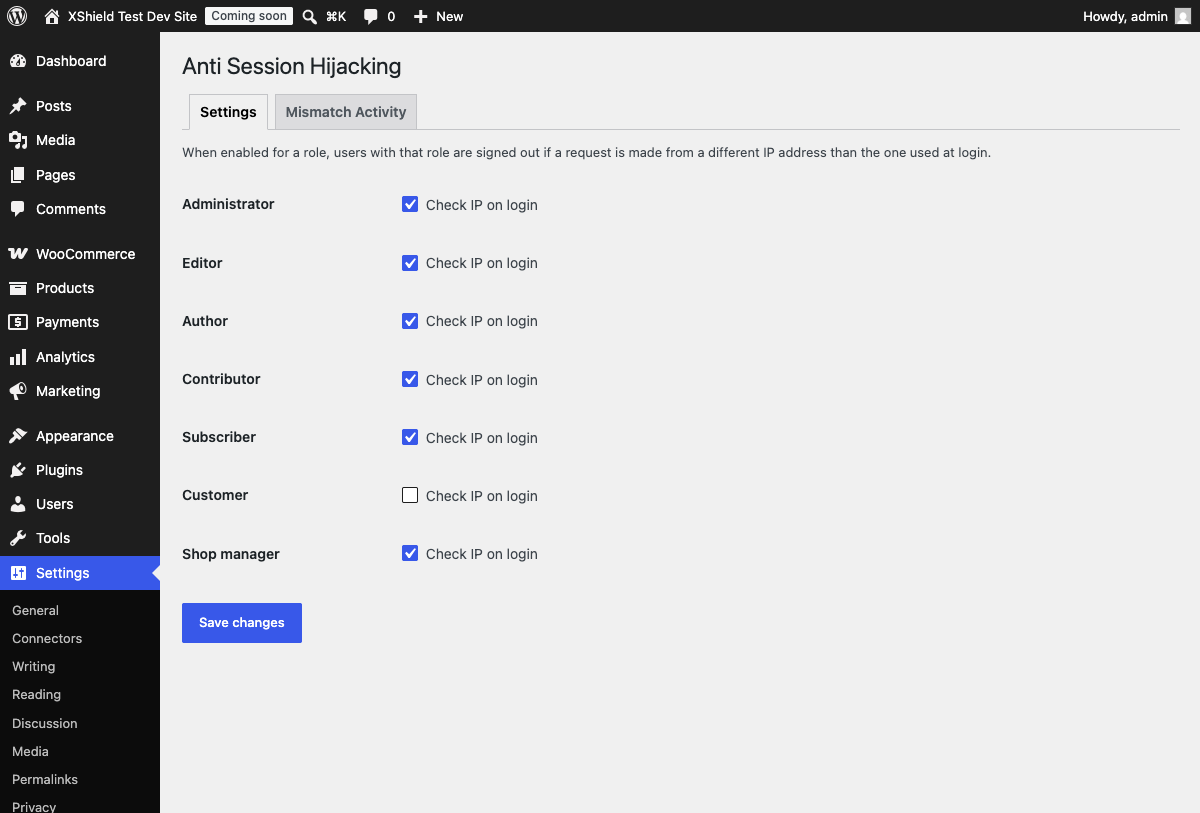
- Per-role control: enforce it for Administrators and Editors, relax it for roles that move between networks.
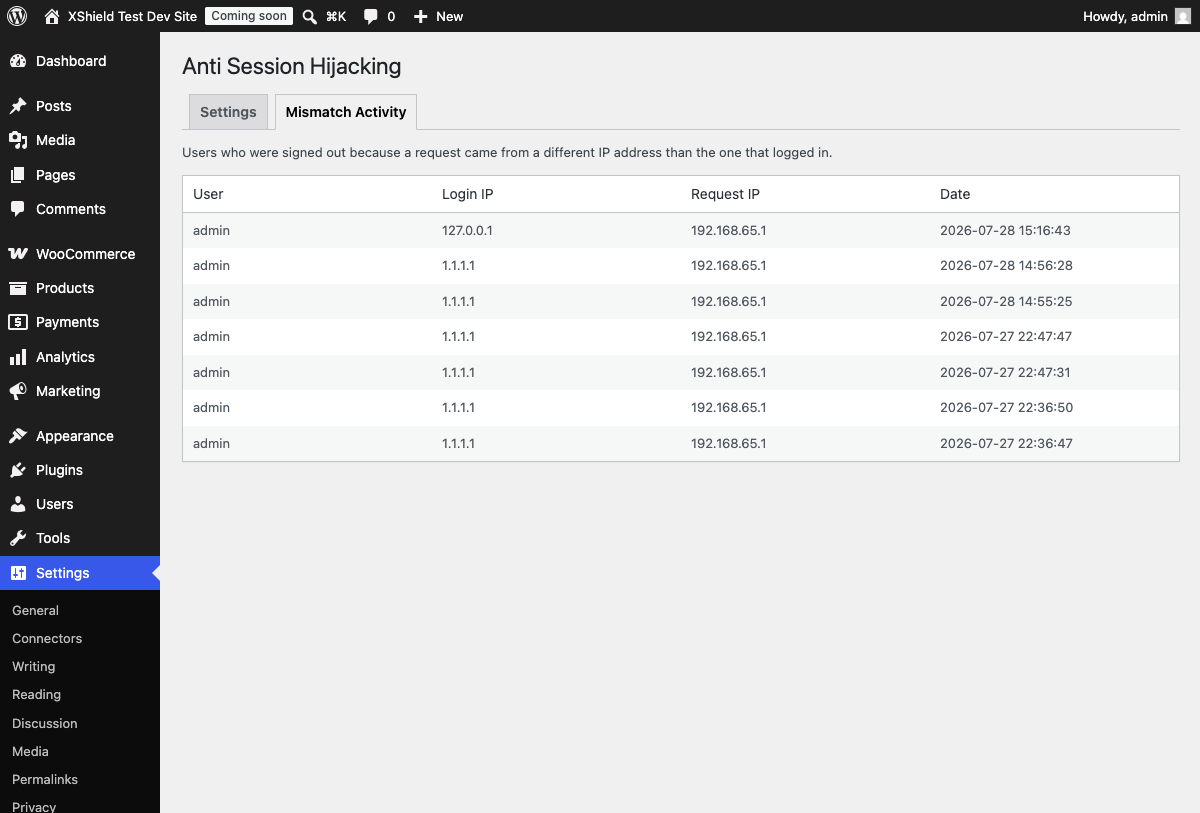
- Mismatch Activity log showing the user, the login IP, the IP that triggered the mismatch, whether it came from the same browser, and what kind of request ended the session — enough to tell a colleague switching on a VPN apart from something worth investigating.
- Correct client IP detection behind a reverse proxy, load balancer, or CDN such as Cloudflare, using X-Forwarded-For — trusted only when the connection genuinely originates from a known proxy, so the header cannot be spoofed to bypass the check.
- Runs entirely on your own server. No external requests, no third-party services, no accounts.
- Lightweight: one comparison per request, no dashboard nags, no upsells.
Who it’s for
This suits sites where an administrator or editor account being taken over would be expensive: membership sites, WooCommerce stores, client sites, multi-author publications, and any site where staff log in over the public internet.
It pairs well with two-factor authentication. 2FA protects the moment of logging in; this protects the session that exists afterwards.
What this plugin does not do
Being clear about the limits, so it’s the right fit:
- It does not block brute-force attacks or scan for malware — it only guards existing sessions.
- It does not stop an attacker who is on the same IP address as the victim.
- It cannot help if the site is served over plain HTTP, where cookies can be read in transit. Use HTTPS.
- Users whose IP address legitimately changes mid-session — some mobile networks, some corporate proxies, some VPNs — will be signed out and need to log in again. The per-role setting exists for exactly this reason.
Captures
Instal·lació
- Upload the
anti-session-hijackingfolder to the/wp-content/plugins/directory, or install the plugin through the Add Plugins screen in WordPress. - Activate the plugin through the ‘Plugins’ screen in WordPress.
- That’s it — the check is immediately active for all roles. To adjust which roles it applies to, go to Settings Anti Session Hijacking.
PMF
-
Will this sign out users whose IP address changes for legitimate reasons?
-
Yes, and this is the main trade-off to be aware of. Some mobile carriers, corporate proxies, and VPNs rotate a user’s IP address mid-session, which is indistinguishable from a hijack as far as the check is concerned. If this is disruptive for a particular group of users, turn the check off for their role under Settings Anti Session Hijacking. Administrator accounts are usually worth keeping strict.
-
Does it work behind Cloudflare, a load balancer, or a reverse proxy?
-
Yes. Behind a proxy, every request appears to come from the proxy’s own address, which would make the check useless. The plugin reads the real visitor IP from the X-Forwarded-For header instead — but only when the request genuinely arrives from a proxy address, so an attacker cannot simply send that header themselves to defeat the check. The trusted proxy ranges default to the usual private networks and can be adjusted with the
antisehi_trusted_proxiesfilter. -
Does it work with WooCommerce?
-
Yes. WooCommerce bundles Action Scheduler, which runs background jobs by having your site send an HTTP request to itself, carrying the logged-in user’s cookies. Those requests arrive from the server’s own address rather than the user’s, so the plugin deliberately does not check them — otherwise every administrator on a WooCommerce site would be signed out repeatedly. WordPress’s own Site Health tests work the same way and are covered by the same exemption. Requests from anywhere else are checked as strictly as ever, and the exempt addresses can be adjusted with the
antisehi_self_addressesfilter. -
Does this replace two-factor authentication?
-
No, it complements it. Two-factor authentication protects the act of logging in. It does nothing once a session already exists, which is precisely when a stolen cookie is used. Running both covers the login and the session that follows.
-
Does this plugin send any data outside of my site?
-
No. Every check happens locally, using data WordPress already stores for the current session. There are no external requests, no telemetry, and no third-party services involved.
-
Does this plugin create any new database tables?
-
Yes, one: a mismatch log recording the username, the IP the session logged in with, the IP that triggered the mismatch, and a timestamp, each time a user is signed out by this plugin. It’s viewable under Settings Anti Session Hijacking Mismatch Activity. Nothing in it ever leaves your site, and the table — along with the plugin’s settings — is removed automatically when you uninstall the plugin.
-
Does it store personal data, and what about GDPR?
-
The mismatch log stores usernames and IP addresses, and IP addresses are considered personal data under the GDPR. They are stored only on your own server, only when a mismatch actually occurs, and are deleted entirely when you uninstall the plugin. If you keep a privacy policy listing what your site records, it’s worth mentioning this log.
-
Does this plugin update itself automatically?
-
Yes. When you activate it, it switches on WordPress’s own automatic updates for this plugin, so security fixes reach your site without waiting for someone to log in and press update. This is a security plugin, and an out-of-date one protects nobody.
It uses the same setting as the Automatic Updates column on your Plugins screen, so nothing is hidden from you: the screen will show auto-updates as enabled, and you can switch them off there exactly like any other plugin. If you do switch them off, that choice sticks — deactivating and reactivating the plugin will not quietly turn them back on. Uninstalling removes the plugin from that list entirely.
-
Will it sign out all of a user’s devices?
-
No. Only the specific session that failed the check is destroyed. If the same user is logged in on a phone and a laptop, ending the hijacked session leaves the other one signed in.
Ressenyes
No hi ha ressenyes per a aquesta extensió.
Col·laboradors i desenvolupadors
«Anti Session Hijacking» és programari de codi obert. La següent gent ha col·laborat en aquesta extensió.
Col·laboradors
Traduïu «Anti Session Hijacking» a la vostra llengua.
Interessats en el desenvolupament?
Navegueu pel codi, baixeu-vos el repositori SVN, o subscriviu-vos al registre de desenvolupament per fisl de subscripció RSS.
Registre de canvis
0.8.0
- Fixed: on WooCommerce sites, administrators were repeatedly signed out while doing nothing unusual. WooCommerce bundles Action Scheduler, which starts background work by having the site send an HTTP request to itself and forwards the logged-in user’s cookies with it. That request arrives from the server’s own address, so a perfectly valid session looked like it had moved to a new machine. WordPress’s own Site Health loopback tests do the same thing.
- Requests a site makes to itself are no longer treated as hijacks. They are also no longer used to record a session’s address, which would have caused the opposite problem — the real user’s next request would then have looked like the intruder. Remote requests are checked exactly as strictly as before.
0.7.0
- Sessions ended during a background request — the admin heartbeat, an admin-ajax call, a REST call — now explain themselves. Previously the browser never followed the redirect, so the first thing you saw was WordPress’s own «Your session has expired» prompt, which gave no clue that this plugin was responsible. The login screen now states the real reason instead.
- The Mismatch Activity log records two new details: whether the request came from the same browser as the session it belongs to, and what kind of request ended it. A different address from the same browser is usually one person changing network or switching on a VPN, while a different address from a different browser is worth a closer look.
0.6.0
- Fixed: activating the plugin on a site behind a reverse proxy or CDN signed every logged-in user out and recorded a false entry in the Mismatch Activity log. Sessions created before activation carried the IP that WordPress core records (the proxy’s address), which the plugin then compared against the real visitor address it resolves itself — a guaranteed mismatch that was never an actual hijack.
- The plugin now records and compares its own IP value instead of reusing the one written by WordPress core, so the two can no longer disagree. A session first seen after upgrading is adopted at its current address and guarded from that point on, which means upgrading to this version does not sign anyone out either.
0.5.0
- Automatic updates for this plugin are now switched on when it is activated, so security fixes arrive without waiting for a manual update. It uses WordPress’s own per-plugin setting, stays visible in the Automatic Updates column on the Plugins screen, and can be turned off there at any time.
0.4.0
- Added translations for Dutch, German, French, and Spanish.
- Added a translation template (.pot) so the plugin can be translated into further languages.
0.3.0
- Renamed all internal classes, functions, options, and hooks to a unique
ANTISEHIprefix to avoid any chance of collisions with other plugins.
0.2.0
- Added the Mismatch Activity log (user, login IP, request IP, date) under Settings Anti Session Hijacking.
- Added correct client IP detection behind a trusted reverse proxy or CDN via X-Forwarded-For, so the check keeps working on proxied sites instead of silently never triggering.
- Fixed a duplicate «Settings saved.» notice on the settings screen.
0.1.0
- Initial release: compares the request IP against the login IP for the active session and signs the user out on a mismatch, with per-role enable/disable settings.