

Descripció
Custom Post Type WC Integration turns ANY WordPress custom post type (CPT) into a sellable WC product — without forcing you to recreate every post as a duplicate product.
Sell pages, posts, courses, bookings, listings, events, donations, digital downloads, or any custom content type directly through WooCommerce. Just connect the CPT, set a price (or map an existing meta key), and use the built-in shortcodes to display the price and add-to-cart button anywhere on your site.
Whether you want a full WooCommerce shop experience for your CPTs, or you only need WooCommerce for payments and checkout, this plugin gives you both — with a clean, no-code admin UI.
👉 Documentation | Get Pro 👈
🚀 Why Choose This Plugin?
- No Duplicate Products — stop manually re-creating each CPT post as a WooCommerce product.
- Sell Anything — courses, events, bookings, listings, digital files, donations, services, custom content.
- Use Existing Meta Fields — already storing prices in ACF, JetEngine, or custom meta? Just map the meta key.
- WooCommerce-as-Checkout — keep your custom landing pages and use WooCommerce only for secure payments.
- Beginner-Friendly — no coding required. A few clicks and you’re selling.
- Works With Any Theme — clean shortcodes drop into any layout, builder, or template.
🎯 Perfect For
- Selling online courses (LearnPress integration)
- Selling bookings & appointments (BA Book Everything integration)
- Selling directory listings or classifieds (JetEngine integration)
- Selling events, tickets, or memberships
- Selling digital downloads (Pro)
- Accepting donations through specific posts/pages
- Using WooCommerce purely as a payment gateway for landing pages
🏆 Free Features
- ✅ Integrate unlimited custom post types with WooCommerce
- ✅ Add regular price meta field to any CPT
- ✅ Add sale price meta field to any CPT
- ✅ Fallback regular price — map an existing meta key (great for ACF, JetEngine, Meta Box)
- ✅ Fallback sale price — reuse meta keys you already have
- ✅ Shortcode for WooCommerce notices:
[cptwooint_wc_all_notices/] - ✅ Shortcode for price:
[cptwooint_price/] - ✅ Shortcode for add to cart button:
[cptwooint_cart_button/] - ✅ Shortcode for short description:
[cptwooint_short_description/] - ✅ Make CPT archive pages look like the WooCommerce shop page
- ✅ Make CPT single pages look like the WooCommerce product page
- ✅ Use product categories with your CPT
- ✅ Use product tags with your CPT
- ✅ Customize button color, background, and size from settings
- ✅ Clean React-powered admin UI
🏆 ACF (Advanced Custom Fields) Support
Already using ACF to store prices on your custom posts? No problem.
- Create a price field with ACF.
- Add a price value to a post.
- Open the plugin settings and select your ACF price meta key as the fallback.
- Drop the cart button shortcode where needed — done.
🏆 PRO Features
- All free features included
- Quick Edit & Bulk Edit for CPT prices and stock right from the post list
- Full product types support — Simple, Variable, External/Affiliate, Grouped
- Display CPT posts on the WooCommerce shop page alongside regular products
- Sale price scheduling with start and end dates
- Inventory management — SKU, stock quantity, stock status, low-stock alerts, backorders, sold individually, purchase limits
- Shipping data — weight, dimensions, shipping classes
- Product gallery images with Swiper slider (vertical/horizontal thumbs, RTL, auto-height, zoom)
- Downloadable products — file delivery, download limits, expiry dates
- Customer downloads from the WooCommerce My Account page
- Upsells & Cross-sells for CPTs
- Product attributes — full taxonomy-based attribute CRUD UI for CPTs
- Product reviews & ratings — 1–5 stars, verified purchase badge, HPOS-compatible, rating distribution
- Structured data / JSON-LD schema — Product, Review, BreadcrumbList, Website, Order (better SEO & Google rich results)
- Pro shortcodes —
[cptwooint_sku],[cptwooint_attributes],[cptwooint_gallery],[cptwooint_gallery_with_variation],[cptwooint_upsell_products] - WooCommerce Bookings integration (sell bookable CPTs)
- Easy Booking for WooCommerce integration
- LearnPress review compatibility (sell and review courses)
- Extra Product Options (Themecomplete EPO) support
- Automatic license updates directly from your WordPress dashboard
🏆 Quick Start — Integrate in 4 Steps
- Install and activate Custom Post Type WooCommerce Integration.
- Open WC Integration in your WordPress admin sidebar.
- Select your custom post type under “Select Post Type”.
- Enable the default price meta field — or map your existing meta keys.
That’s it. Your CPT is now WooCommerce-ready.
🏆 Already Have Price Meta Fields?
If your CPT already stores prices via ACF, JetEngine, Meta Box, or any other plugin:
- Select the appropriate regular price meta key from the dropdown.
- Optionally select a sale price meta key.
- Save settings — the plugin will read prices straight from your existing data. No migration needed.
🏆 Display Price & Cart Button
Use these shortcodes anywhere — pages, posts, single templates, page builders, widgets:
[cptwooint_price/]— displays the formatted price.[cptwooint_cart_button/]— displays the add-to-cart button.[cptwooint_short_description/]— displays the short description.[cptwooint_wc_all_notices/]— displays WooCommerce notices (errors, success messages).
🏆 WooCommerce as a Payment Gateway Only
Don’t want a full shop? You don’t need one.
CPT WooCommerce Integration lets you keep your beautifully designed custom landing pages and use WooCommerce only for checkout and payments. No need to enter products in the database — just connect the page or post and let WooCommerce handle the secure payment flow with all its supported gateways (Stripe, PayPal, etc.).
🏆 Accept Donations With WooCommerce
Run a donation page or post? Add a price, drop in the cart button, and accept donations of fixed amounts directly through WooCommerce checkout — no third-party donation plugin required.
🏆 Compatible Plugins & Integrations
- LearnPress — sell courses through WooCommerce. Documentation
- ACF (Advanced Custom Fields) — use ACF price fields directly.
- BA Book Everything — sell bookings and appointments. Documentation
- JetEngine — full CPT and meta integration.
- Custom Post Type UI — register CPTs and connect instantly.
- Extra Product Options for WooCommerce (Free & Pro)
- WooCommerce Bookings (Pro)
- Easy Booking for WooCommerce (Pro)
- Compatible with Elementor, Visual Composer, Gutenberg, and most page builders.
- And many more — works wherever standard WooCommerce hooks are respected.
Captures
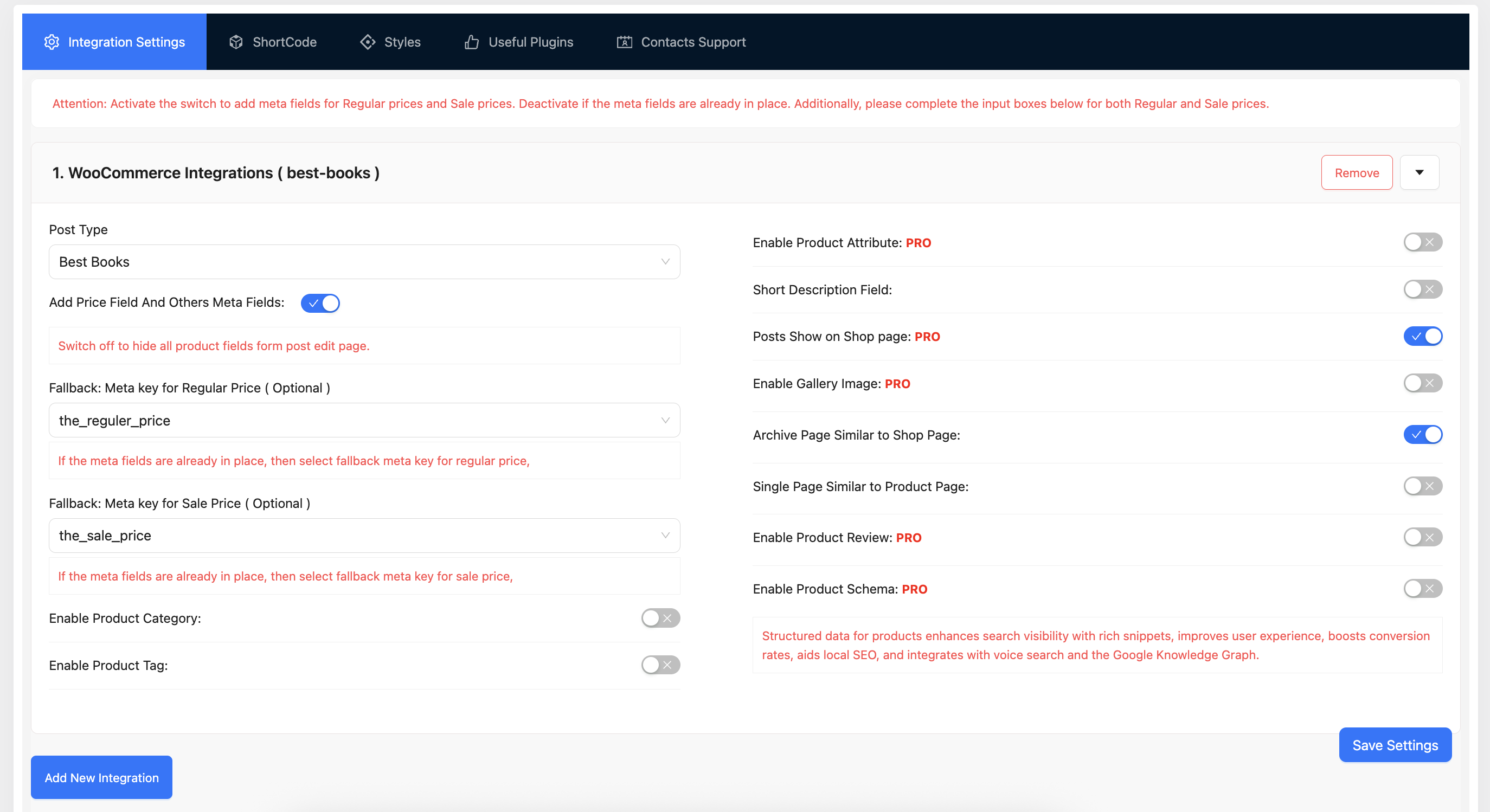
Integration Settings — select your CPT and configure price meta 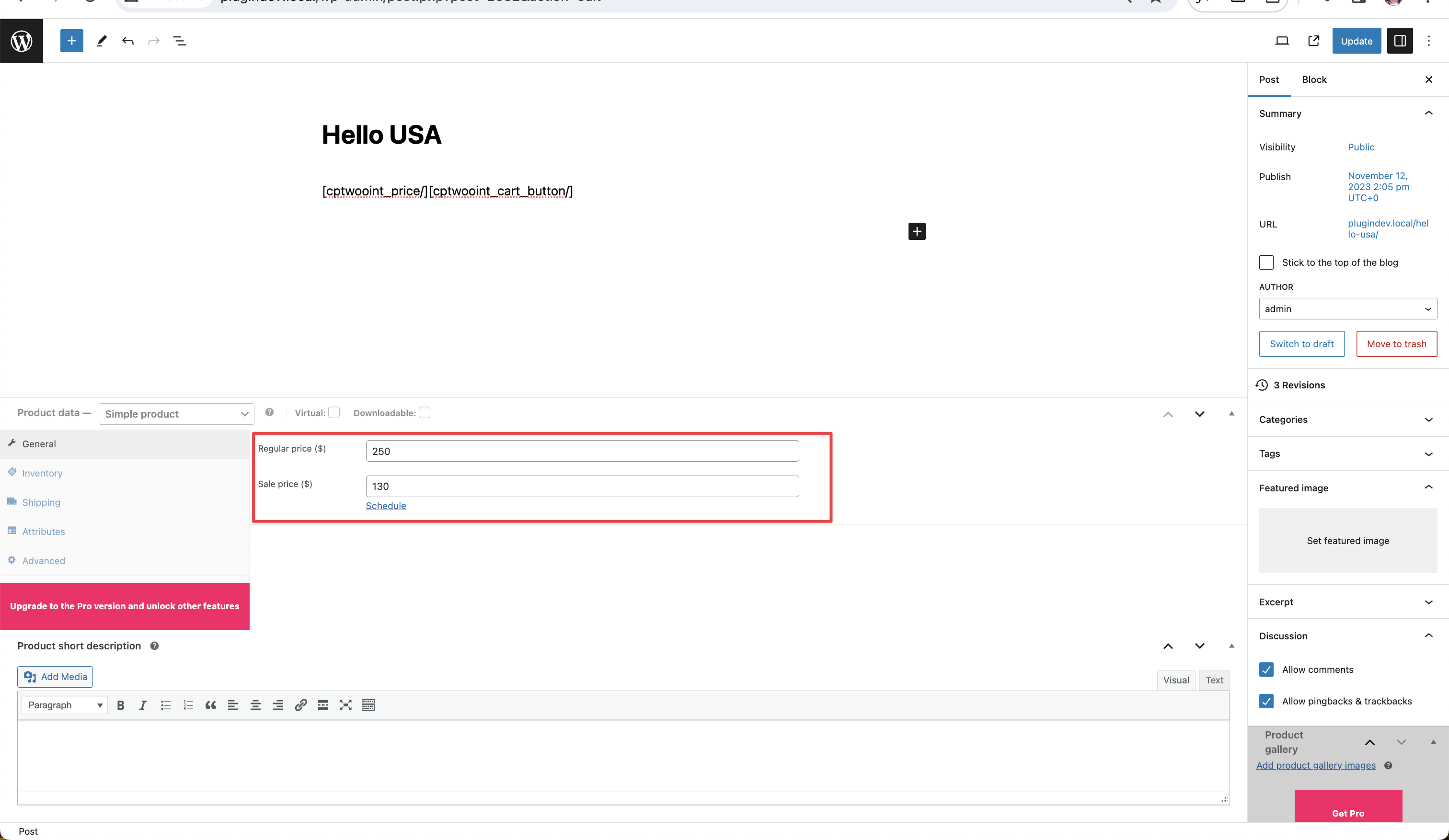
Price Meta Field — enable default fields or map existing meta keys 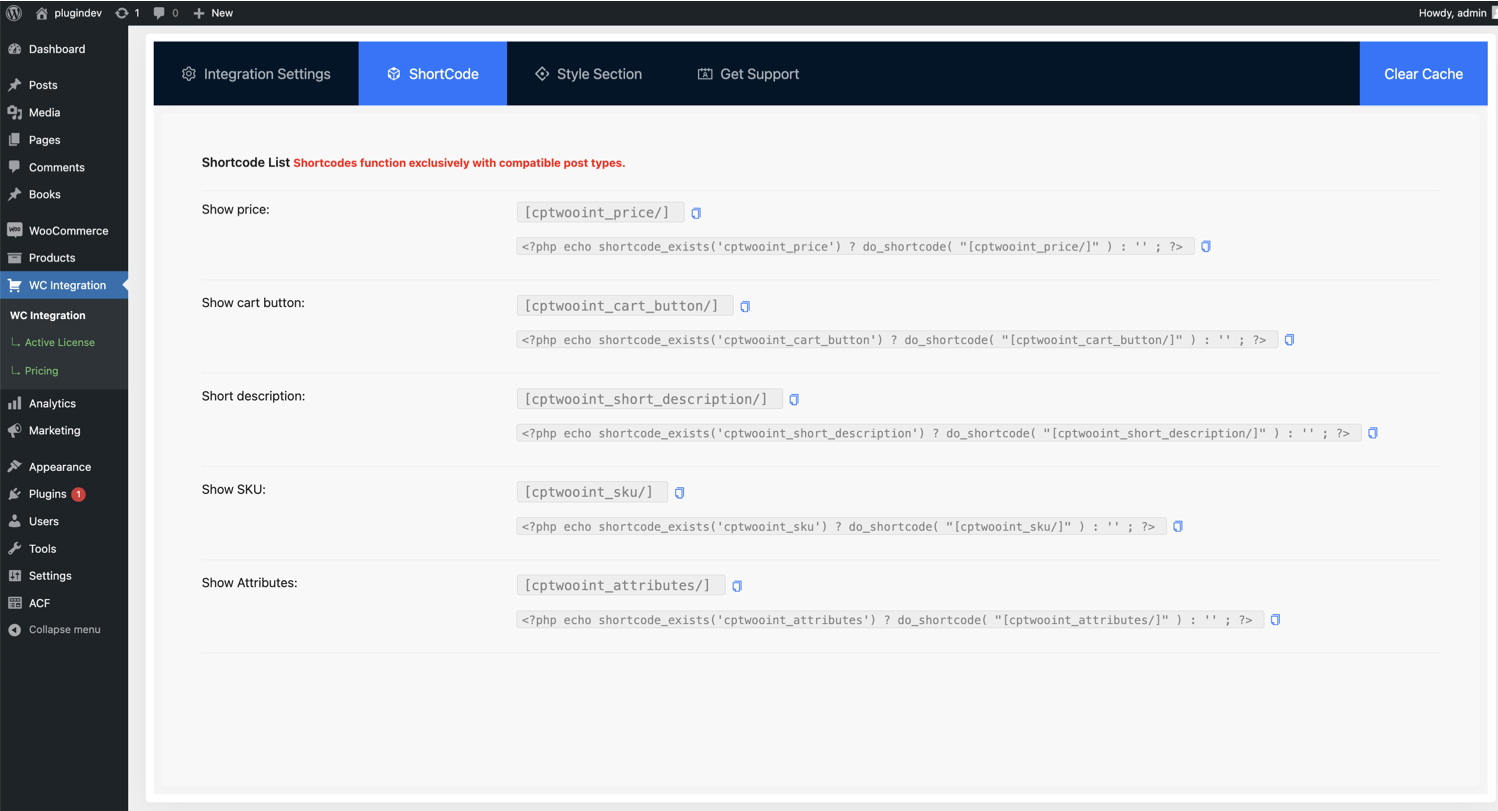
Shortcode Generator — copy-paste ready shortcodes for price and cart 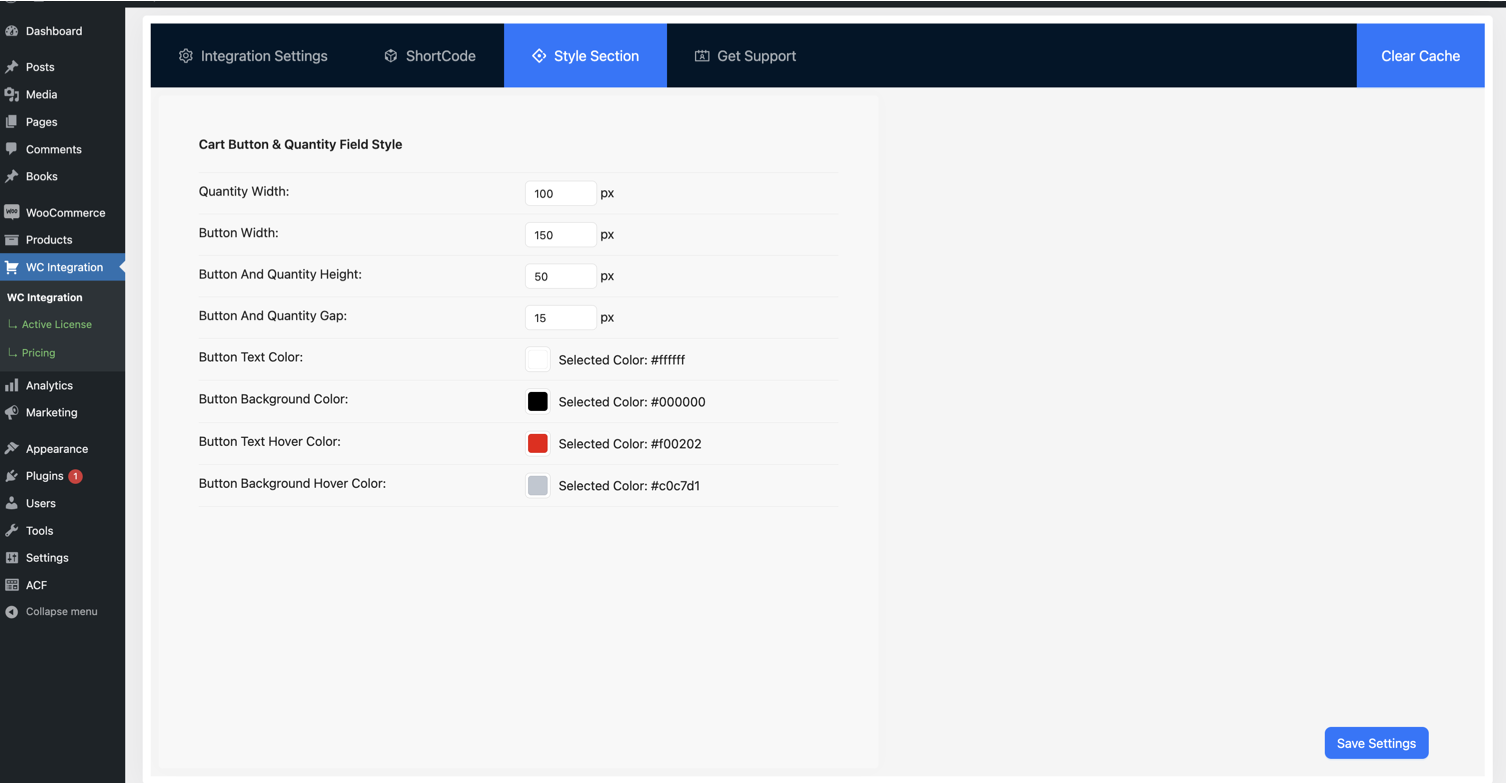
Button Style Customizer — adjust color, background, and size
PMF
-
1. What does the Custom Post Type WooCommerce Integration plugin do?
-
It connects any WordPress custom post type (CPT) with WooCommerce so you can sell pages, posts, courses, events, bookings, listings, donations, or any custom content type — without manually creating duplicate WooCommerce products. You set a price, drop in a shortcode, and WooCommerce handles the cart and checkout.
-
2. Do I need coding skills to use this plugin?
-
No. The plugin includes a clean React-powered admin UI. Select your custom post type from a dropdown, enable the price meta field, and start selling. No PHP, no theme edits, no shortcodes hand-written from scratch.
-
3. Can I sell multiple custom post types with one plugin?
-
Yes. You can integrate unlimited custom post types with WooCommerce. Each CPT can have its own regular price and sale price configuration, and you can map different meta keys for each one independently.
-
4. Does this plugin work with ACF (Advanced Custom Fields)?
-
Yes. If you store prices in ACF fields, simply select the ACF meta key as the fallback regular price (and optionally sale price) in the plugin settings. The plugin will read prices straight from ACF — no data migration required.
-
5. Is it compatible with JetEngine, LearnPress, and BA Book Everything?
-
Yes. The plugin ships with built-in integrations for JetEngine (CPTs and variation panels), LearnPress (sell courses via WooCommerce), and BA Book Everything (sell bookings). It also works alongside Custom Post Type UI, Meta Box, and most major CPT plugins.
-
6. What shortcodes are available in the free version?
-
Four shortcodes are bundled:
[cptwooint_price/]— display the price[cptwooint_cart_button/]— display the add-to-cart button[cptwooint_short_description/]— display the short description[cptwooint_wc_all_notices/]— display WooCommerce notices (errors, success, warnings)
You can place them in pages, posts, single templates, widgets, or any page builder.
-
7. Can I use WooCommerce only for payments without showing a shop?
-
Absolutely. Many users keep their custom landing pages exactly as designed and use WooCommerce purely as a checkout/payment processor. You don’t need to enter products in WooCommerce — just connect your CPT or page using this plugin and customers can pay through any WooCommerce-supported gateway (Stripe, PayPal, etc.).
-
8. Can I accept donations with this plugin?
-
Yes. You can configure a page or post with a fixed price and use the cart button shortcode to accept donations through WooCommerce checkout. It’s a simple way to collect donations without installing a separate donation plugin.
-
9. Will my CPT archive look like the WooCommerce shop page?
-
Yes — that’s a built-in free feature. Enable the “Archive Page Like Shop Page” option and your CPT archive will inherit the WooCommerce shop layout. There’s a matching option to make CPT single pages look like WooCommerce product pages.
-
10. Where can I find the plugin settings after activation?
-
After you activate the plugin, a new menu item called WC Integration appears in the WordPress admin sidebar. Click it to open the settings panel where you can configure post types, meta keys, shortcodes, and button styles. You’ll also be auto-redirected to the settings page right after activation.
Ressenyes


Col·laboradors i desenvolupadors
«Custom Post Type WooCommerce Integration» és programari de codi obert. La següent gent ha col·laborat en aquesta extensió.
Col·laboradors

Traduïu «Custom Post Type WooCommerce Integration» a la vostra llengua.
Interessats en el desenvolupament?
Navegueu pel codi, baixeu-vos el repositori SVN, o subscriviu-vos al registre de desenvolupament per fisl de subscripció RSS.
Registre de canvis
2.2.8.1 ( 26 Apr, 2026 )
*Improvement: Documentation And URL Update
2.2.8 ( 06 Apr, 2026 )
- Improvement: Price value save as empty and not purchasable.
2.2.7 ( Mar 30, 2026 )
- Improvement: UI Improvement and Sanitization
2.2.6 ( Feb 10, 2026 )
- Fixed: Admin UI Improvements
- Fixed: Price Display Issue on Single Page
2.2.5 (Jan 28, 2026)
- Fixed: Data Type Issue resolve and loading issue fixed.
2.2.4 ( Nov 15, 2025 )
- Fixed: Activation Hook Run properly.
- Fixed: Display Price Issue resolve
2.2.3 ( Oct 27, 2025 )
- Fixed: Deprecated Asset Handler resolve
- Update: Product MEta field Settings Label Changes
2.2.2 ( Aug 20, 2025 )
- Fixed: Support Url Change
- Fixed: Display Price Issue resolve
2.2.1 ( Aug 12, 2025 )
- Fixed: Price Multiple Calculation Issue Fixed
2.2.0 ( Jul 30, 2025 )
- Update: CPT Price Cart Calculation Functionality
- Change: Hooks
cptwoo_product_get_priceParameters Changes - Fixed: Price Conflicting With 3rd Party Plugin
- Visual Composer Compatibility.
2.0.10 ( January 27, 2025 )
- Support: Woocommerce Assets Added Admin Page
2.0.0 ( June 25, 2024 )
- Updated: File Structure Change
- Updated: Hooks System Implement By Hooks Loader
- Added: Upgrade Notice added
1.3.10 ( May 28, 2024 )
- Fixed: Admin Page Issue
- Added: Submenu Added
- Added: New Feature Compatibility For addons
1.3.0 ( February 08, 2024 )
- Support: Addons Compatibility
- Fix: Single Page Issue
- Added: Archive Page Similar to Shop Page
- Added: Single Page Similar to Product Page
1.2.0 ( 11 December, 2023 )
- Added: Addons Support For Variation CPT
- Support: Both single and archive pages can exhibit a layout similar to the WooCommerce page
1.1.0 ( October 24, 2023 )
- Added: More meta field added
1.0.0 ( August 06, 2023 )
* Initial Plugin.