
Descripció
Content Health reads your own posts and tells you what is holding them back.
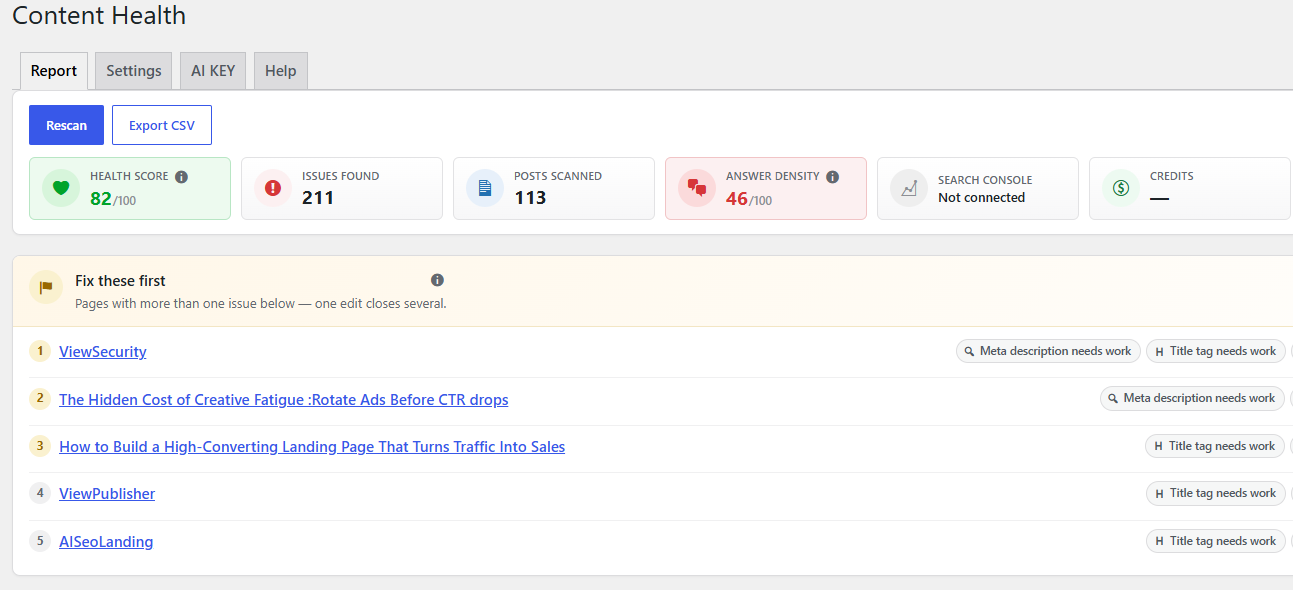
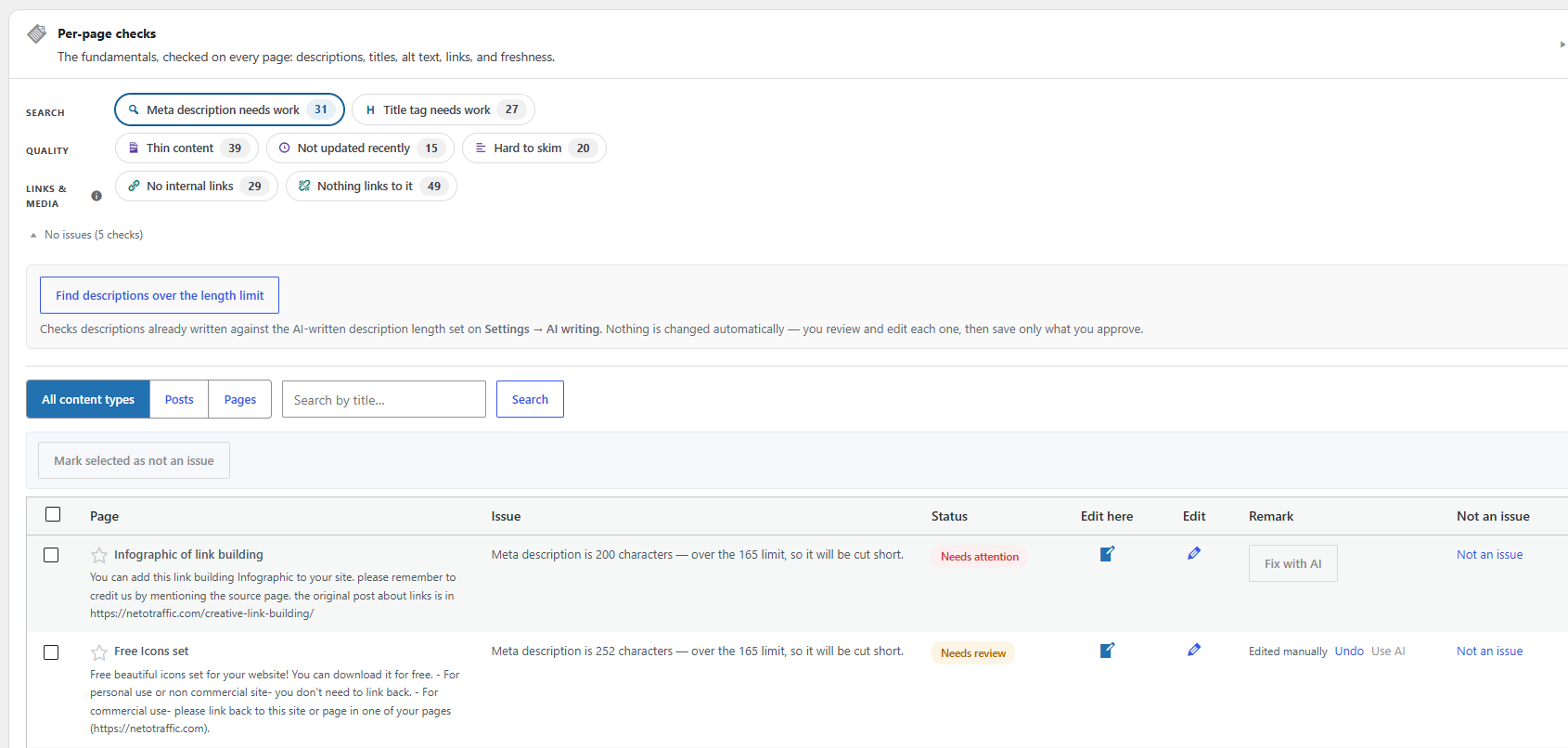
Activate it, click Scan my site, and you get nine counts:
- how many posts have no meta description
- how many have a title tag that is too long to show in full, or too short to be worth the space
- how many are thin — under your word threshold
- how many have not been updated in years
- how many have no internal links
- how many contain images with no alt text
- how many have nothing linking to them — orphaned pages
- how many are hard to skim — missing subheads, a broken heading outline, or wall-of-text paragraphs
- how many were written by an author with no bio — a trust signal both readers and AI engines look for
Click any number to see exactly which posts, with a link straight to the editor. A «Fix these
first» shortlist ranks the posts with the most to gain, so a site with hundreds of flagged posts
has an obvious place to begin, and a single Health score next to the scan button gives
one number to track between scans instead of nine separate counts.
The corpus report
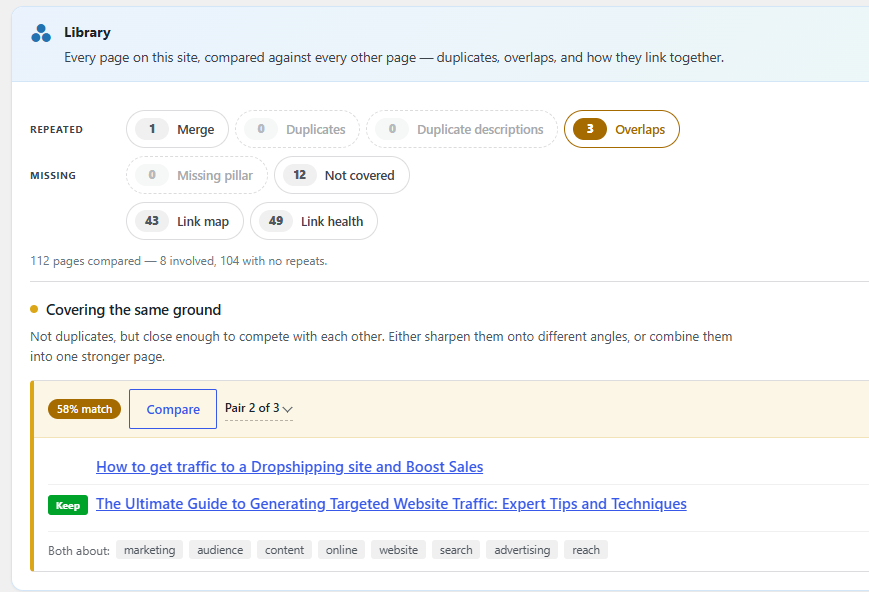
The Report tab also compares every post against every other post:
- Duplicate content — pages close enough to be the same article, with the strongest one
flagged to keep. - Covering the same ground — pages that overlap but are not duplicates: sharpen them onto
different angles or combine them. - Merge candidates — thin pages that only add up to something when read together.
- Missing pillar — related pages that nothing else on the site links to.
This runs during the scan from your own post content: no AI, no network call.
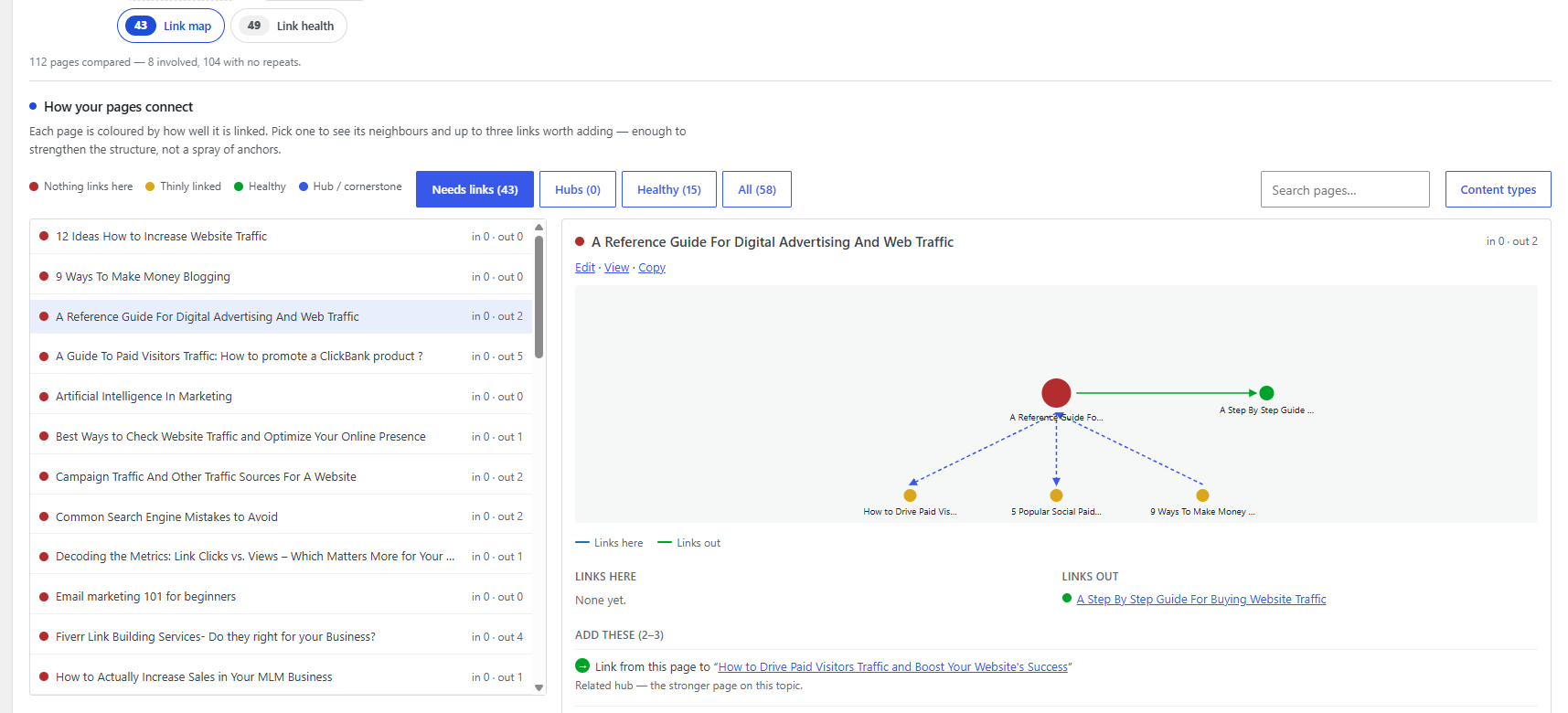
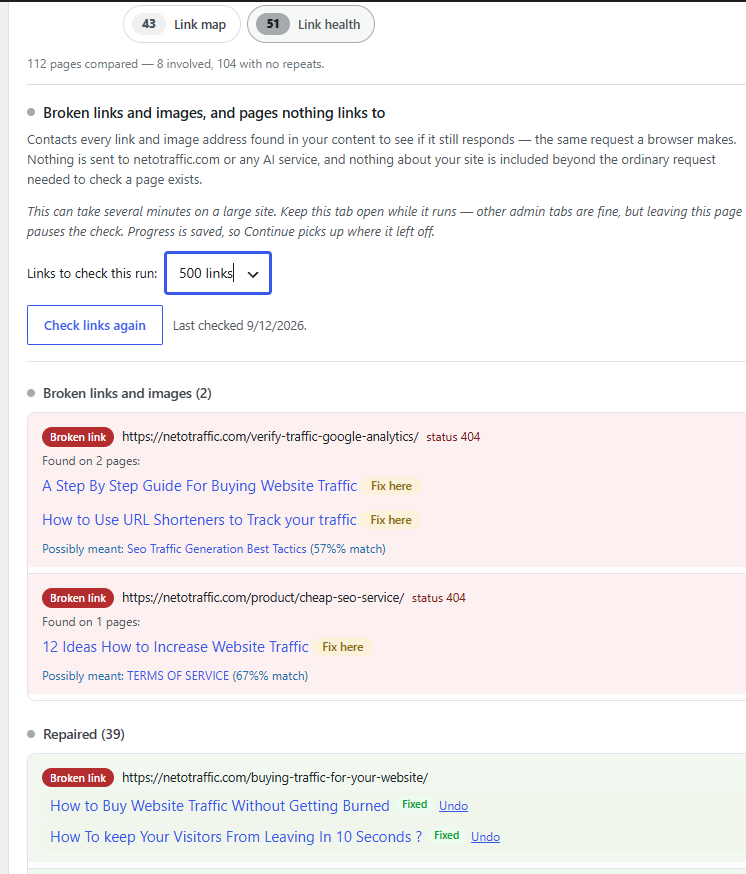
A Link health view sits alongside those: every active redirect, every orphan page, and
every broken link or image found by an optional checker (its own button, never part of Scan
my site).
The audit is the whole free plugin. No account, no sign-up, and no time limit.
Works with your SEO plugin
Meta descriptions and title tags belong to whichever SEO plugin you use, so this plugin reads
and writes that plugin’s own fields rather than inventing competing ones. Supported:
- Yoast SEO
- Rank Math
- SEOPress
- All in One SEO (read-only — see the FAQ)
- No SEO plugin at all — this plugin can store and output descriptions and titles itself
Built for big sites
The scan runs in batches with a progress bar and a handful of queries per batch. It never
renders your posts, so it does not run every other plugin on your site thousands of times.
There are no cron jobs and no background activity of any kind.
Optional extras
Paste an API key and the plugin can generate meta descriptions, title tags, image alt text,
internal-link suggestions, a thin-post draft (outline first), Content Blocks, or an llms.txt
site summary through netotraffic.com. You review every write before it is saved, and every
change can be undone. With no key, none of that runs and nothing is sent. What is sent, and
when, is listed in the FAQ.
A dedicated LLMs & crawlers page covers /llms.txt (built from your published pages,
never written to disk) and Allow/Block rules for named AI bots in robots.txt. Answer
Density scores how many question-shaped headings lead into a real answer. Content
Blocks add TL;DR, FAQ and Pros & Cons in the editor. Job title, credentials and social
links can be added on each author’s profile for an optional author card.
Captures
Instal·lació
- Upload the plugin folder to
/wp-content/plugins/, or install it from the Plugins screen. - Activate the plugin.
- Go to the Content Suite menu item (its own top-level menu, no longer under Tools) and click Scan my site.
That is everything the free audit needs. The AI Fixes tab and LLMs & crawlers are all optional and can be ignored.
PMF
-
Do I need an account to use this plugin?
-
No. The audit — all nine checks, the Health score, the corpus report, the Link health tab
(including the broken link checker), the drill-down lists, the settings — works completely on its
own and always will.
An account is only needed if you want the plugin to write meta descriptions, title tags or alt
text for you, suggest links, or draft an article. -
What external services does this plugin use?
-
Three, all optional, none of them on by default:
- netotraffic.com — only if you paste an API key and click a generate or fix button.
Endpoint:https://api.netotraffic.com/v1/plugin.
Terms: https://netotraffic.com/terms-of-service/
Privacy: https://netotraffic.com/privacy-policy/ - Google Search Console — only if you paste your own Google Cloud Client ID and Client
Secret and click Connect. This is your own Google Cloud project; netotraffic.com is never
involved and never sees that data.
Terms: https://policies.google.com/terms
Privacy: https://policies.google.com/privacy - Check links (Link health tab) — only when you click that button. It requests the link
and image addresses found in your content to see whether each one still responds. No
account and no API key. What is sent is an ordinary HTTP request (a HEAD, or a small
ranged GET if a server refuses HEAD).
Nothing is sent on activation, on a schedule, or in the background.
- netotraffic.com — only if you paste an API key and click a generate or fix button.
-
What is sent to netotraffic.com, and when?
-
Nothing, unless you have pasted an API key and clicked a button that generates something.
New accounts include a number of free credits; the plugin shows every price before you
click. You can revoke a key from your netotraffic.com account at any time.- Connect: your API key and site URL, to check the key and read your credit balance.
- Fix with AI (description or title): API key, site URL, plugin version, that post’s
title, URL, current title tag when rewriting a title, and up to 6,000 characters of its
text. - Suggest links: the same, plus titles, URLs and excerpts of other published posts to
choose targets from — never their full text. - Write alt text: the same, plus the web addresses of up to 20 images with no alt text.
The image files themselves are not uploaded. - Draft with AI: the same, plus site language, target length, focus keyword if you typed
one, and — on the second call — the outline as you edited it. - Generate with AI on a Content Block: API key, site URL, plugin version, that post’s
title and up to 6,000 characters of its text. - Generate site summary on llms.txt: API key, site URL, plugin version, site name and
tagline, site language, and titles of up to eight recent published pages.
No personal data about your visitors, users or customers is transmitted. Your credit
balance is updated from those responses; the plugin never calls out merely to refresh a
number. -
What is sent to Google when Search Console is connected?
-
Nothing, unless you have created your own Google Cloud project, pasted its Client ID and
Client Secret, and clicked Connect.- Connect: your browser goes to Google’s consent screen (
accounts.google.com) using
your Client ID. After you grant access, this site’s server exchanges the code for tokens
atoauth2.googleapis.comusing your Client ID and Secret. That exchange never passes
through netotraffic.com. - During a scan while connected: one request to Google’s Search Console API
(www.googleapis.com/webmasters/v3) for this site’s click and impression counts per page
over roughly the last six months. Only aggregate counts, not individual visitors.
Disconnecting deletes the saved Client ID, Client Secret and tokens from this site
immediately. Raw Search Console data never leaves this site’s database. - Connect: your browser goes to Google’s consent screen (
-
Will it change my posts?
-
Only when you are connected to the AI service, and only on the post you clicked a button on.
Nothing happens on its own, and every change has an Undo button next to it because the previous
value is always saved first.Four things can be changed, and they are separate:
- The meta description — its own field, never your post content.
- The title tag — your SEO plugin’s title field. Your post’s actual name is never changed,
so nothing is renamed anywhere else on your site. - Image alt text — this does edit your post content, but only by adding an
altto images
that had none. Nothing else in the post is touched. - A drafted article on a thin post — this replaces (or adds to) the post’s content, and it
is the only feature that does. You read the whole draft in the plugin and click Save before
anything reaches the page. WordPress also keeps its own revision.
Doing a whole list at once never writes straight to your site: it drafts everything and shows
you first, so you can edit and untick any you do not want before saving.By default it also refuses to touch a post that already has a description. You can turn that
safety off in Settings if you actually want to replace existing ones. -
Does it add the internal links for me?
-
No, and that is deliberate. It suggests them: an anchor phrase that already appears in your
post, the post it should link to, and the finished HTML on a Copy button. You decide where it
goes and paste it in yourself.Automatically inserting a link means editing your stored post content, and one bad edit on a
live page is a much bigger problem than a meta description you can undo. Every suggested
anchor phrase is also checked against your actual post text before you see it, so you will
never be handed a phrase you cannot find. -
Which SEO plugins are supported?
-
Yoast SEO, Rank Math and SEOPress are fully supported for both reading and writing.
All in One SEO is read-only in this version: it stores descriptions in its own database table
with its own cache, and writing there directly could leave AIOSEO showing stale values. On an
AIOSEO site the audit works normally and AI fixes hand you the finished description to paste in.If you have no SEO plugin at all, the plugin stores descriptions itself, and there is a setting
to output them as a description tag. That setting turns itself off automatically if you later
install an SEO plugin, so you can never end up with two description tags. -
What makes a page «orphaned»?
-
Nothing else on your site links to it. Search engines find pages by following links, so a page
nothing points at is harder to discover and gets no ranking strength passed to it.This check needs the whole site read before it can answer, so it only appears once a scan
finishes — a half-finished scan would report most of your site as orphaned. Links a post makes
to itself do not count.Anything in one of your navigation menus is never listed, and neither are your front page and
blog page — they are linked from every page on the site.One limitation to know about: only links inside your posts’ content are counted. The scan reads
what is stored in the database and never renders a page, which is what keeps it fast on large
sites, but it means a post reachable only through a category archive or a related-posts widget
can still show up here. If a listed page looks fine to you, mark it «not an issue» and it will
stay off the report. -
Because that is where the fix actually lives. A bio is a field on the author’s profile
(Users Profile), not anything the post editor exposes, so this is the one report whose Edit
link points somewhere other than the post itself. It needs the same permission WordPress already
requires to edit that user’s profile; if you cannot edit the author’s profile, the link is left
off the row instead of sending you somewhere that will just refuse you.The check itself only looks at whether the author has any bio text at all — it does not judge
length or quality, and it says nothing about theme output. Whether your theme actually displays a
byline or the bio on the page is a separate, theme-specific question this plugin cannot answer
without rendering your posts, which is exactly what the scan is built to avoid. -
What is the Health score?
-
One number, 100 down to 0, next to the scan button once a scan has read at least one post. It is
not a new signal — it is the same weighted scoring «Fix these first» already uses (a missing
description counts for more than a missing alt tag), averaged across every scanned post instead of
just the top ten, and normalised so the number means the same thing on a 5-post site and a
5,000-post one. 100 means every scanned post currently has zero open issues. It deliberately
ignores the cornerstone star: this is a site-wide reading, not a «what to fix first» ranking, and a
handful of starred pages should not be able to swing the whole number. -
What counts as an internal link?
-
A link in the post’s content pointing at your own domain, either as a full URL or as a relative
path. Anchors,mailto:, andtel:links do not count.Because the scan reads the stored post content rather than rendering the page, links added by
your theme, by related-post widgets, or by shortcodes are not counted. Those are not really the
post’s own internal links, and rendering every post to find them would make scanning a large
site impossibly slow. -
What does the corpus report (duplicates, overlaps, merge candidates, missing pillar) compare?
-
Each post is reduced to a handful of its most distinctive words during the scan, weighted so its
title counts more than its body. Posts are then compared pairwise by how much that reduced set
overlaps. Two posts that share almost everything are reported as duplicates; a looser overlap is
reported as «covering the same ground». A thin pair or group in either band becomes a merge
candidate; an overlapping pair where neither post is linked to from anywhere else on the site
becomes a «missing pillar» pair. All of this runs on your own post content already read during
the scan — no extra requests, no AI. -
How does the broken link checker work, and why isn’t it part of the main scan?
-
Scan my site only ever reads your database, which is what makes it safe to run as often as you
like on a site of any size. Checking whether a link still works means requesting the address
itself — a fundamentally slower, external kind of check — so it stays a separate button
(«Check links» on the Link health tab) rather than something the main scan does automatically.
It runs in two batched passes, the same progress-bar pattern the main scan uses: first it reads
every link and image address out of your content, then it requests each unique address once
(so a link repeated on fifty pages is only checked once), and shows anything that no longer
responds together with every page that links to it. -
How is the word count calculated?
-
Block delimiters and shortcodes are stripped, HTML tags are removed, and what is left is
counted. It handles non-English text correctly. -
My site has thousands of posts. Will scanning break it?
-
No. The scan runs in batches of 100 posts, each its own quick request, with a progress bar. You
can close the tab at any point — you will just get partial results and can rescan later. -
How do I remove everything the plugin stored?
-
Deleting the plugin removes its settings and saved scan results automatically. There is also a
setting to delete the plugin’s own post data on uninstall. Descriptions that were written into
your SEO plugin’s field are left alone — they are your content at that point, and deleting them
would remove ones this plugin never wrote.
Ressenyes
No hi ha ressenyes per a aquesta extensió.
Col·laboradors i desenvolupadors
«NetoTraffic Content Suite» és programari de codi obert. La següent gent ha col·laborat en aquesta extensió.
Col·laboradors
Traduïu «NetoTraffic Content Suite» a la vostra llengua.
Interessats en el desenvolupament?
Navegueu pel codi, baixeu-vos el repositori SVN, o subscriviu-vos al registre de desenvolupament per fisl de subscripció RSS.
Registre de canvis
1.2.0
- Admin menu is Content Suite with the plugin icon.
- Brand (icon + Content Health) sits on the left of the tab row; not a tab.
- Settings, AI KEY and Help show: NetoTraffic Content Suite — version …
- AI KEY feature list is collapsed behind a chevron; signup line stays visible.
1.1.9
- Gutenberg blocks ship block.json so WordPress.org lists them as TL;DR, FAQ and Pros & Cons.
1.1.8
- robots.txt core lines: derive admin/AJAX paths from admin_url().
- Plugin row «Rate this plugin» links to the full reviews page (not a 5-star filter).
- Front-end author-card / content-block CSS uses wp_enqueue_style + wp_add_inline_style.
1.1.6
- Credit price list: distinguish the two Hard to skim actions — «per page (add subheadings)» vs
«per page (skimmability rewrite)» instead of duplicate «per page» labels. - Help tab: Content Health menu overview, credit price guide, llms.txt cornerstone note, and
entries for Get content brief and Find pages that could link here.
1.1.5
- Fixed REST API fatal error (500 on every bach/v1 call including Forget key and Connect): a bad
route registration left over from removing Citation monitor brokerest_api_init. Restored
/crawlers/report,/schema/settings, and/gsc/credentialsroutes.
1.1.4
- Generate site summary on llms.txt: optional AI button writes the one-line Site summary
intro for review (page list still built locally). Uses a newllms_introAPI op; hidden until
netotraffic.com exposesllms_intro_coston ping. - Removed Citation monitor submenu and citation-check feature.
1.1.3
- Fixed LLMs & schema (and Citation monitor) admin pages rendering as raw HTML: building the AI
crawlers report no longer calls WordPress’s do_robots(), which was sending Content-Type:
text/plain during admin page render.
1.1.2
- Admin labels use descriptive names instead of brand stuffing: Content Health menu,
LLMs & schema and Citation monitor submenus, Health score, Issues on this page
editor metabox, Expertise & credentials on author profiles, and a neutral robots.txt comment.
1.1.1
- Renamed admin labels to NetoTraffic branding: top menu NetoTraffic, Site audit report,
AI Discovery (llms.txt, crawlers, schema), Mention tracker (citation checks), and
Audit score (was «Health score» / «Content Health score») — distinct from competing plugins. - Fixed AI Discovery and Mention tracker pages breaking when the full report script loaded on them.
- robots.txt rules now credit NetoTraffic Content Suite, not a generic product name.
1.1.0
- Moved off the Tools submenu onto its own top-level Content Health menu, with two new
submenu pages — Technical AEO and Citations — rather than more tabs on an already
crowded Report screen. The Report/Settings/AI KEY/Help experience itself is unchanged. - New Answer Density score (0-100) on the Report tab: how many question-shaped headings lead
straight into a real answer, extending the existing hard-to-skim structure check. - New Technical AEO page: an llms.txt generator (virtual, never written to disk), AI
crawler controls (see and set Allow/Block/No rule per named bot, plus an optional visit log),
and a Schema engine (Article/FAQ/HowTo/Author JSON-LD, with a warning when your SEO plugin
already outputs a type). - New Content Blocks: TL;DR, FAQ and Pros & Cons blocks (plus classic-editor shortcodes) with
an optional «Generate with AI» button per block. - New author credentials fields (job title, credentials, social links) on each author’s own
profile screen, feeding the Schema engine’s Author type and an optional author card shortcode. - New Citation Tracker (Citations page): track a list of questions and check whether ChatGPT,
Perplexity, Gemini and Claude cite your site for them, proxied through netotraffic.com, with a
history kept for trend. - If you have Google Search Console connected: the OAuth redirect URI moved from
tools.php?page=… toadmin.php?page=...along with the menu change above. Already-connected
sites keep working with no action needed; only a brand new «Connect Google Search Console»
click needs the updated URI added to your Google Cloud project (Settings tab shows the current
one to copy).
1.0.2
- Link health: removed the estimated-time-remaining readout (its measured rate was too noisy on
slow/inconsistent hosts to be reliable) in favor of a plain «this can take several minutes on a
large site» note.
1.0.1
- Link health: choose how many links to check per run (default 500) before pausing with a
Continue button, an estimated-time-remaining readout while checking runs, and a short note that
the check needs this tab to stay open. - Version bump to force browsers to fetch the current admin.js/admin.css instead of a cached copy
that was occasionally missing the link map button.
1.0.0
- Initial release.
- Content audit, nine checks: missing meta descriptions, weak title tags, thin content, stale
posts, missing internal links, missing image alt text, orphaned pages, hard-to-skim structure
(GEO/AEO signals: missing subheads, a broken heading outline, unanswered question headings,
wall-of-text paragraphs), and posts by an author with no bio (an E-E-A-T trust signal). The
author-bio report links to the author’s own profile screen, not the post, since that is where
the fix lives. - A single Content Health score (0-100) next to the scan button, the same weighted scoring «Fix
these first» uses, averaged across every scanned post rather than ranked into a shortlist, with
its change since the last completed scan shown alongside it. - Corpus report: duplicate content, overlapping content («covering the same ground»), duplicate
meta descriptions, merge candidates and missing-pillar pages, computed from the same scan with
no AI and no network call. Duplicate groups can 301 the losing pages to the keeper with one
click, with Undo; missing-pillar and not-covered findings can spin up a draft page straight into
the AI article-writing flow, optionally starting from an AI content brief that proposes an angle
and outline before you commit to drafting. - Link health tab: active redirects, orphan pages, and an optional broken-link/broken-image
checker, on one screen. The checker is its own batched, button-triggered pass — the only
feature in the plugin that contacts a URL other than your own site, and the only reason it is
not simply part of the main scan. - A «Fix these first» shortlist ranking posts by how much fixing them changes, with a cornerstone
star to weight a site’s important pages higher regardless of issue count, and an eye icon
showing which flagged pages Google Search Console confirms are actually being shown in results. - A Help tab explaining every button and badge on the Report tab in plain language.
- Adapters for Yoast SEO, Rank Math, SEOPress and All in One SEO (read-only), plus a standalone
mode for sites with no SEO plugin. - Optional AI fixes through netotraffic.com: meta description rewrites, title tag rewrites, image
alt text, an author bio for authors missing one, subheadings for posts with none, a rewrite for
wall-of-text paragraphs and unanswered question headings, internal link suggestions in both
directions (suggestion-only, never auto-inserted), section-by-section refreshes for stale posts,
and full article drafts for thin posts (outline approved first, draft read and saved manually).
Every write has a per-post Undo. A «Fix heading levels» repair for a skipped heading level (e.g.
H2 straight to H4) needs no AI and no credits. - Bulk review flow for AI drafts: batches are drafted for review, editable and individually
toggled off, before anything is saved. - Optional Google Search Console connection (Settings tab), bring-your-own Google Cloud project,
no broker — disconnected by default, nothing changes for any install that never clicks Connect.
When connected: the stale-content check tells «still ranking, just old» apart from «actually
declining» using real click/impression trend instead of age alone, a «High visibility, low
clicks» card and a «Competing with your own page» card appear, and «Fix these first» weighs
pages Google actually shows above identical issues on pages nobody sees.