

Descripció
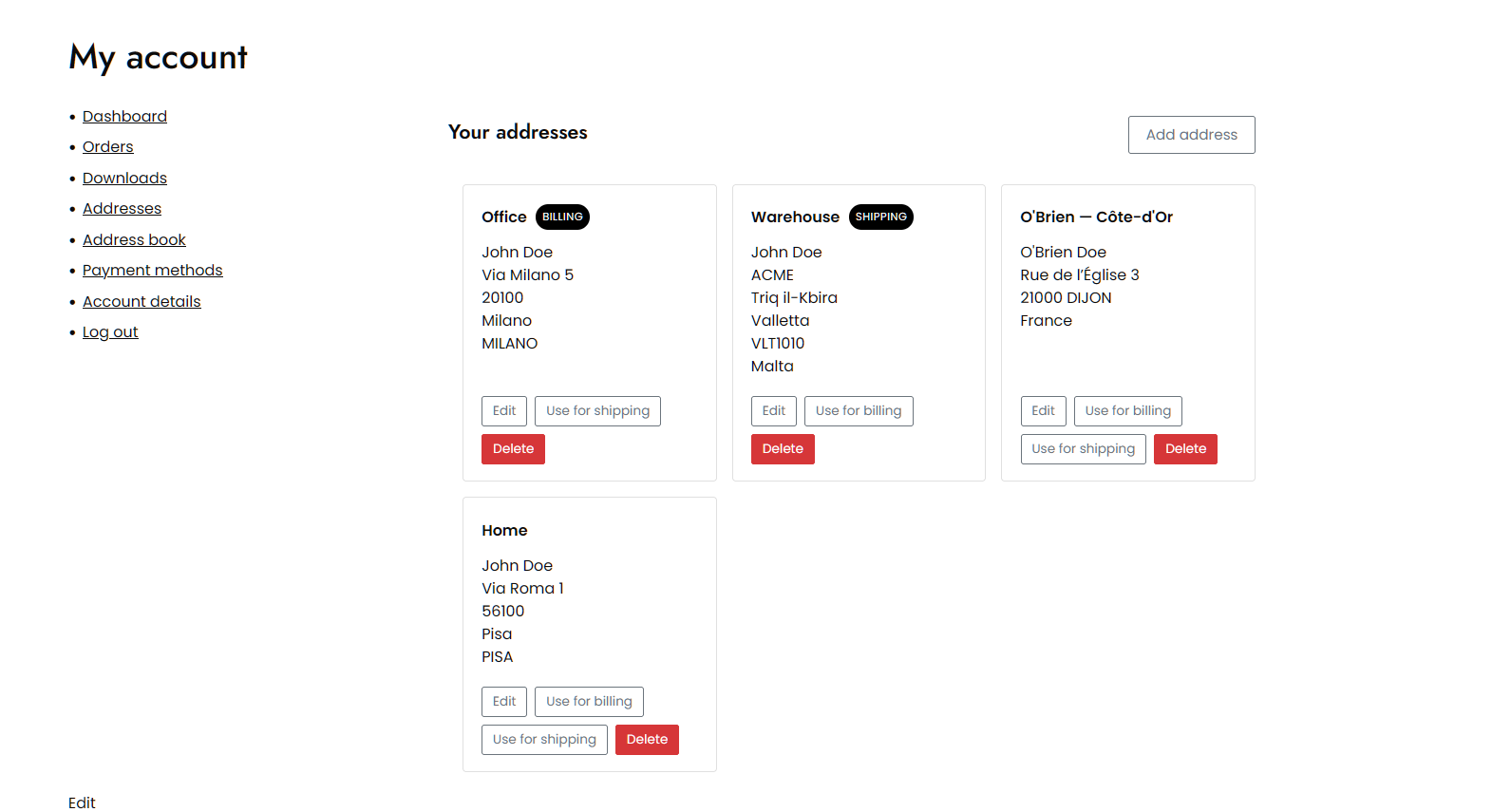
Vanquish Multiple Addresses for WooCommerce gives your customers a real address book. They can save as many billing and shipping addresses as they like, name them (Home, Office, …), set a default, and pick one at checkout instead of retyping it every time.
Free features
- Save as many billing and shipping addresses per customer as you like
- Name each address and set a default
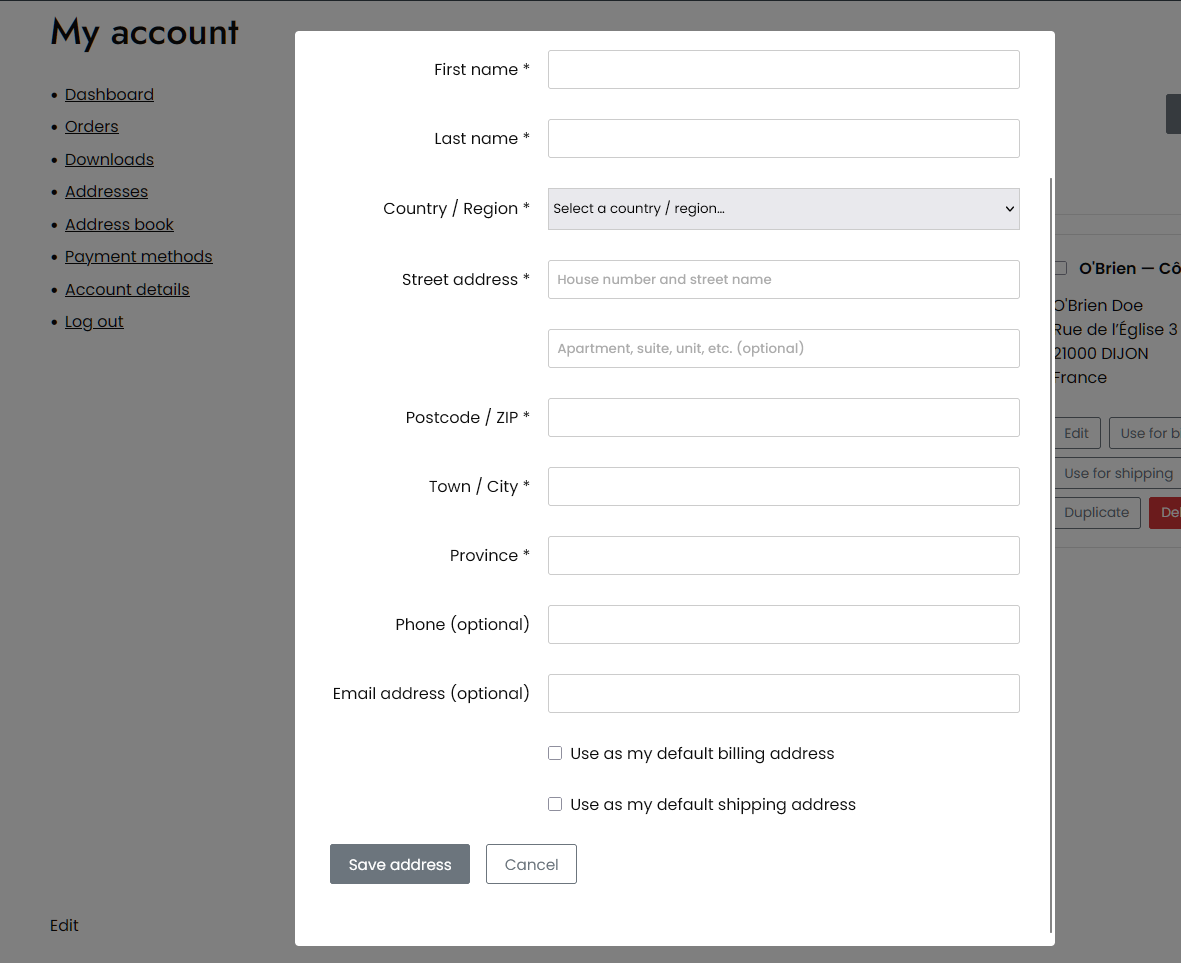
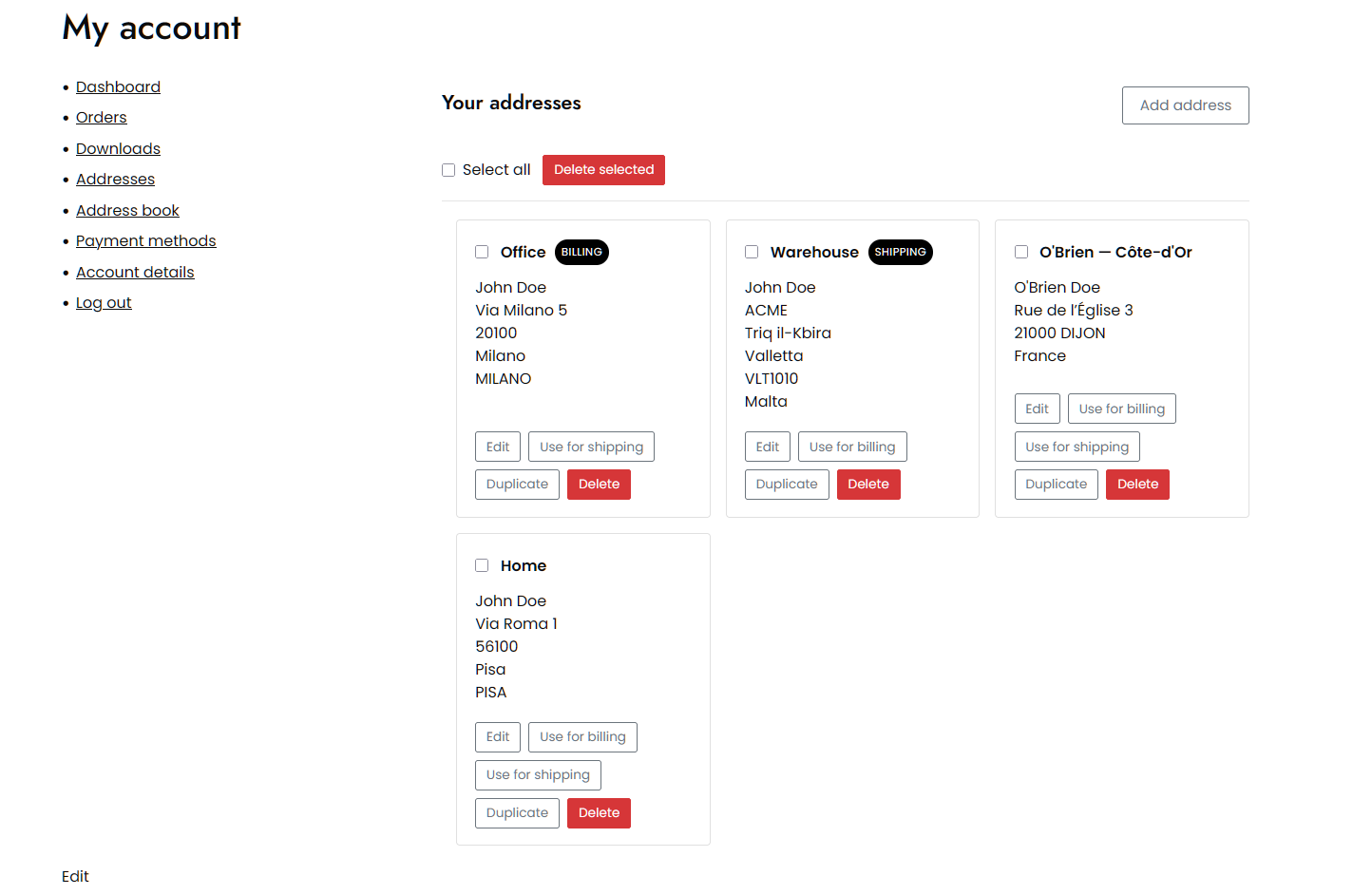
- Add, edit and delete addresses from the My Account area
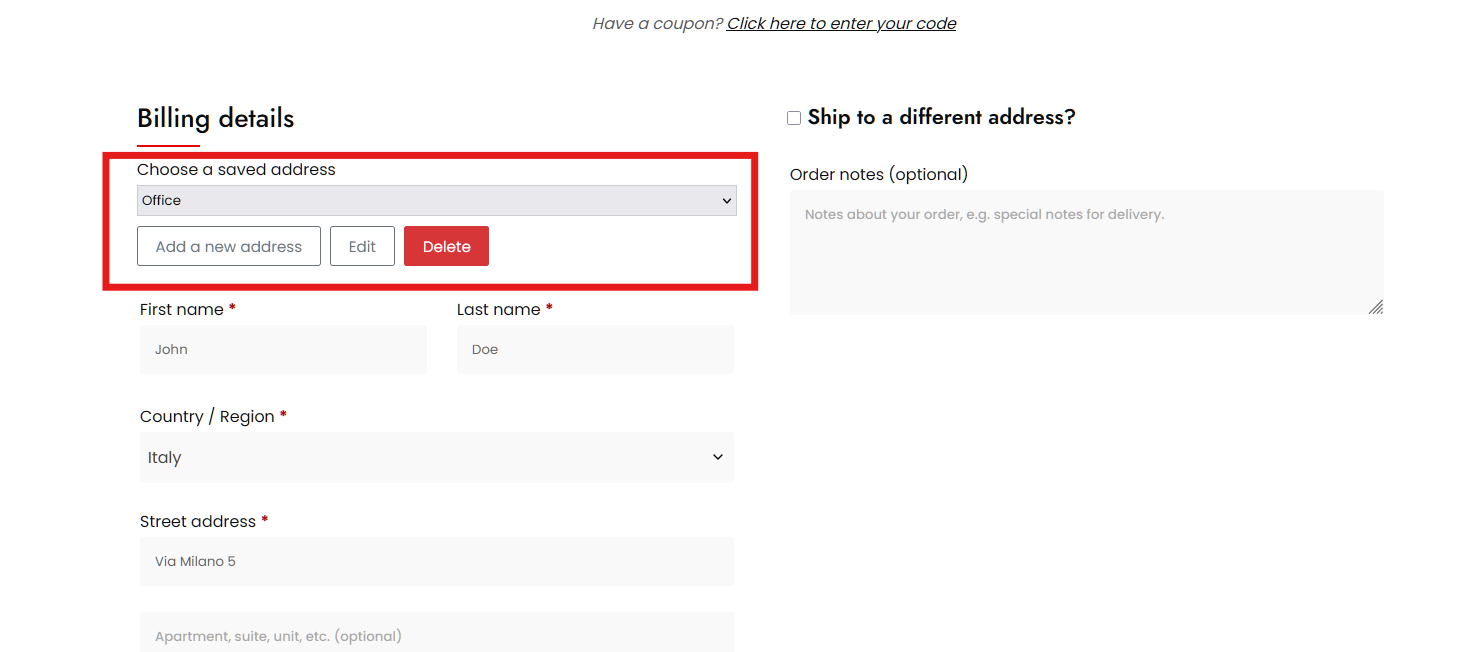
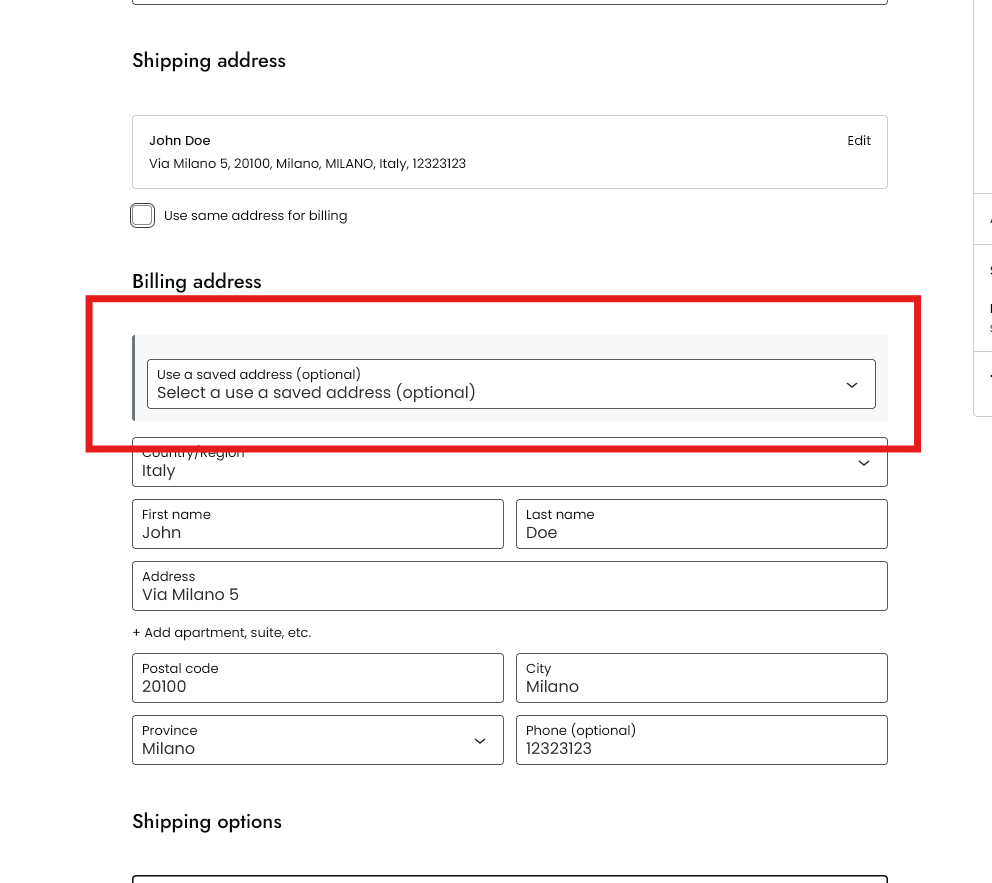
- Pick a saved address at checkout, for billing and for shipping
- Works in both the classic checkout and the block checkout
- Add and edit addresses without leaving the checkout, or turn that off and keep the address book in My Account
- Preselect the customer’s default address at checkout, or keep the address WooCommerce already filled in
- Show the selector on the billing form, the shipping form, or both
- Set the color of the address buttons to match your theme
- Billing and shipping address columns on the admin orders list, which you can hide from Screen Options
- Supports High-Performance Order Storage (HPOS)
- Override any template from your theme, and change the rest with filters
There is no cap on the number of addresses, no time limit, and nothing switched off waiting to be paid for. The premium edition adds separate features; it does not unlock these.
Premium features
Where the free edition is about keeping addresses, the premium edition is about using several of them in the same order — one cart going to more than one place — and about managing your customers’ address books yourself.
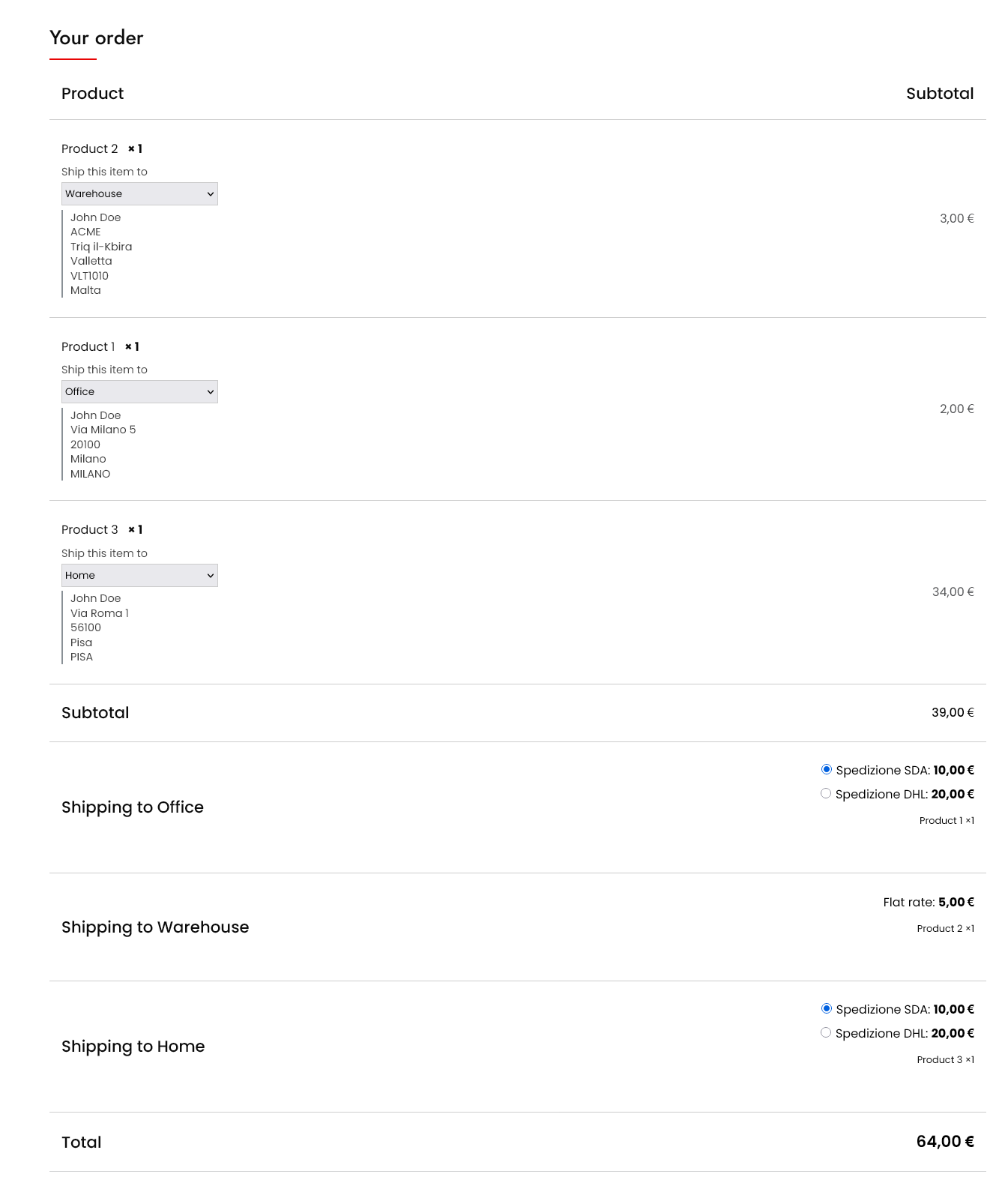
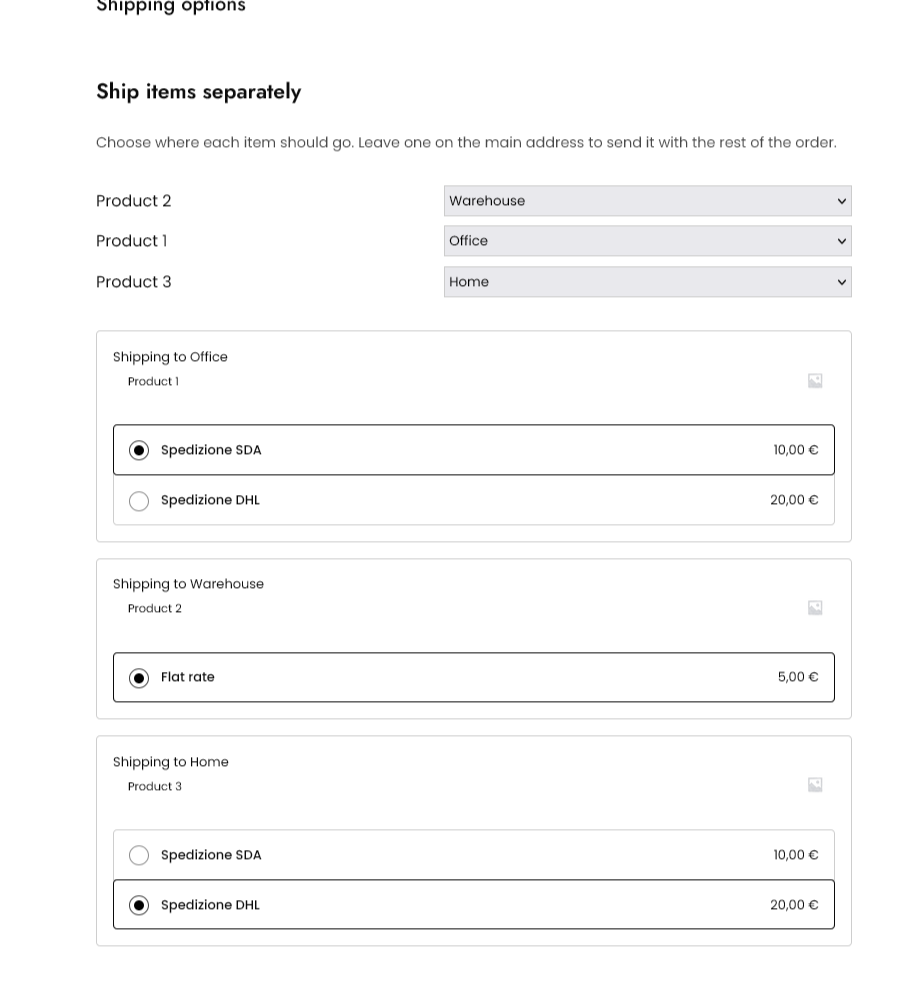
- Ship each product in the cart to a different saved address, in both checkouts
- Split the order into one package — and one shipping cost — per destination
- Charge a handling fee for each extra destination: a flat amount, or based on how many destinations there are
- Store a delivery note with an address and carry it into the order notes
- Give each address its own shipping email, for whoever receives the parcel
- Restrict the address book by user role, and cap how many addresses each customer can save
- Search a customer’s address book, select several addresses at once, delete them together or duplicate one
- Import and export every customer’s addresses as CSV
- See a customer’s address book on their user profile, and pick a saved address when editing an order
- Add your own CSS to the My Account and checkout pages
- Translate the labels you write yourself, one text per language, with WPML or Polylang
Captures
Instal·lació
- Make sure WooCommerce is installed and active.
- Upload the plugin folder to
/wp-content/plugins/, or install it from the Plugins screen. - Activate the plugin.
- Configure it under Multiple Addresses in the admin menu.
- Your customers will find their addresses under Address book in My Account.
PMF
-
Does it require WooCommerce?
-
Yes. The plugin needs WooCommerce to be installed and active.
-
Where are the customer addresses stored?
-
In standard WordPress user meta, so they are removed with the user and are never sent to any external service.
-
Does it work with the block checkout?
-
Yes. The saved-address selector appears in both the classic checkout and the
block checkout, and the premium per-product destinations work in both too. -
Does it work for customers who check out as a guest?
-
No, and it cannot: an address book belongs to a user account, so there is
nowhere to keep one for a guest. Customers who log in, before or during
checkout, see their saved addresses straight away. -
Does an address have to be a billing or a shipping address?
-
No. There is one address book, and any saved address can be used for billing, for
shipping, or for both. Each address can be marked as the default for billing and
for shipping independently, so the address you use for both does not have to be
saved twice. -
Does it work with WPML or Polylang?
-
Yes. The address form follows WooCommerce’s own fields and rules for each
country, and the plugin’s own strings are translated like those of any other
plugin. The premium edition goes one step further for the labels you write
yourself, such as the delivery note label or the handling fee label: each one
gets a field per active language, so every customer reads it in their own. -
Can I change how it looks, or add my own rules?
-
Yes. Every template can be overridden from your theme: copy a file out of the
plugin’stemplates/folder intoyourtheme/vanquish-multiple-addresses/and
edit it there, exactly as you would override a WooCommerce template. Filters
cover what a template cannot reach —vanmuad_can_use_address_bookand
vanmuad_can_manage_addresses decide who gets an address book and who may
change it, andvanmuad_address_form_fieldslets you relabel, add or remove
fields in the address form. -
I already use «WooCommerce Multiple Customer Addresses & Shipping». Do my customers lose their addresses?
-
No. Each customer’s saved addresses are converted the first time their address
book is read, so there is nothing to run and no migration to schedule. The
conversion also fixes something the old plugin could not: an address saved once
for billing and again for shipping becomes a single entry usable for both, and an
address that matches one already saved here is merged into it rather than added
twice.The old data is never deleted. It stays exactly where it was, so going back to
the previous plugin leaves you with everything you had. -
I am coming from «WooCommerce Multiple Customer Addresses & Shipping». Does it do everything I use today?
-
Almost. The address book, the checkout selectors, per-product destinations, split
shipping and the admin-side tools are all here, several of them rebuilt and
improved.The one thing deliberately left out is the VAT / tax ID field. It was never
really part of an address book, and there are dedicated plugins that do it
properly — including our own. Everything else you were using has been carried
over. -
When the premium «charge shipping separately for each destination» option is on,
WooCommerce quotes each destination as its own shipment. Anything that depends on
the order value — a free shipping threshold, or a table rate — therefore applies
per destination, using the value of the products going to that address, not
the order total. An order worth 100, split evenly between two addresses, is two
shipments of 50 each, so a «free over 80» rule will not apply to either.Leave the option off to keep a single shipping cost for the whole order while
still recording which address each product goes to.
Ressenyes


Col·laboradors i desenvolupadors
«Vanquish Multiple Addresses for WooCommerce» és programari de codi obert. La següent gent ha col·laborat en aquesta extensió.
Col·laboradors

Traduïu «Vanquish Multiple Addresses for WooCommerce» a la vostra llengua.
Interessats en el desenvolupament?
Navegueu pel codi, baixeu-vos el repositori SVN, o subscriviu-vos al registre de desenvolupament per fisl de subscripció RSS.
Registre de canvis
1.0.3
- Premium: the «Support Forum» item in the plugin menu now opens Vanquish support instead of the WordPress.org forum. Freemius builds that link from the plugin slug alone, so the support address set on the product never applied to it and paying customers were being sent to the forum meant for free users, where they have no licence to show. The free version still points at WordPress.org, which is where free support belongs and where it should stay.
1.0.2
- Rewrites the plugin page in plainer English, and documents features that were already there but never mentioned: the button color, adding and editing addresses from the checkout, preselecting the customer’s default address, HPOS support, theme template overrides, and WPML / Polylang.
- Says plainly that the address book needs a customer account, so it does nothing for guest checkout. That was true from the first release and nowhere written down, which is the kind of thing you find out after installing.
- Fixes the wording of the handling fee description, which said «by number of destinations» where it meant «based on», and settles on American spelling throughout the interface.
1.0.1
- Adds an «Activate Premium» page explaining how to install the premium version after buying. Freemius offers no license field in the free build, and rightly so — the premium code is not in this package at all, so a key would have nothing to unlock. That is invisible to someone who has just paid and is looking for somewhere to type it, so the steps are now spelled out.
1.0.0
- Initial release.
- Address book in My Account: save, name, edit and delete any number of billing and shipping addresses.
- Saved-address selector in the classic checkout and the block checkout.
- An address has no type: any address can be the default for billing, for shipping, or for both, so the one you use for both is not saved twice.
- Optional billing and shipping address columns on the orders list, with High-Performance Order Storage support.
- Addresses saved by «WooCommerce Multiple Customer Addresses & Shipping» are converted automatically, merging entries that plugin stored twice. The old data is left untouched.