

Descripció
Aquesta extensió s’integra amb l’API de WPVulnerability per proporcionar avaluacions de vulnerabilitats en temps real per al nucli de WordPress, extensions, temes, versió de PHP, Apache HTTPD, nginx, MariaDB, MySQL, ImageMagick, curl, memcached, Redis i SQLite.
Entrega informes detallats directament al tauler de WordPress, ajudant-te a estar al corrent dels possibles riscos de seguretat. Configura l’extensió per enviar avisos periòdics sobre l’estat de seguretat del teu lloc, assegurant que et mantens informat sense sentir-te aclaparat. Dissenyada per ser fàcil d’utilitzar, admet mesures de seguretat proactives sense emmagatzemar ni recuperar cap dada personal del teu lloc.
Fiabilitat de les dades
La informació que proporciona la base de dades d’informació prové de diferents fonts que han estat revisades per tercers. No hi ha cap mena de responsabilitat per la informació. Actua sota el teu propi risc.
Utilitzant l’extensió
WP-CLI
Pots utilitzar les següents ordres de WP-CLI per gestionar i comprovar vulnerabilitats:
- Nucli:
wp wpvulnerability core - Extensions:
wp wpvulnerability plugins - Temes:
wp wpvulnerability themes - PHP:
wp wpvulnerability php - Apache HTTPD:
wp wpvulnerability apache - nginx:
wp wpvulnerability nginx - MariaDB:
wp wpvulnerability mariadb - MySQL:
wp wpvulnerability mysql - ImageMagick:
wp wpvulnerability imagemagick - curl:
wp wpvulnerability curl - memcached:
wp wpvulnerability memcached - Redis:
wp wpvulnerability redis - SQLite:
wp wpvulnerability sqlite
Per configurar l’extensió pots utilitzar:
- Amaga component:
wp wpvulnerability config hide <component> [on|off] - Correu electrònic d’avisos:
wp wpvulnerability config email <emails>(separats per comes) - Període d’avisos:
wp wpvulnerability config period <never|daily|weekly> - Retenció de registres:
wp wpvulnerability config log-retention <0|1|7|14|28>(en dies) - Durada de la memòria cau:
wp wpvulnerability config cache <1|6|12|24>(en hores)
Tots els comandaments admeten l’opció --format per especificar el format de sortida:
--format=table: Mostra els resultats en un format de taula (per defecte)--format=json: Mostra els resultats en format JSON
Necessites ajuda?
wp wpvulnerability --help: Mostra informació d’ajuda per als comandos de WPVulnerabilitywp wpvulnerability [command] --help: Mostra informació d’ajuda per a un comandament de WPVulnerability
REST API
L’extensió WPVulnerability proporciona diversos punts d’entrada REST API per recollir informació de vulnerabilitat per a diferents components del lloc WordPress.
- Nucli:
/wpvulnerability/v1/core - Extensions:
/wpvulnerability/v1/plugins - Temes:
/wpvulnerability/v1/themes - PHP:
/wpvulnerability/v1/php - Apache HTTPD:
/wpvulnerability/v1/apache - nginx:
/wpvulnerability/v1/nginx - MariaDB:
/wpvulnerability/v1/mariadb - MySQL:
/wpvulnerability/v1/mysql - ImageMagick:
/wpvulnerability/v1/imagemagick - curl:
/wpvulnerability/v1/curl - memcached:
/wpvulnerability/v1/memcached - Redis:
/wpvulnerability/v1/redis - SQLite:
/wpvulnerability/v1/sqlite
L’API REST de WPVulnerability utilitza Contrasenyes d’Aplicació per a l’autenticació. Necessites incloure una Contrasenya d’Aplicació vàlida a la capçalera d’autorització de les teves sol·licituds
Exemple de sol·licitud amb autenticació
curl -X GET https://example.com/wp-json/wpvulnerability/v1/plugins -u username:application_password
Substitueix nom d’usuari pel teu username de WordPress i application_password per la teva Contrasenya d’Aplicació.
Configuracions Extra
«From:» mail (des de: 3.2.2)
Si, per alguna raó, necessites que els correus electrònics enviats per l’extensió tinguin un remitent diferent de l’administrador del lloc, pots canviar-ho des del wp-config.php afegint una constant:
define( 'WPVULNERABILITY_MAIL', 'sender@example.com' );
Si la constant està activa, serà visible a la pantalla de configuració
Força l’ocultació de comprovacions (des de: 4.1.0)
Si vols amagar sempre un component concret, pots definir una constant a wp-config.php. Si s’estableix a true, l’opció es marcarà automàticament a la pantalla de configuració i s’ometrà l’anàlisi corresponent.
Exemple:
define( 'WPVULNERABILITY_HIDE_APACHE', true );
Constants disponibles: WPVULNERABILITY_HIDE_CORE, WPVULNERABILITY_HIDE_PLUGINS, WPVULNERABILITY_HIDE_THEMES, WPVULNERABILITY_HIDE_PHP, WPVULNERABILITY_HIDE_APACHE, WPVULNERABILITY_HIDE_NGINX, WPVULNERABILITY_HIDE_MARIADB, WPVULNERABILITY_HIDE_MYSQL, WPVULNERABILITY_HIDE_IMAGEMAGICK, WPVULNERABILITY_HIDE_CURL, WPVULNERABILITY_HIDE_MEMCACHED, WPVULNERABILITY_HIDE_REDIS, WPVULNERABILITY_HIDE_SQLITE.
Durada de la memòria cau (des de: 4.1.0)
Per defecte, les dades de l’API es guarden a la memòria cau durant 12 hores. Per canviar-ho, defineix WPVULNERABILITY_CACHE_HOURS a wp-config.php amb un d’aquests valors: 1, 6, 12 o 24. Aquest valor substitueix la pantalla de configuració i l’ordre de WP-CLI.
define( 'WPVULNERABILITY_CACHE_HOURS', 24 );
Rotació de registres (des de: 4.2.0)
WPVulnerability emmagatzema les respostes més recents de l’API perquè puguis revisar les trucades recents des de la nova pestanya de registres. Defineix WPVULNERABILITY_LOG_RETENTION_DAYS a wp-config.php per controlar quants dies d’entrades es conserven. Els valors admesos són 0, 1, 7, 14 o 28; utilitzar 0 desactiva el registre completament.
define( 'WPVULNERABILITY_LOG_RETENTION_DAYS', 14 );
Quan la constant hi és present, el seu valor s’aplica a la interfície de configuració i a través de WP-CLI, garantint una rotació de registres coherent a tots els entorns.
Configuració de seguretat (des de: 4.3.0)
WPVulnerability utilitza un enfocament de detecció híbrid per al programari del servidor (ImageMagick, Redis, Memcached, SQLite): extensions PHP primer (més segur), i ordres de shell com a alternativa (més precís). Pots controlar aquest comportament mitjançant constants de configuració de seguretat a wp-config.php.
Desactivació global d’ordres de shell:
define( 'WPVULNERABILITY_DISABLE_SHELL_EXEC', true );
Desactiva completament l’ús d’ordres de shell. Recorre únicament a extensions PHP. Utilitza-ho per obtenir la màxima seguretat quan la pèrdua de precisió sigui acceptable.
Mode de seguretat (standard/strict/disabled):
define( 'WPVULNERABILITY_SECURITY_MODE', 'strict' );
standard– Detecció híbrida: extensions PHP primer, ordres de shell com a alternativa (per defecte, millor precisió)strict– Només extensions PHP, sense ordres de shell (alta seguretat, menor precisió)disabled– Sense cap detecció de programari (màxima seguretat)
Llista blanca de components:
define( 'WPVULNERABILITY_SHELL_EXEC_WHITELIST', 'imagemagick,redis' );
Permet ordres de shell només per als components especificats. Components disponibles: imagemagick, redis, memcached, sqlite. Utilitza-ho per a un control granular.
Exemples:
Màxima seguretat (sense ordres de shell):
define( 'WPVULNERABILITY_SECURITY_MODE', 'strict' );
Permet només la detecció de shell d’ImageMagick:
define( 'WPVULNERABILITY_SHELL_EXEC_WHITELIST', 'imagemagick' );
Desactivació completa:
define( 'WPVULNERABILITY_DISABLE_SHELL_EXEC', true );
Totes les ordres de shell estan predefinides i validades; no hi intervé cap entrada de l’usuari. Les ordres es registren per a l’auditoria de seguretat.
Compatibilitat
- WordPress: 4.7 – 7.1
- PHP: 7.0 – 8.5
- WP-CLI: 2.3.0 – 2.12.0
Seguretat
Aquesta extensió s’adhereix a les següents mesures de seguretat i protocols de revisió per a cada versió:
- WordPress Plugin Handbook
- WordPress Plugin Security
- WordPress APIs Security
- WordPress Coding Standards
- Plugin Check (PCP)
Privadesa
- Aquesta extensió o la WordPress Vulnerability Database API no recopila cap informació sobre el lloc, la identitat, les extensions, temes o contingut que té el lloc.
Vulnerabilitats
- Es va trobar i corregir una vulnerabilitat de seguretat a la versió 4.2.2.1. Totes les versions anteriors (3.3.0 – 4.2.1) estan afectades. Actualitza a la versió 4.2.2.1 o posterior.
Found a security vulnerability? Please report it to us privately at ROBOTSTXT.
Col·laboradors
You can contribute to this plugin at the WPVulnerability repository.
Captures

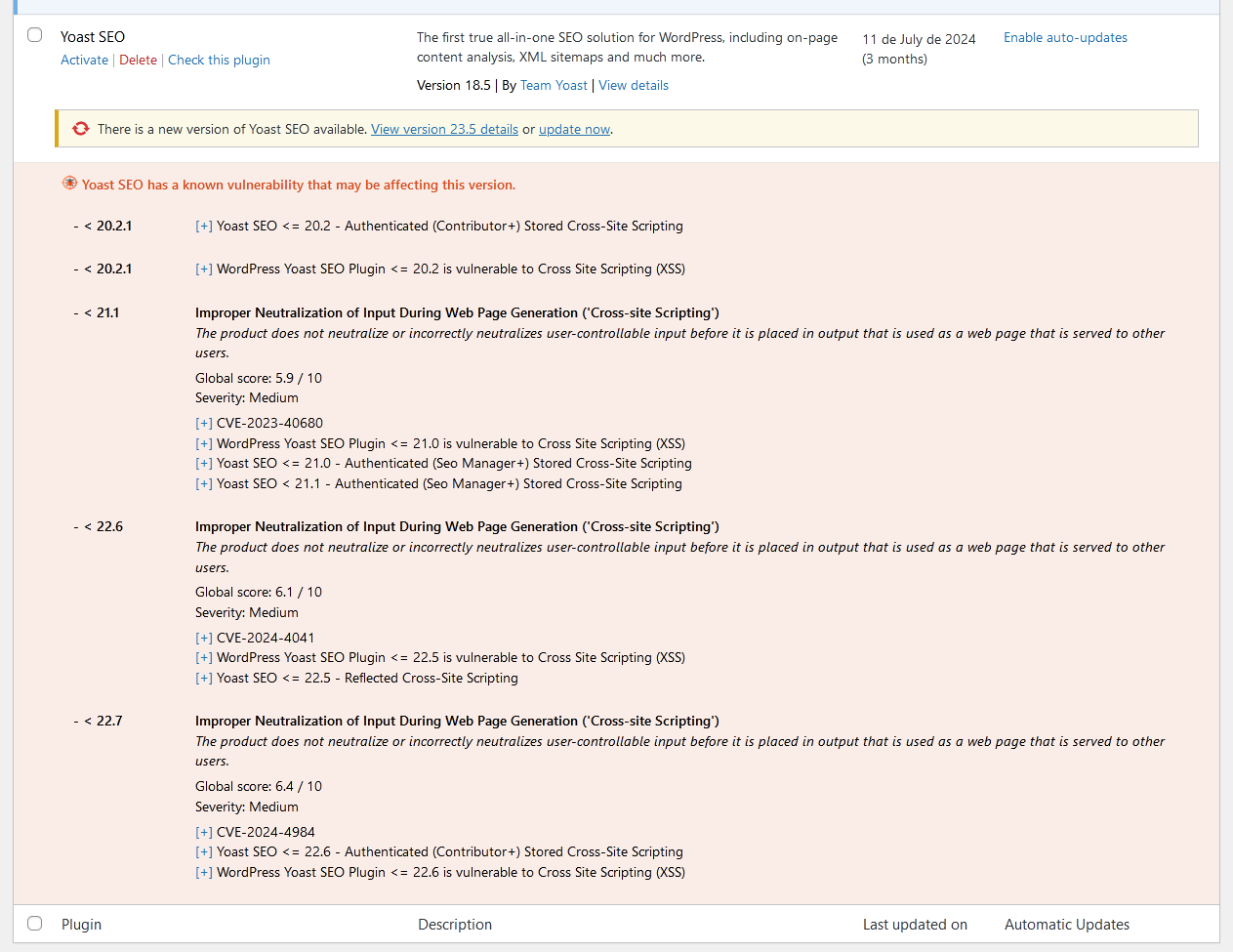

Instal·lació
Descàrrega automàtica
Visita la secció d’extensions del WordPress, cerca [wpvulnerability]; Baixa i instal·la l’extensió.
Descàrrega manual
Extraieu el contingut del ZIP i carregueu el contingut al directori /wp-content/plugins/wpvulnerability/. Un cop pujat, apareixerà a la llista de plugins.
PMF
-
D’on prové la informació sobre vulnerabilitats?
-
L’origen està en l’API WPVulnerability.com. Les vulnerabilitats que apareixen en aquesta API provenen de diferents fonts, com ara les CVE.
-
Les dades del meu lloc s’envien a algun lloc?
-
No. Mai. La teva privacitat és molt important per a nosaltres. No comercialitzem amb les teves dades.
-
Quines vulnerabilitats em trobaré?
-
Es documenten vulnerabilitats al nucli de WordPress, extensions, temes, PHP, Apache HTTPD, nginx, MariaDB, MySQL, ImageMagick, curl, memcached, Redis i SQLite.
-
Què faig si el meu lloc web té una vulnerabilitat?
-
Primer de tot, tranquil·litat. Investiga quina és la vulnerabilitat i, sobretot, comprova que tens l’última versió de l’element compromès. Et recomanem activament que mantinguis tot el teu WordPress i les seves extensions actualitzats. Contacta amb el teu proveïdor d’allotjament per corregir vulnerabilitats que no són de WordPress (com el servidor web, bases de dades i altre programari).
Ressenyes


Col·laboradors i desenvolupadors
«WPVulnerability» és programari de codi obert. La següent gent ha col·laborat en aquesta extensió.
Col·laboradors


“WPVulnerability” s’ha traduït a 14 configuracions regionals. Gràcies als traductors per les seves aportacions.
Traduïu «WPVulnerability» a la vostra llengua.
Interessats en el desenvolupament?
Navegueu pel codi, baixeu-vos el repositori SVN, o subscriviu-vos al registre de desenvolupament per fisl de subscripció RSS.
Registre de canvis
[5.1.6] – 2026-08-22
Corregit
- Saving the «Delete all plugin data on uninstall» preference no longer triggers a fatal error (
add_settings_error()was called before the WordPress admin API was loaded). - Notification channels can now be disabled entirely: unchecking every channel and saving previously kept the old channels active, because unchecked checkboxes are never submitted.
- «Reset Plugin» and «Delete all logs» now purge both log stores (API request logs and shell execution audit logs). Previously the shell audit store was never cleaned, and both deletions silently did nothing because the log post types were not registered yet when the actions ran.
- The Debug tab API connectivity tests now use the real API routes: WordPress core collapses pre-release versions (e.g. 7.1-alpha) to their stable milestone, and plugins/themes are tested against their actual slug routes instead of nonexistent plural ones (HTTP 404).
- Component icons now carry explicit width/height attributes and a meaningful alt text. The same icons are embedded in notification emails and Site Health, where the plugin CSS is not loaded and unsized SVGs rendered at their intrinsic 800×800 size.
Modificat
languages/wpvulnerability.potregenerated with the new strings.
Compatibilitat
- WordPress: 4.7 – 7.1
- PHP: 7.0 – 8.5
- WP-CLI: 2.3.0 – 2.12.0
Proves
- PHP Coding Standards: 3.13.6 (0 errors)
- WordPress Coding Standards: 3.4.1
- PHPStan: 2.2.9 (level 9, 0 errors)
- PHPUnit: 9.6.36 (54 tests)
[5.1.5] – 2026-08-22
Modificat
- The contributor list now leads with the ROBOTSTXT organization account, followed by Javier Casares; the remaining contributors are unchanged.
- Regenerated
languages/wpvulnerability.potso its source references match the current code. The string set is unchanged (450 strings); all shipped translations were verified against it and remain fully up to date.
Compatibilitat
- WordPress: 4.7 – 7.1
- PHP: 7.0 – 8.5
- WP-CLI: 2.3.0 – 2.12.0
Proves
- PHP Coding Standards: 3.13.6
- WordPress Coding Standards: 3.4.1
- PHPStan: 2.2.9 (level 9, 0 errors)
- PHPUnit: 9.6.36 (45 tests)
[5.1.4] – 2026-08-22
Aspectes destacats
- The Site Health vulnerability tests work again on every WordPress version: they were silently disabled everywhere by an availability gate that could never pass. Secrets are now masked in the admin forms, and compatibility was verified against real PHP interpreters from 5.6 to 8.5.
Corregit
- The Site Health integration registered its tests behind
class_exists( 'WP_Site_Health' ), but core loads that class lazily, afterinit, where the plugin loads its modules — so the guard always evaluated to false and none of the 13 vulnerability tests ever appeared in Site Health. The filter is now registered unconditionally; below WordPress 5.2 it simply never fires. - «Clear all caches» in the debug tools now also deletes the
wpvulnerability-plugins-cache-datatimestamp option, so the plugins dataset is fully refreshed afterwards. - The notification email «From:» address is now sanitized with
sanitize_email()on all code paths. - The plugins list table «Last updated» column decoded the whole plugins dataset for every table row; it is now decoded once per request.
- Removed a duplicated
json_decode()call when reading the vulnerable-themes count. - The
wp_date()compatibility polyfill no longer fatals on WordPress 4.7–5.3: core callswp_maybe_decline_date()unconditionally, but that function only exists since 5.4; the call is now availability-guarded. - The core and software JSON getters return
'[]'instead of an empty string when encoding fails, matching the plugins and themes getters.
Seguretat
- Webhook URLs (Slack, Teams, Discord) and the Telegram bot token are masked in the admin settings forms (single-site and network), showing only their last 4 characters — previously they were rendered in full into the page HTML. The inputs are plain text fields, so masked values never trigger browser URL validation. Saving a form with unchanged masked values keeps the stored secret; clearing a field still removes it.
- Removed the dead
register_uninstall_hook()registration:uninstall.phpsupersedes it and the registration added a stray autoloaded option row. - Single-site settings registrations now explicitly set
show_in_rest => false, matching the multisite configuration.
Modificat
- Admin CSS/JS assets load only on the WPVulnerability settings pages, the dashboard and the plugins/themes list tables instead of on every wp-admin screen.
- The shell availability probe (
wpvulnerability_can_shell_exec()) result is cached per request instead of spawning a process on every call.
Compatibilitat
- WordPress: 4.7 – 7.1
- PHP: 7.0 – 8.5
- WP-CLI: 2.3.0 – 2.12.0
- Verified against real PHP interpreters 5.6.40, 7.0.33, 7.1.33, 7.2.34, 7.3.33, 7.4.33, 8.0.30, 8.1.34, 8.2.33, 8.3.33, 8.4.24 and 8.5.9: every plugin file lints clean from 7.0 up and fails on 5.6, confirming the declared floor. PHPCompatibility gate 7.0-8.5 clean; wp-compat WordPress floor 4.7 clean.
Proves
- PHP Coding Standards: 3.13.6
- WordPress Coding Standards: 3.4.1
- PHPStan: 2.2.9 (level 9, 0 errors)
- PHPUnit: 9.6.36 (45 tests)
Versions anteriors
Si voleu veure el registre complet de canvis, visiteu el fitxer changelog.txt